Fashion and apparel
An apparel maker follows the collection from research to production, with each piece's pattern, fittings and trims on a card.
 Colin
Talk to us
Start free
Colin Workspace · Organize
Each board has lists that follow how work moves in your company, and each task is a card with an owner, a deadline, a checklist and the conversation of the people on it. You drag the card from one list to the next and everyone sees where things stand.
You know how it goes. Someone asks the group for a review of the piece, someone else replies with a thumbs up, and three days later nobody knows whether the review happened, who took it or when it was due. There is a tracking spreadsheet, but nobody has touched it since last week.
The more people and projects at once, the worse it gets. The manager asks each person "how's it going?", because there is nowhere to look. And what was already delivered gets mixed in with what's still open, so the list never seems to move.
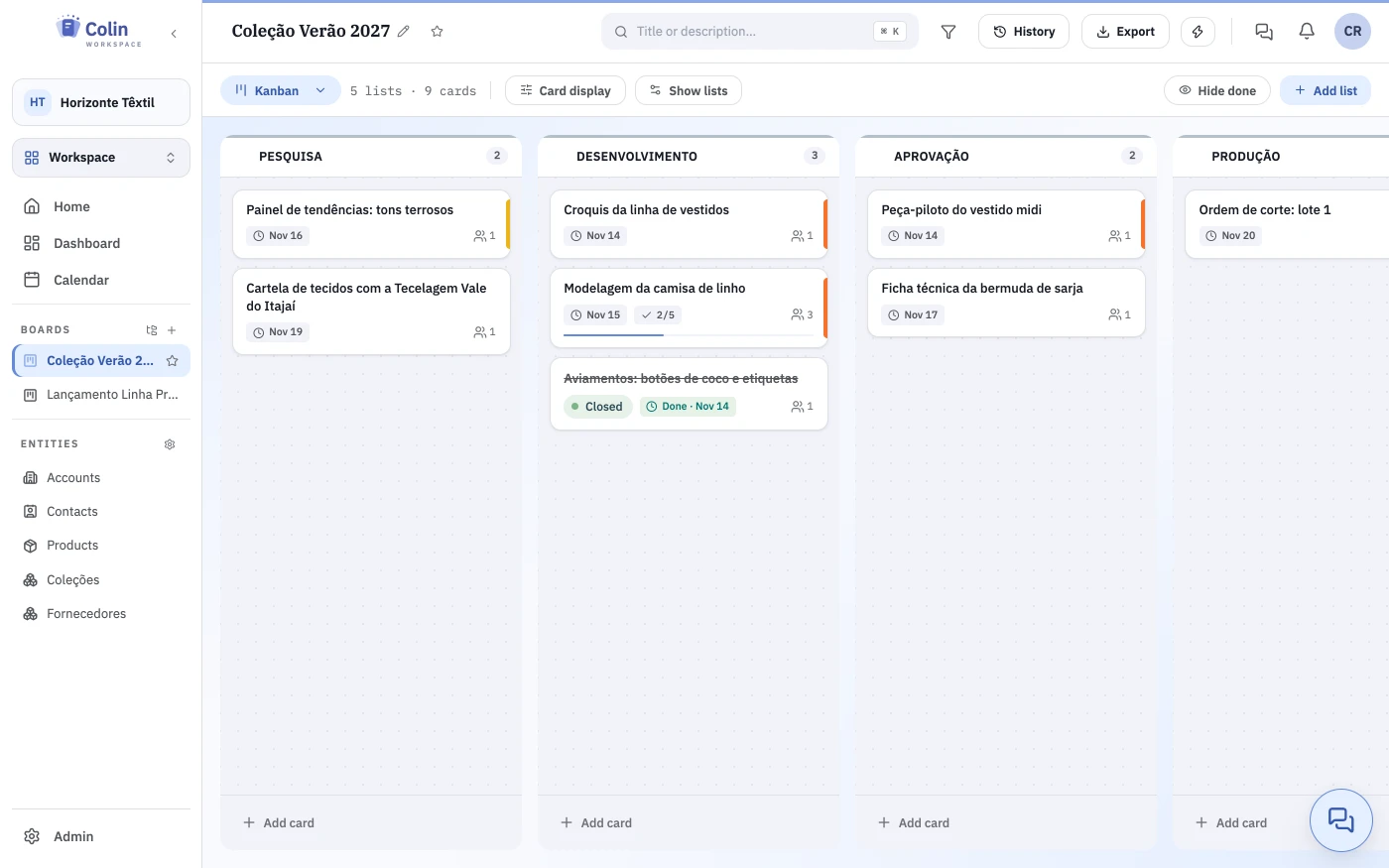
Each list is a stage of the work, with how many cards it holds. On the card you already see the deadline, how many checklist items are done and how many people are on it. Finished cards drop to the bottom of the list, and one click on Hide done takes them out of view.
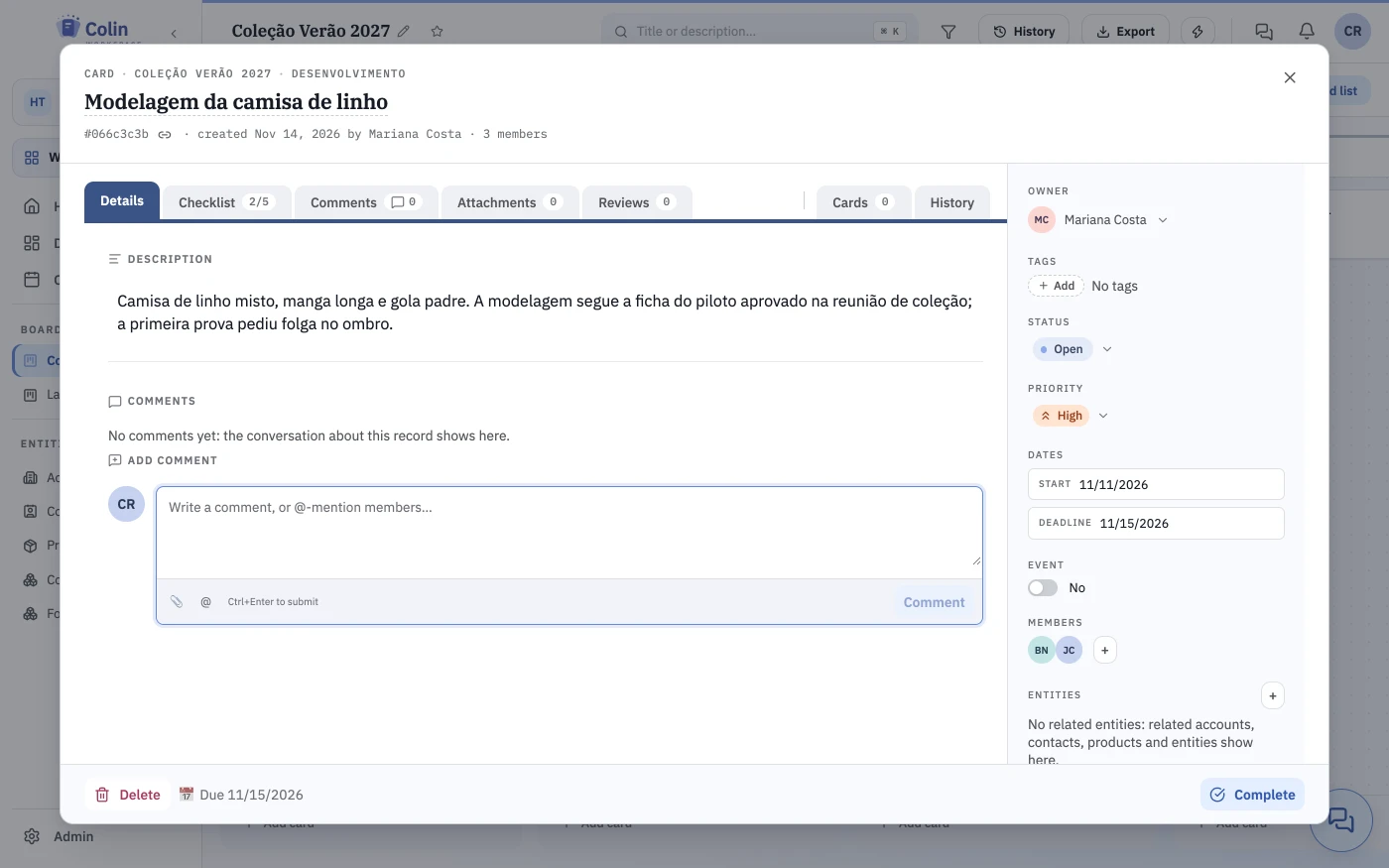
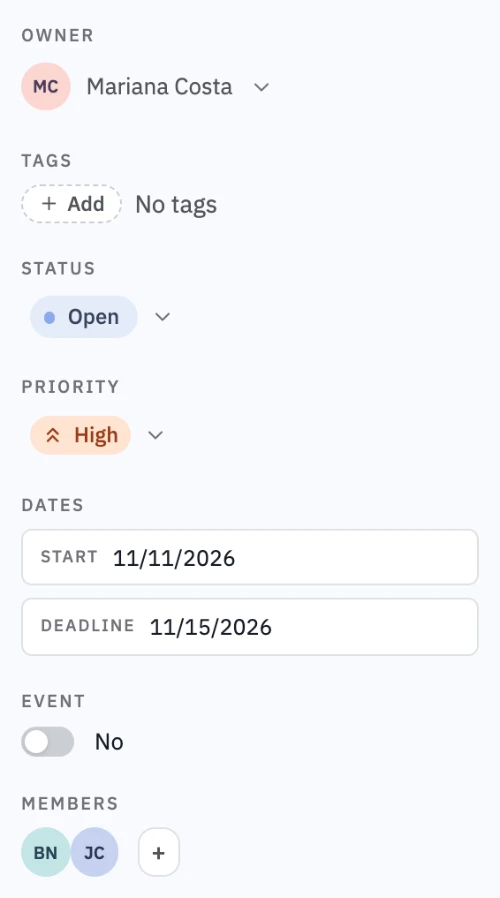
Open the card and the description and the conversation sit on one side, where you mention colleagues with @. On the other side are the owner, tags, status, priority, start date and deadline, and the members. Tabs hold the checklist, attachments, linked cards and history.
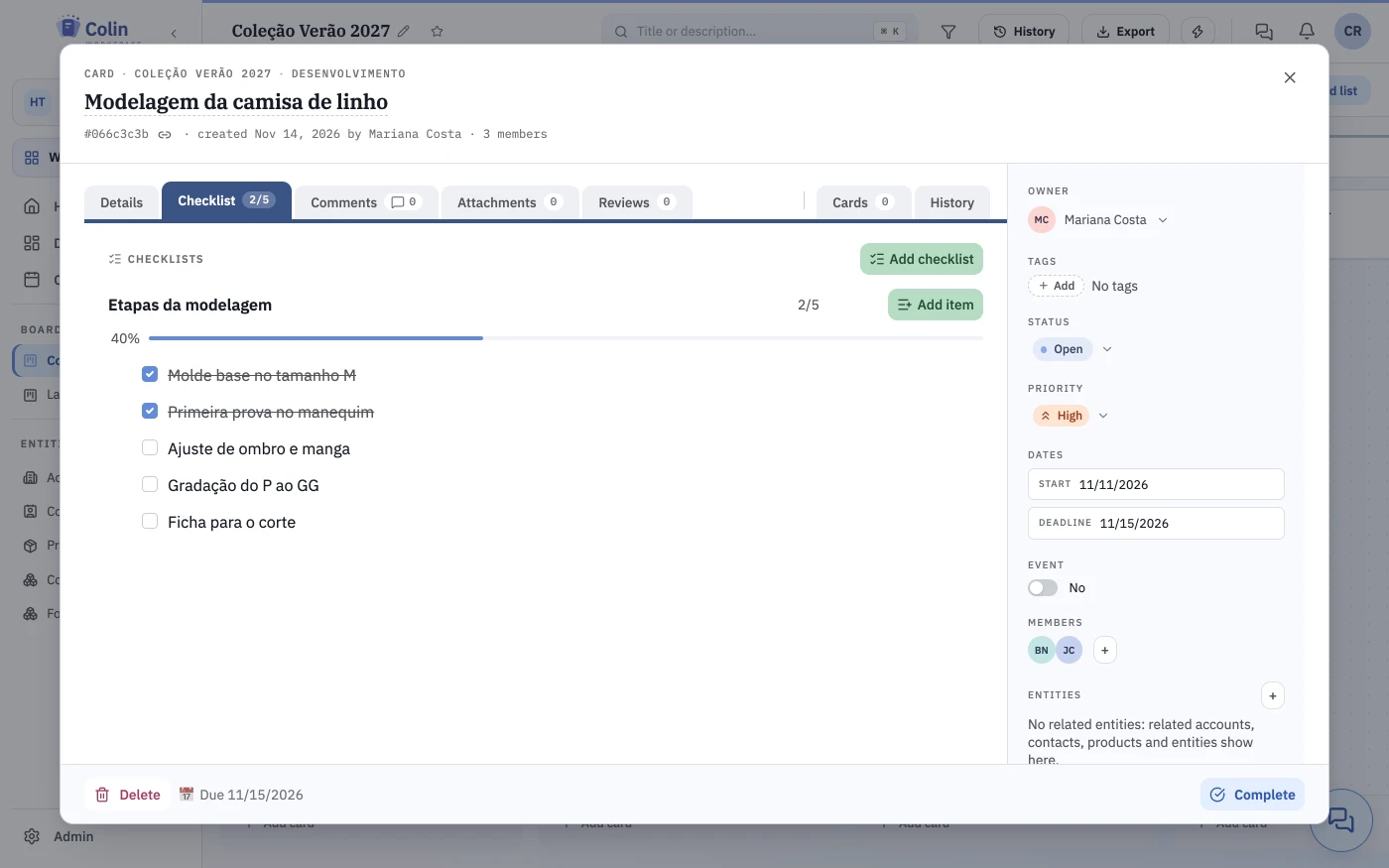
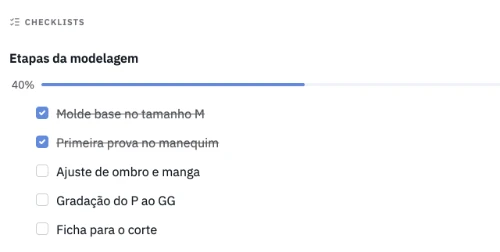
Break the task into steps and tick each one off when it's done. The bar shows how far along you are, and the same count appears on the card on the board, without opening it.
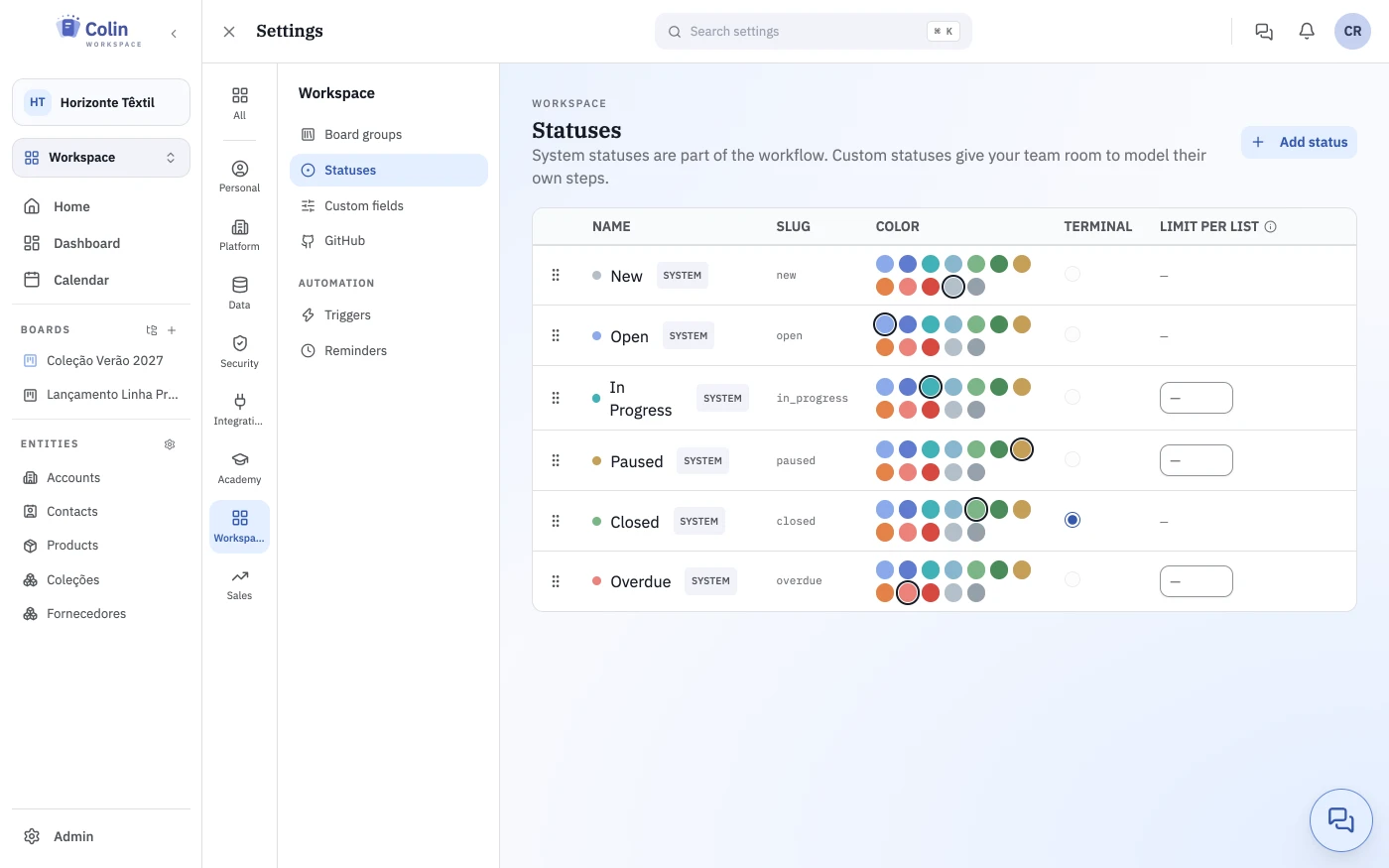
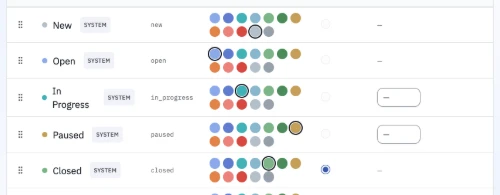
Besides the statuses that come ready, you create your own, pick a colour and mark which ones end the work. You can also set a limit of cards per status in each list: when it's exceeded, the list shows a warning and nobody is blocked.
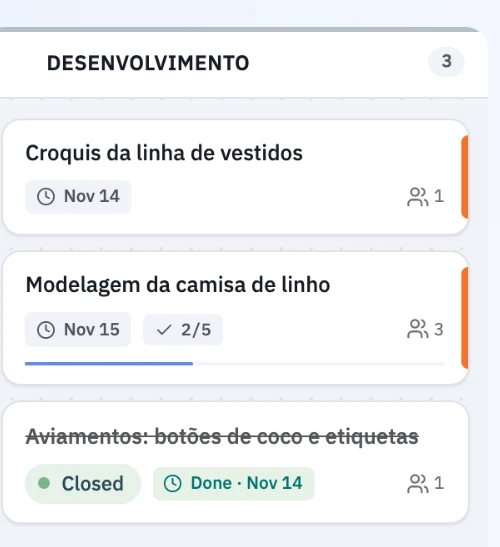
If work moves from one stage to the next, it fits on a board. A few examples:
An apparel maker follows the collection from research to production, with each piece's pattern, fittings and trims on a card.
An agency puts each job on a card, from brief to client approval, with the files and the conversation in one place.
A builder lays out the project's stages on a board and knows what's late without calling the site foreman.
A software team uses the board for what goes into the next release, with the test checklist inside the card.
A services firm opens a card per request and sees on the list who has each one and when it's due.
If your team uses other statuses, create your own in Settings, under Workspace, in Statuses.
Every change to the card goes into its history: who moved it, who changed the deadline, who completed it and when. The history can't be edited or deleted, so you can tell what happened even months later.
The statuses belong to your company. Any status marked final completes the card, and that's what automations and dashboards look at. A list can also give a status to the card that enters it, so moving a card already says where the task stands.
Who sees each board depends on the access you give: only their own cards, every card, or every card with editing. Whoever follows a card without working on it gets notified of what changes.
It comes with Colin Workspace and Colin Suite, at every user tier, with as many boards, lists and cards as you want. Colin Workspace starts at R$ 84 per user/month.
The same board as a Gantt, a timeline and a list, and a dashboard of what's open and overdue.
When, if and then rules that move cards, call people in and tell other systems, on their own.
Groups of people with access to boards by level: only their own cards, every card, or every card with editing.
The data your process calls for inside every card, with calculated fields that update by themselves.
The company mailbox connected to a board: each conversation becomes a card, and the reply goes out from it.
Rooms, direct messages and a link to a deal or a card turned into a record card in the conversation, for everyone in the company.
A board tied to a repository: card and issue synced both ways, merges in the history.
The sales day, the boards and the chat on iPhone, Android and Apple Watch, with part of the work done even without signal.
Data in Brazil, a history nobody edits, masked personal data and the tools to answer an LGPD request.
Connect Google, Microsoft or iCloud to put the card's deadline on your calendar. A connected mailbox can turn into cards on a list you choose.
As many as you need, each with its own lists. In the side menu you star your favourites to find them faster.
Yes. The same board opens as a list, a Gantt chart, a timeline and a calendar, with the same cards.
The owner answers for the card. Members work on it together. A follower doesn't work on the card but gets notified of what changes.
It stays on the list, below the open ones, with the date it was completed. If you don't want to see them, use Hide done. You can reopen it later.
Yes. Besides the ones that come ready, you create statuses with a name and a colour and mark which ones end the work. Any final status completes the card.
Yes. Each status can have a limit per list. When it's exceeded the list shows a warning, and nobody is stopped from moving the card.
Yes, with Workspace triggers. For example: when a card enters a list, Colin adds a member and leaves a comment. Triggers also respond to a card created or completed, a checklist item ticked and a comment.
Yes. A Gmail, Microsoft or IMAP mailbox connected to Colin creates a card for each new message on the list you choose.
What kanban is, how to choose the columns, what goes on each card, when to limit work in progress and the agreements that keep the board up to date after the first week.
Trello's automation types, how many runs each plan allows a month, the five rules worth having on any kanban board and how to build the same rules with Colin Workspace's Triggers.
Register a card, pick the apps and how many seats you want, and nothing is charged until the trial ends. Or we'll show you Colin with your company's boards and pipeline in 30 minutes.
 Chat on WhatsApp