Fashion and apparel
A clothing maker puts the technical sheet and the costs on every garment in the collection and sees the calculated margin before approving production.
 Colin
Talk to us
Start free
Colin Workspace · Organize
A card with a title, a deadline and an owner covers a lot, but it doesn't know what the fabric for the garment costs or which sizes it comes in. With custom fields, each board gets the data your process calls for, organised in groups. And the calculated field does the maths: fill in the costs and the price, and the margin shows on the card without anyone opening a calculator.
The team runs the work on the board, but the numbers are somewhere else. The garment's cost is in a spreadsheet, the sizes are in an email from the supplier, the fabric approval was agreed in a group chat. To decide anything, someone opens three windows and hopes they're all up to date.
When the team tries to put it all on the card, it ends up in the description. Everyone writes it their own way, one person puts the price with a comma and another with a dot, nobody can filter or compare, and the margin is still worked out by hand the night before the meeting.
Plenty of people arrive here looking for custom fields in Trello or another board tool. The question behind it is usually the same: how do I make the card hold my process's data, in the right format, and do the maths by itself.
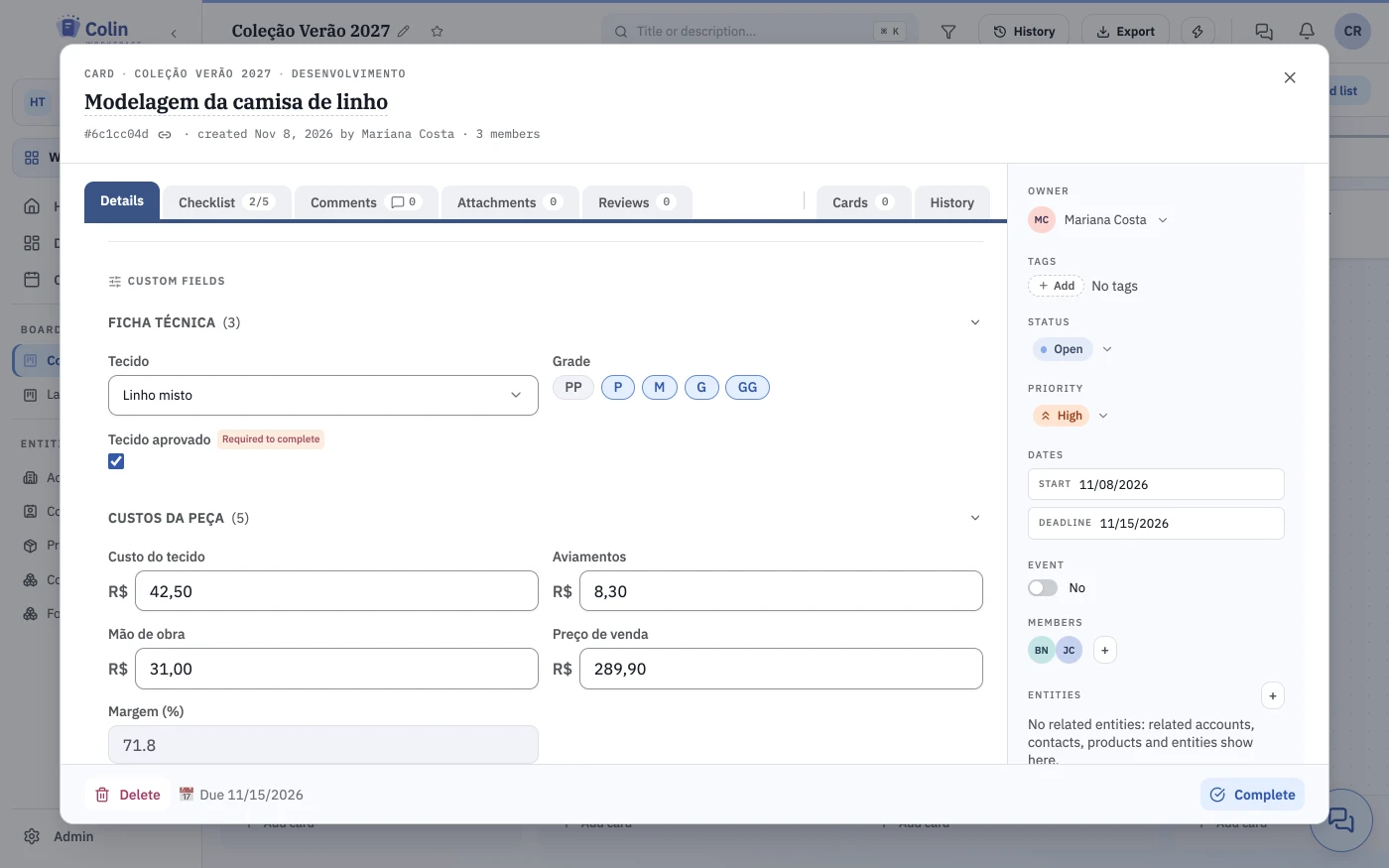
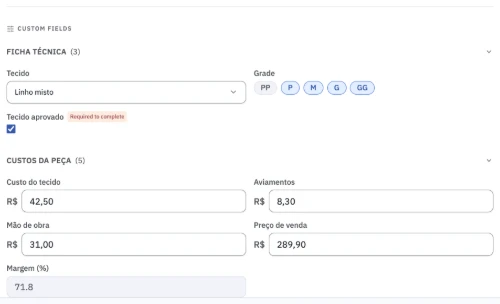
Open the card and the fields appear on the Details tab, split by group. On the linen shirt, the Ficha técnica (technical sheet) holds the fabric picked from a list, the sizes as tags and the fabric approved box. Right below, the Custos da peça (garment costs) hold the amounts in reais and the margin, which is calculated and read only. The Required to complete badge flags what has to be filled in before the card can be closed.
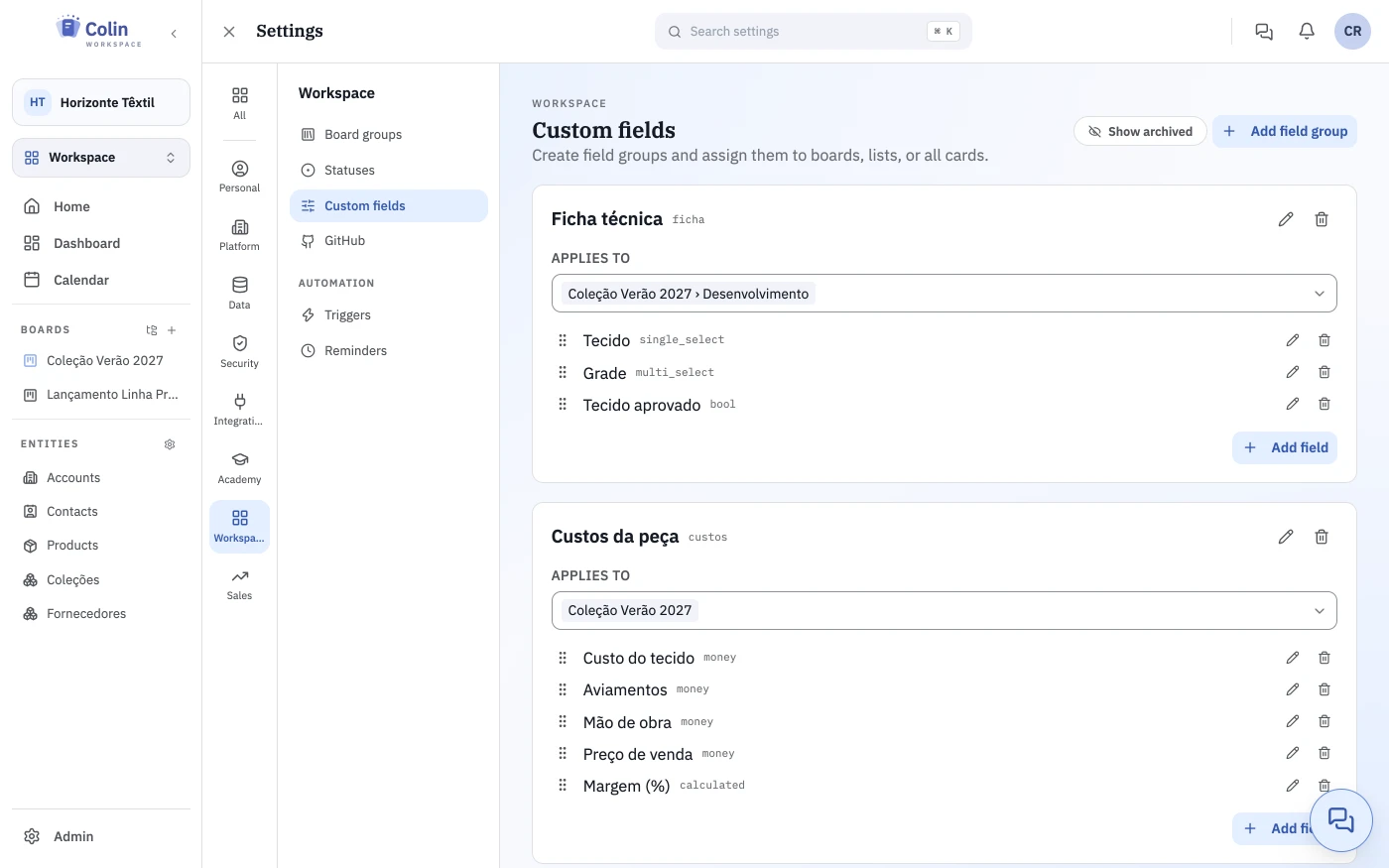
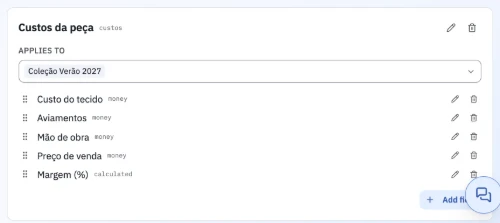
In Settings, Custom fields, you create a group, name it and say where it applies: to every card, to one board or to just one list. The Ficha técnica applies only to the Desenvolvimento list, and the Custos da peça apply to the whole board. Inside the group you add the fields and drag them into the order the team will fill them in.
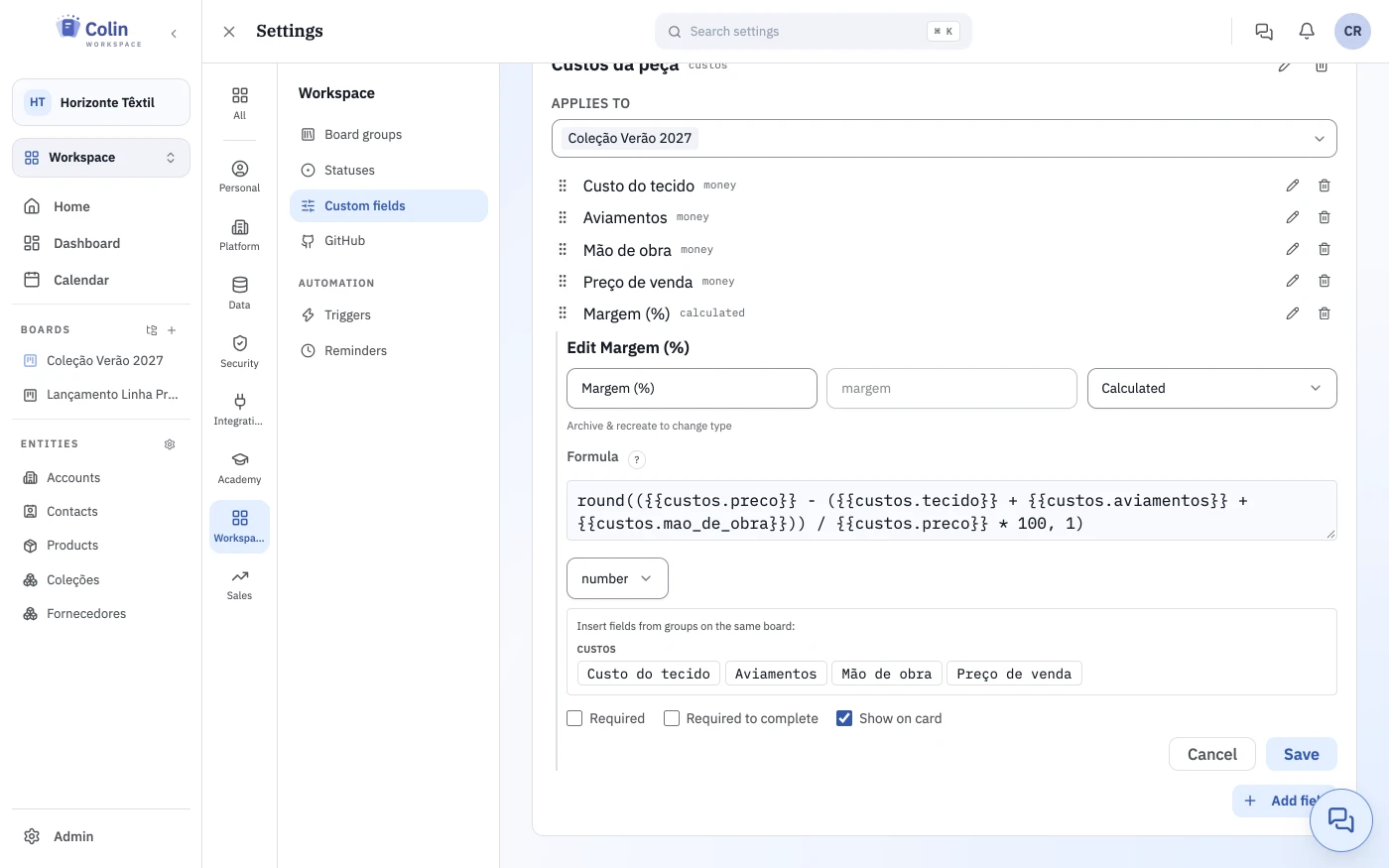
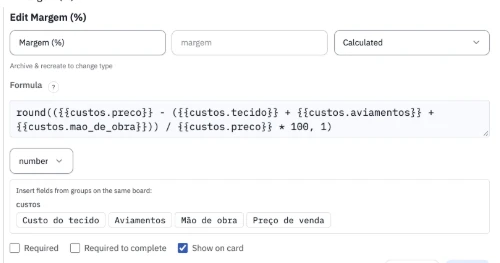
A calculated field holds a formula instead of a value. Click the group's fields to insert them and write the sum: here, the price minus the total costs, divided by the price, times a hundred, rounded to one decimal place. You can use functions such as round, min, max, if and the difference between dates, plus the card's own title, status and dates.
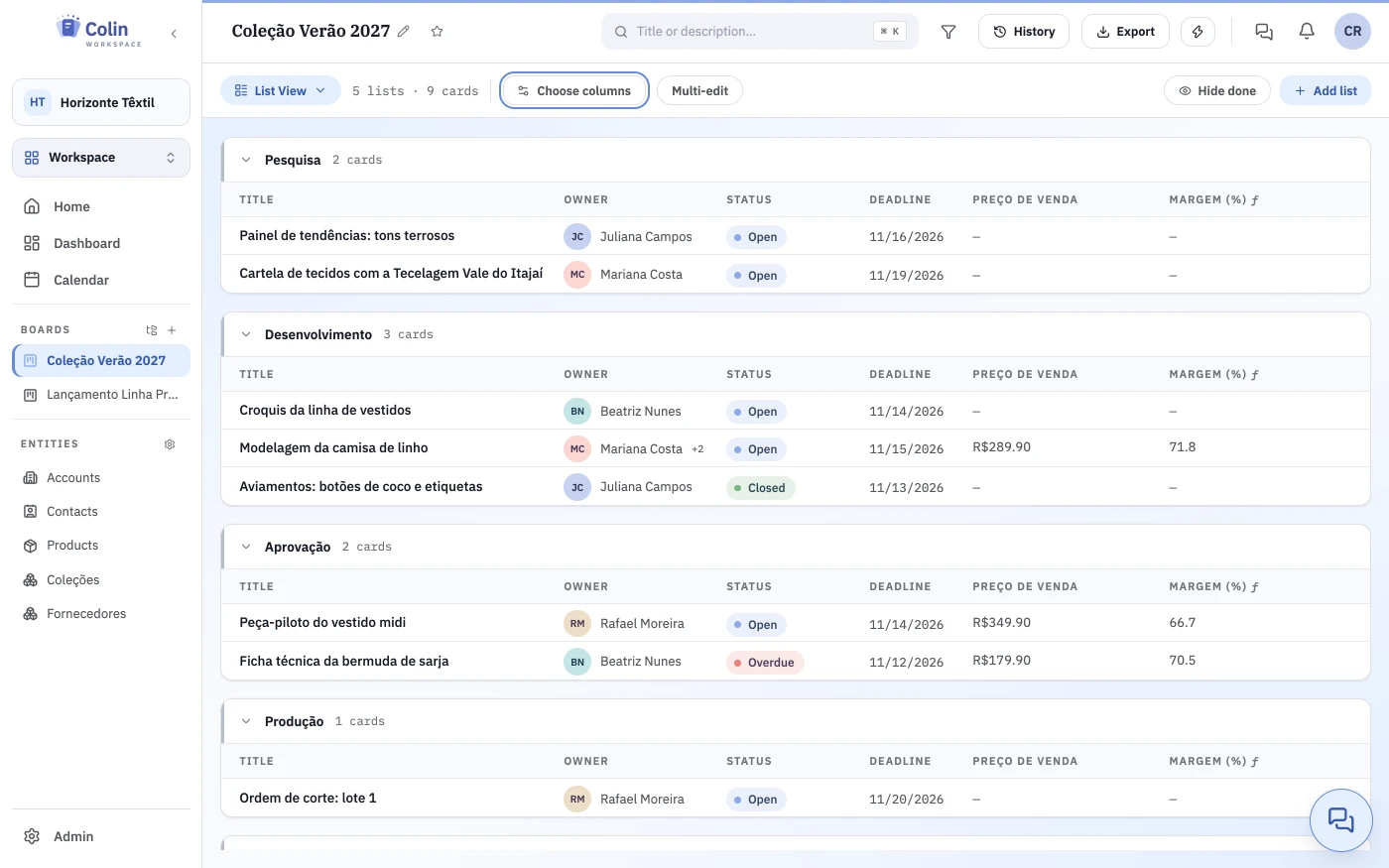
In the board's list view, open Choose columns and tick the fields you want to see. The selling price and the margin become columns next to the title, owner and status, and the calculated field is marked with ƒ. Comparing the collection's garments no longer means opening card after card.

Every industry has the information that keeps the work moving. A few examples:
A clothing maker puts the technical sheet and the costs on every garment in the collection and sees the calculated margin before approving production.
An agency records the client, the approved budget and the estimated hours on every job and works out how much of the budget is already spent.
A builder keeps the stage of the works, the area in square metres and the budgeted amount on every task, with the cost per metre calculated.
A software team notes the version, the task size and the pull request link, and counts the days between opening and delivery.
A services company keeps the client's CNPJ with its format checked, the contract value and who handles the account.
The fields show on the cards of that board or list straight away, including the ones that already existed.
Every field has a type, and the type decides what goes in it: text, whole or decimal number, yes or no, one option or several from a list, date, date and time, an amount in the currency you choose, percentage, a team member, another card, link, email and text with a checked format. For the checked format there are ready-made templates such as CPF, CNPJ, CEP, mobile number and car plate. Numbers can have a minimum and a maximum, which block the value on save, block it only when the card is completed, or just warn.
A calculated field is worked out again whenever a field it depends on changes. If a value is missing or the sum doesn't work, like a division by zero, the result stays empty instead of showing a wrong number. A formula that depends on itself, directly or indirectly, isn't accepted. Calculated fields on deals in Colin Sales use the same formula language.
Nothing gets lost. A field or group you no longer need is archived, and its values are kept until you restore it. The type only changes when the change doesn't spoil what's already filled in, like going from whole number to decimal. Every value changed on a card goes into its history, with who changed it and when. And when a card moves to another board or list, it picks up the new place's groups and keeps the ones it already had.
It comes with Colin Workspace and Colin Suite, at every user tier. Fields, groups and calculated fields are included, with no limit on how many and at no extra charge. Colin Workspace starts at R$ 84 per user/month.
Boards with your process's lists and cards with an owner, a deadline, a checklist and the conversation.
The same board as a Gantt, a timeline and a list, and a dashboard of what's open and overdue.
A field changing can fire a Workspace trigger, and a trigger can fill in a field. For example, when the fabric is approved, the card moves to the next list.
On iPhone and Android, the cards dashboard filters by custom fields, and the cards are the same ones as on the board on the web.
Only where you say. Each group applies to every card, to one board or to one list. A group just for the Desenvolvimento list doesn't show on the cards in Produção.
It's a field that holds a formula. It uses other fields on the card, does the maths and shows the result, which nobody edits by hand. When a value changes, the result changes with it.
Yes. Besides the groups' fields, it reads the card's title, status, start date, deadline and completion date. With the date difference function you can count how many days a task took.
Yes. Tick Required to complete and nobody can close the card with the field empty. When a trigger or another automation completes it, Colin completes the card and records in the history that the field was empty.
Only when the change is safe, like whole number to decimal. For other changes, archive the field and create a new one, so no old value gets mangled.
The field isn't deleted, it's archived. It disappears from the cards and its values are kept. Under Show archived you restore it and everything comes back.
Yes. In the list view, Choose columns shows the custom fields, and each board remembers the columns you chose in this browser.
No. They're in Colin Workspace and Colin Suite at every tier, with no limit on fields.
Register a card, pick the apps and how many seats you want, and nothing is charged until the trial ends. Or we'll show you Colin with your company's boards and pipeline in 30 minutes.
 Chat on WhatsApp