Fashion and apparel
An apparel maker gets retailers' orders at orders@ and each order is a card until the invoice goes out.
 Colin
Talk to us
Start free
Colin Workspace · Integrate
You connect the company mailbox, like support@ or orders@, to a Colin board. Each new conversation arrives as a card on a list you choose, and when the customer replies, the reply lands on the same card. Nobody has to forward anything to anyone.
When three or four people read the same inbox, every email is a guess. Someone opens it, assumes someone else already answered and closes it. Someone else answers the same thing twice. And the customer who sent an order on Friday afternoon waits until someone stumbles on their email, way down the list, on Monday.
The usual fix is to forward the email, copy it into a spreadsheet or open a task by hand. That works until the day the customer's reply lands in the inbox and the task is somewhere else, none the wiser.
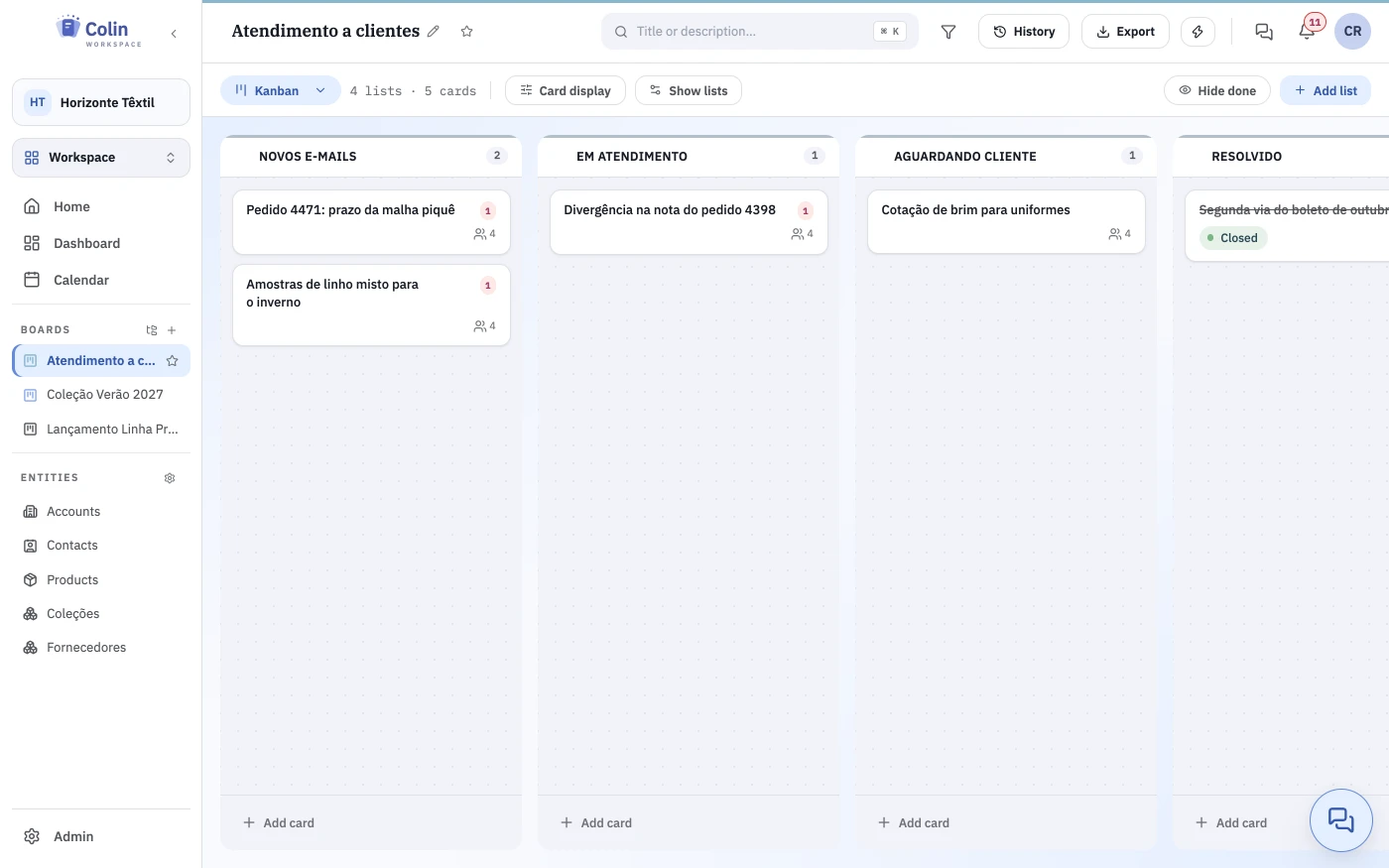
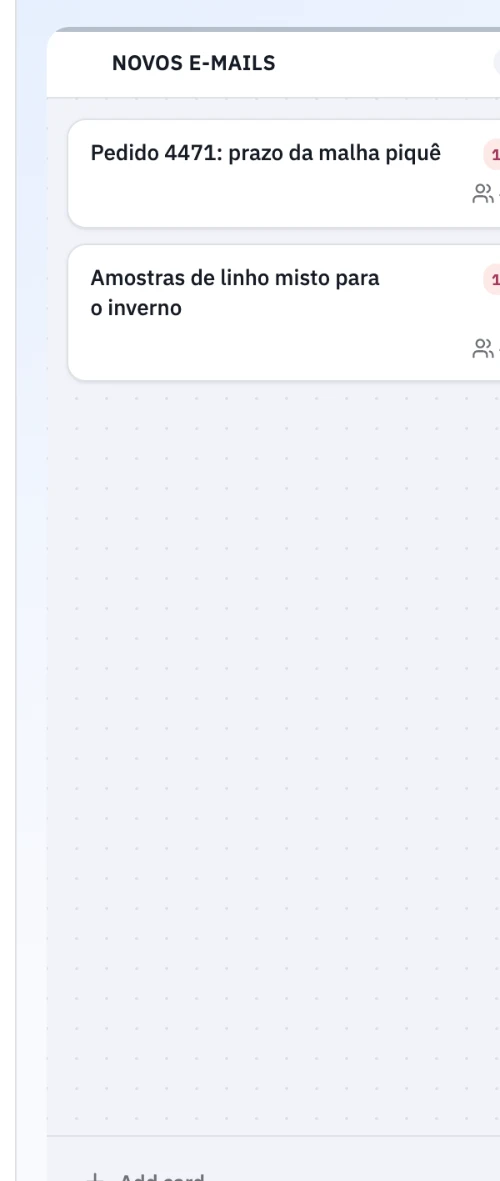
Each new email becomes a card on the intake list, with the subject as its title and the mailbox's people already on it as members. The red number on the card counts the messages nobody has read yet. The team drags the card between lists like any other, and the board shows what's new, what's being handled and what's waiting on the customer.
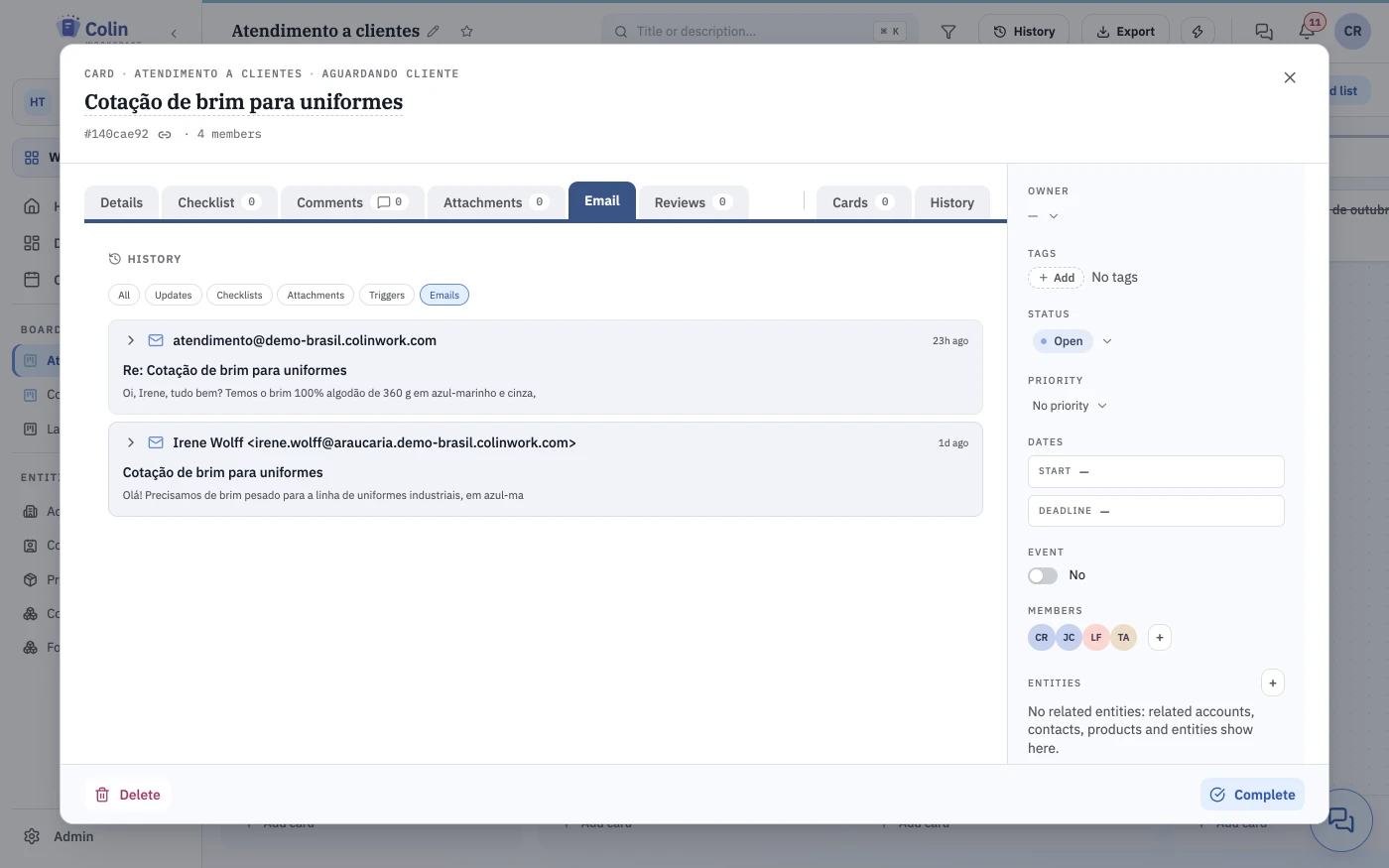
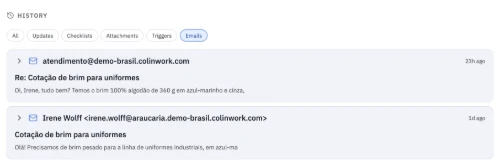
The card's Email tab shows the full conversation, from the customer's message to the team's reply, with who sent it and when. When the customer writes back, the new message comes in here, on the same card, and doesn't open another one.
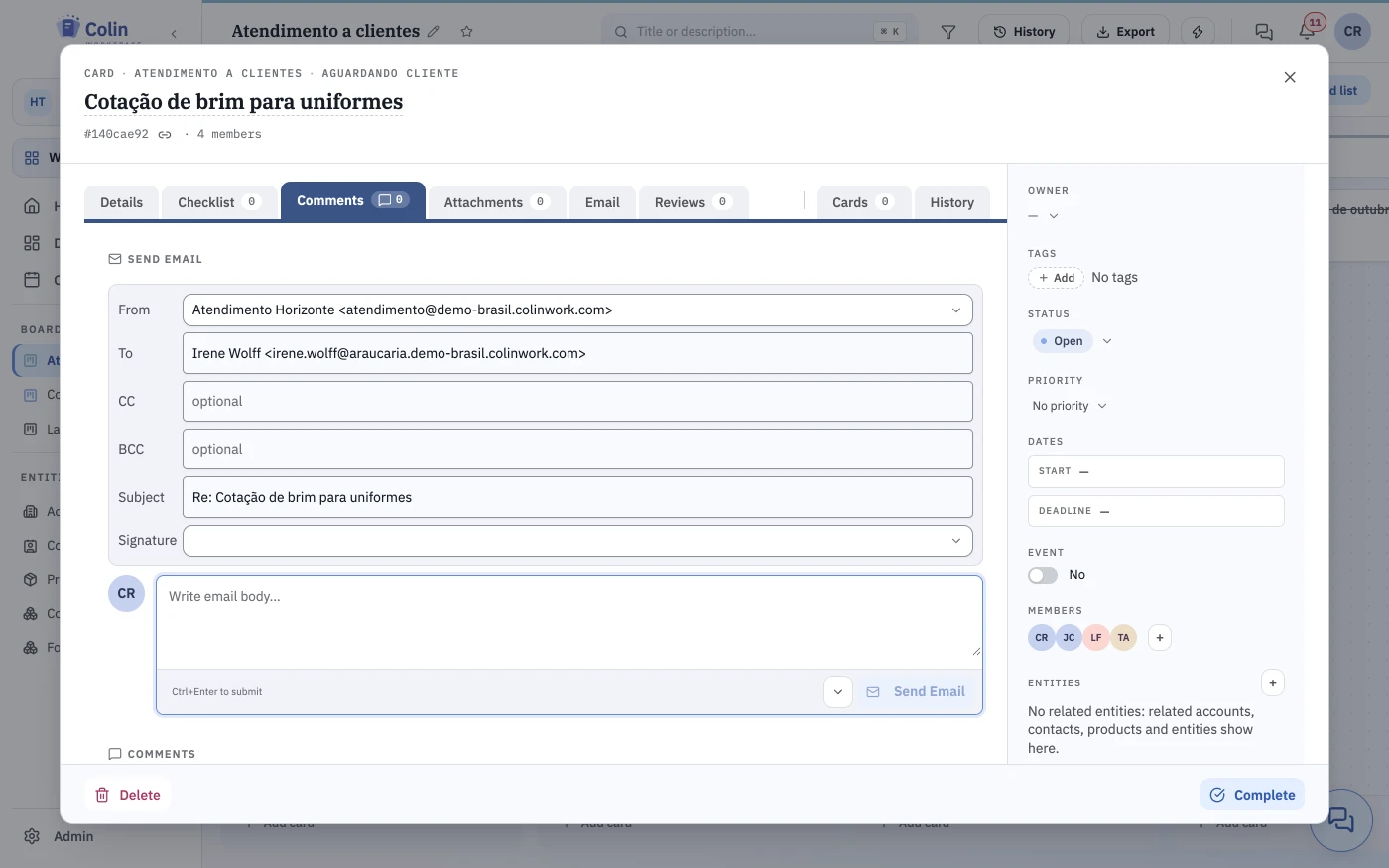
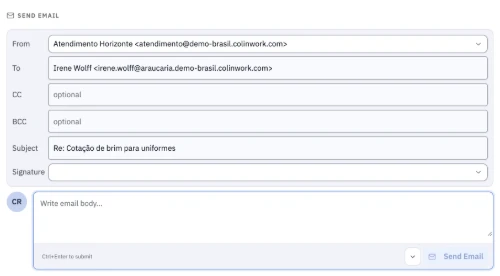
On the Comments tab, you switch the comment to Send as email. Colin already fills in where it goes out from, who it goes to and the subject with Re:, and the message goes into the customer's same conversation, from the company address. You can add CC, BCC and your signature.
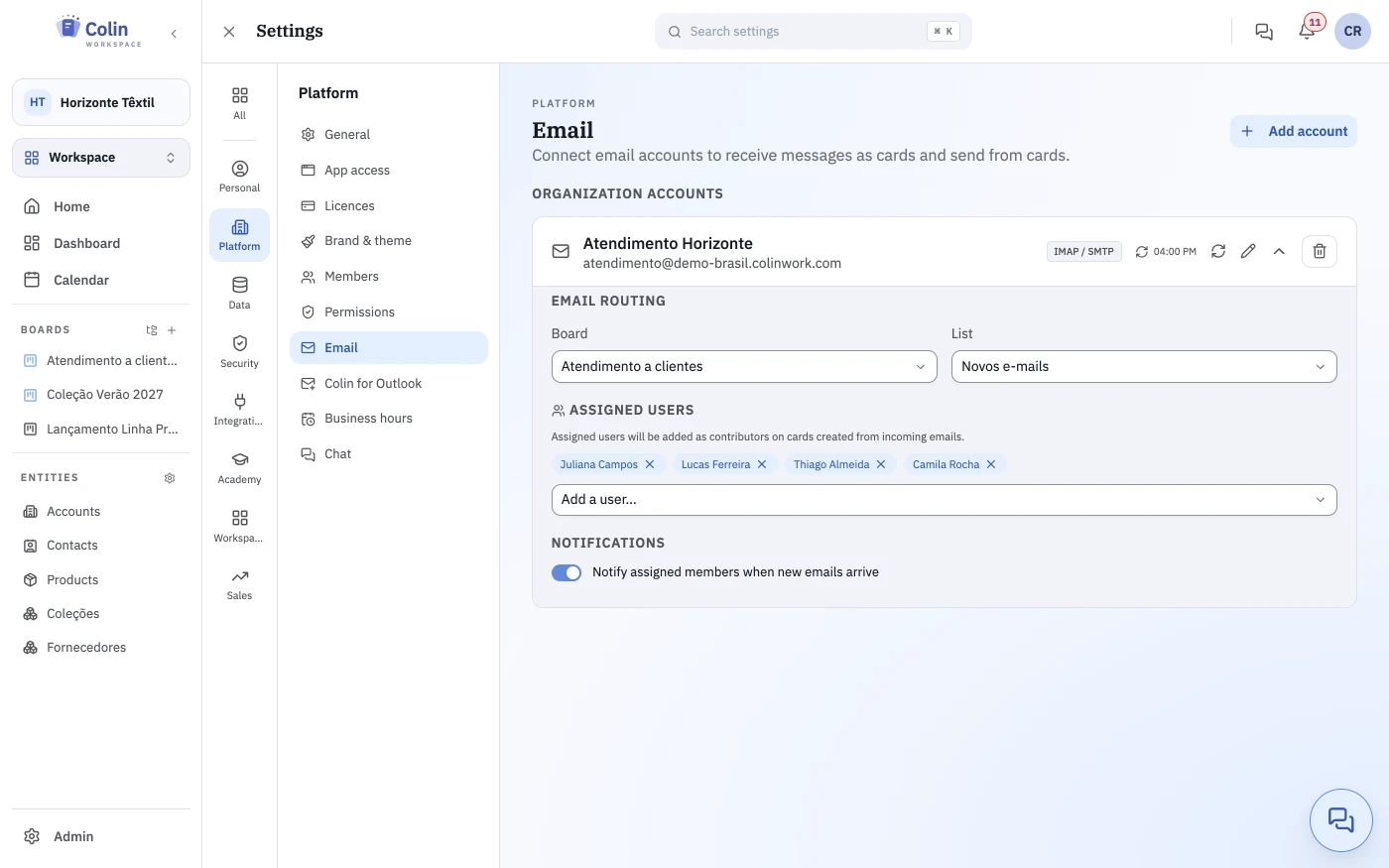
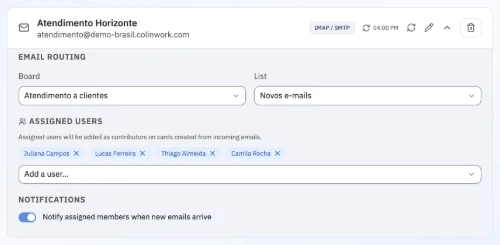
In Settings › Platform › Email, an administrator connects the mailbox through Gmail, Microsoft or IMAP and SMTP, picks the board and list where conversations land and who looks after them. Those people join every new card and get a heads-up when email arrives.
If orders, questions and quotes land in an inbox several people read, the board sorts out the queue. A few examples:
An apparel maker gets retailers' orders at orders@ and each order is a card until the invoice goes out.
A distributor brings the quotes that arrive by email to the board and sees which are still waiting for a price.
A manufacturer puts quality complaints on a board of their own, with each customer conversation on its card.
A services company connects support@ to a board and splits the requests across the team.
A software team gets support@ on a board and answers the customer without leaving the card.
Administrators connect and set up the company's mailboxes. The people assigned to a mailbox reply from it, and administrators reply from all of them.
Colin checks the mailbox about once a minute. Each message is kept on the card it came in on, and Colin recognizes a reply by the email's own headers, so the customer's reply goes back to the right conversation even when they change the subject. A message that has already come in never comes in again.
Whoever sees the card sees the conversation, under the board's usual access rules. To reply from a company mailbox, a person must be assigned to it, or be an administrator, and must see the card. If a send fails, Colin tries again on its own.
Every email received and every reply sent goes into the card's history, with who sent it and when. The history can't be edited or deleted.
It comes with Colin Workspace and Colin Suite, at every user tier, with as many mailboxes as the company wants to connect. Colin Workspace starts at R$ 84 per user/month.
Boards with your process's lists and cards with an owner, a deadline, a checklist and the conversation.
When, if and then rules that move cards, call people in and tell other systems, on their own.
Colin beside the email open in Outlook: the conversation goes to the right contact, account and deal.
The mailbox can be on Google Workspace, Microsoft 365 or any server with IMAP and SMTP. The board's rules can send email through it too.
Gmail and Google Workspace, Microsoft and Microsoft 365, or any server that speaks IMAP to receive and SMTP to send.
Every conversation becomes a card. Replies in the same conversation, from the customer or the team, go into the card that already exists.
No. The reply goes out from the company address, in the same conversation, as if it came from your usual email program.
The people assigned to it and the administrators. They also join every new card from the mailbox as members.
Yes. Each mailbox has its own board and list, so support@ and orders@ can land on different boards.
Then Colin creates no card at all. A conversation only becomes a card once the mailbox has a board and a list.
The people assigned to the mailbox get a Colin notification for each new conversation. An administrator can turn that off on the mailbox itself.
No. It all happens in Colin, in the browser: the mailbox is connected once in Settings and the team works on the cards.
Register a card, pick the apps and how many seats you want, and nothing is charged until the trial ends. Or we'll show you Colin with your company's boards and pipeline in 30 minutes.
 Chat on WhatsApp