Fashion and apparel
An apparel maker moves the piece to approval when the spec sheet is done, and the product manager joins the card right then.
 Colin
Talk to us
Start free
Colin Workspace · Automate
You describe the rule once: when the card reaches Aprovação, call the manager in and leave a comment. From then on Colin does it on every card, the same way, and the history notes who did what.
Every process has those small tasks nobody argues about. The piece went to approval, so someone has to tell the manager. The checklist is done, so the card has to move on. An order came in, so it needs the right tag and the person who handles it.
Each one takes ten seconds. The trouble is that those ten seconds depend on someone remembering, several times a day, on every card. On a busy day the message doesn't go out, the card sits on the wrong list and the manager finds out at Friday's meeting. And whoever joined the team last month didn't even know it was their job.
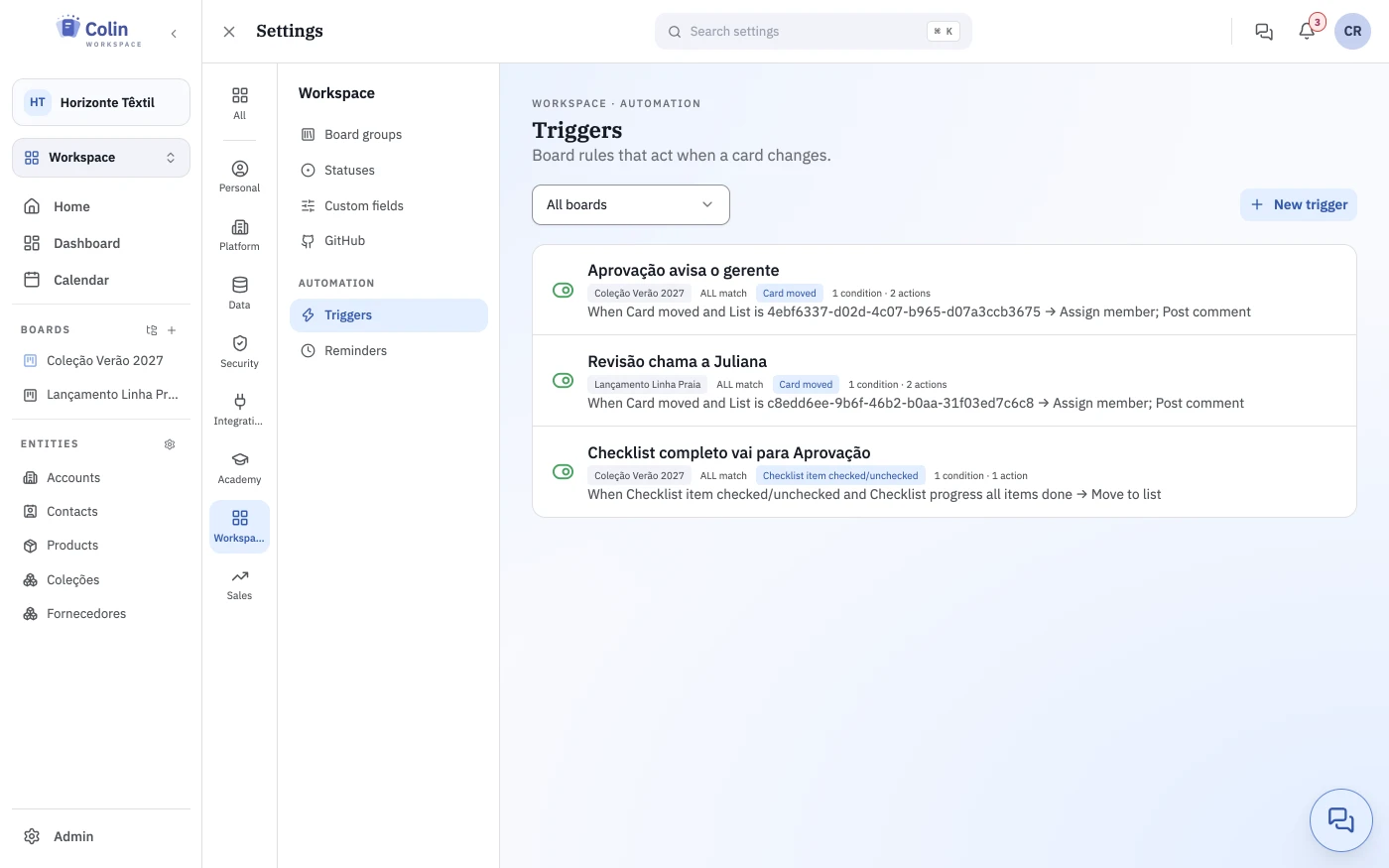
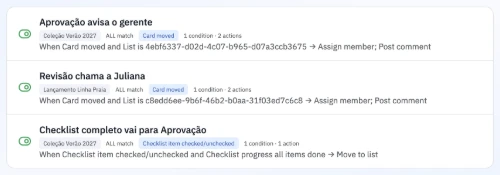
Settings › Workspace · Automation › Triggers holds every rule, each with the board it applies to, the event that fires it and a one-line summary of what it does. One click switches a rule on or off without deleting anything.
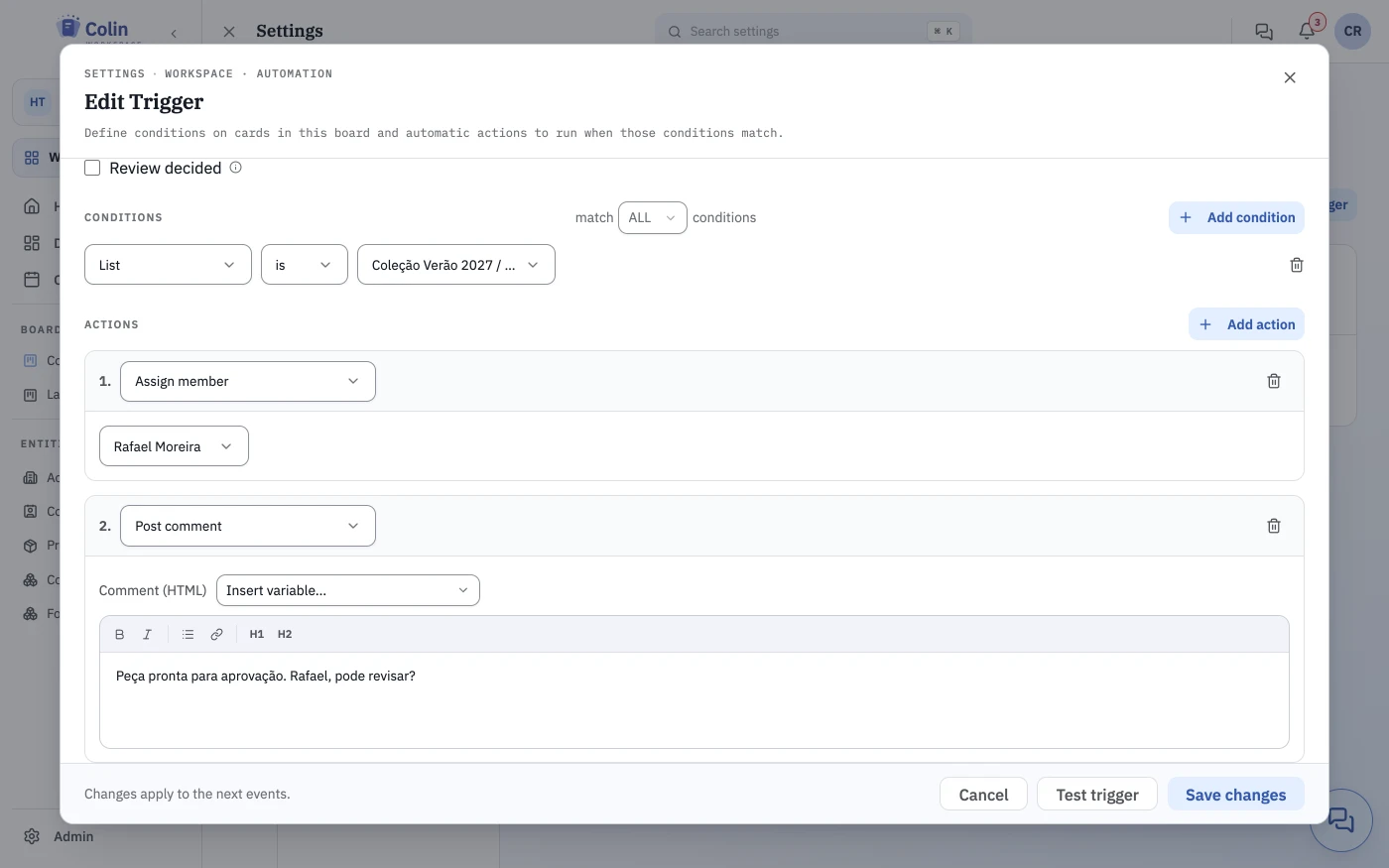
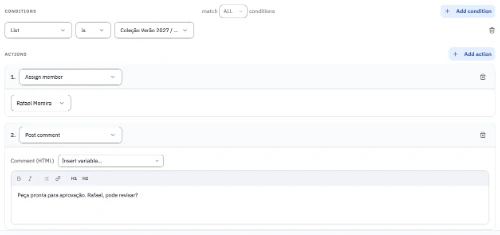
Each rule reads like a sentence. When a card is moved, if the list is Aprovação, add Rafael as a member and comment asking for the review. Conditions can require all or just one, and the actions run in the order you put them.
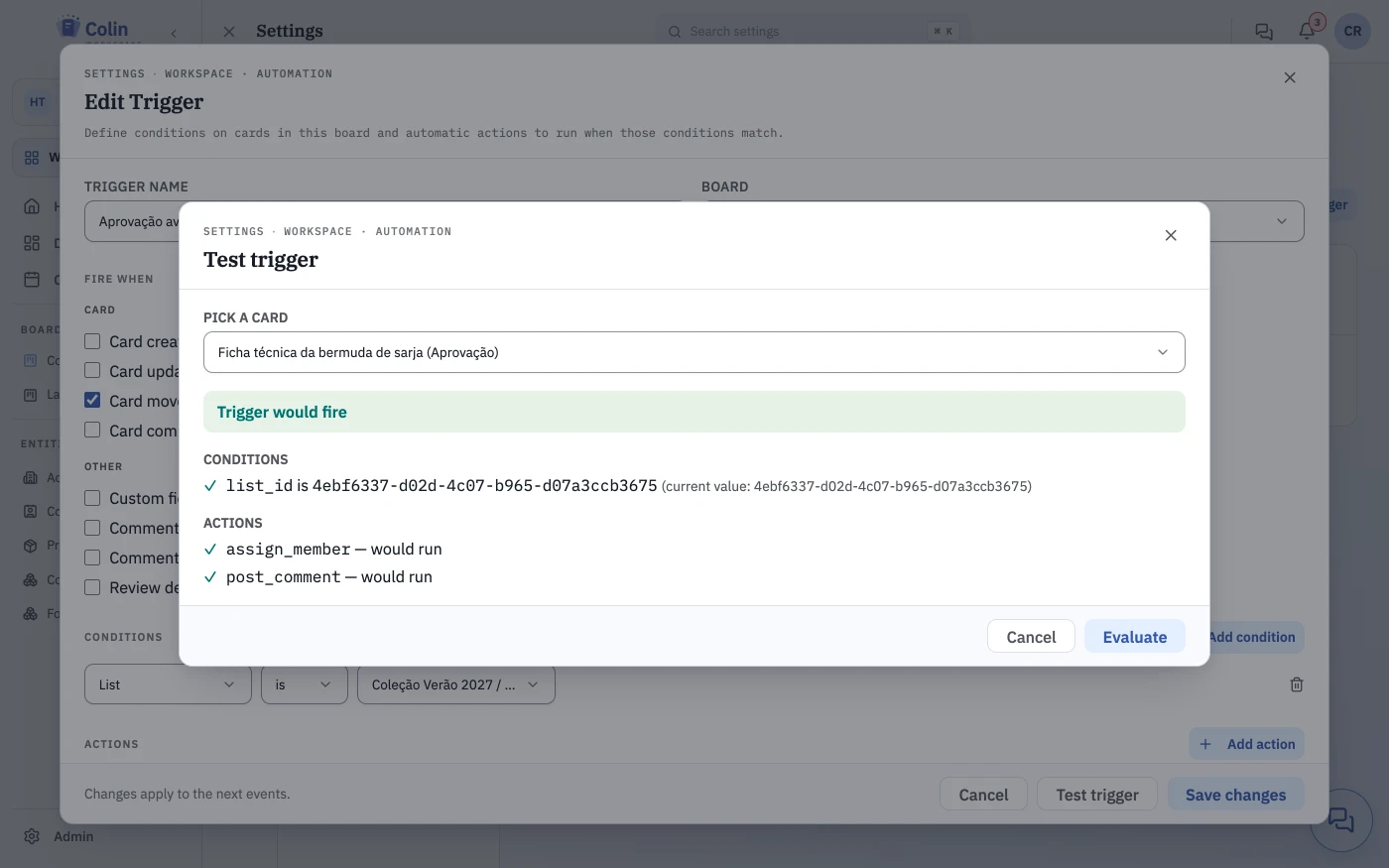
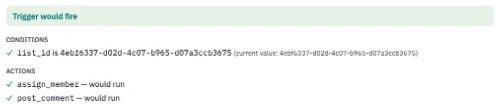
In Test trigger you pick a real card and see whether the rule would fire on it, condition by condition, and what each action would do. Nothing changes on the card. You can get the rule right before it touches anyone's work.
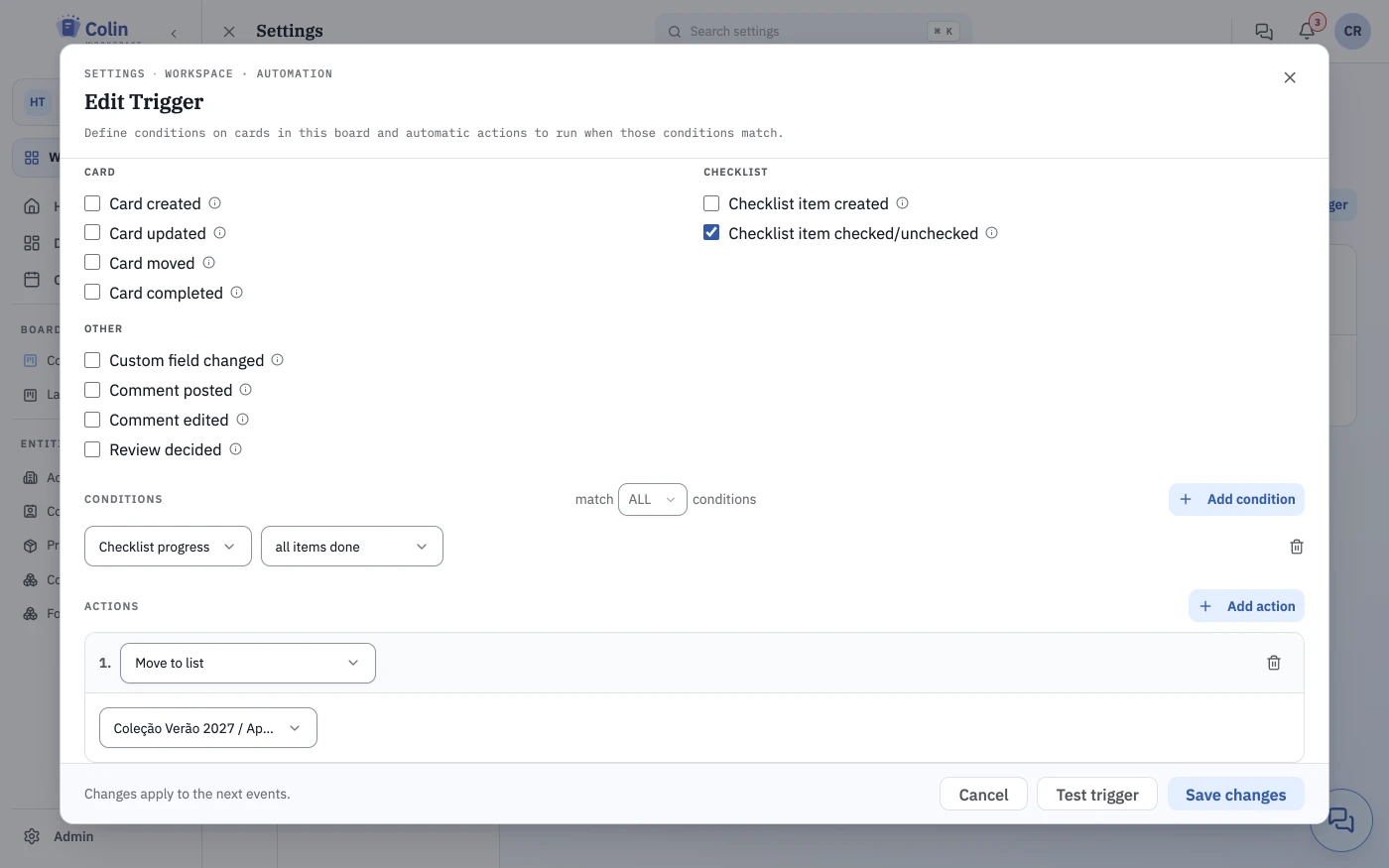
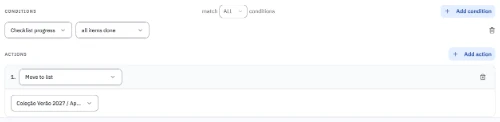
This one moves the card to Aprovação when the last checklist item is ticked. Once it lands there, the rule above calls the manager in. Nobody had to drag the card or remember to tell anyone.
If you can say "whenever this happens, do that", it can become a rule. A few examples:
An apparel maker moves the piece to approval when the spec sheet is done, and the product manager joins the card right then.
An agency adds the Client tag and calls in the account manager whenever a job reaches the client approval list.
A builder creates the inspection checklist on every card that enters the handover stage, always with the same items.
A software team tells another system through its API when a card is completed on the next release's list.
A services firm e-mails the card's members when its status changes to Waiting on client.
Start with a single rule and watch the team work with it for a few days before you create the next. Changes to a rule apply to the next events.
Everything a rule changes on a card goes into its history, just like a person's change: what changed, from what to what and when. Months later you can still tell whether someone moved the card or a rule did.
The rules are built not to run away from you. Each event runs a rule only once. A chain of rules has a depth limit, so one can't keep calling another in a circle. And a comment written by a rule doesn't fire the comment rules.
The rules apply to the cards people create on the boards. Only administrators create and change rules, and each rule applies to one board, so a change on one board doesn't touch another.
It comes with Colin Workspace and Colin Suite, at every user tier, with as many rules as you want and no monthly cap on runs. Colin Workspace starts at R$ 84 per user/month.
Boards with your process's lists and cards with an owner, a deadline, a checklist and the conversation.
The company mailbox connected to a board: each conversation becomes a card, and the reply goes out from it.
A board tied to a repository: card and issue synced both ways, merges in the history.
A rule sends e-mail from the company's connected mailbox, to the card's members or to addresses you choose, posts to a Colin Chat room and calls another system's API through a Connection, with the credential kept in Colin.
A card created, changed, completed or moved to another list, a checklist item created or ticked, a custom field changed and a comment posted or edited.
Add or remove a tag, move the card, add or remove a member, set the deadline and the start date, change the status, create a card or a checklist, create a card from a checklist item, fill or clear a field, comment, send an e-mail, post to chat and call another system's API.
No. Colin's rules never delete anything. The most they do is move, change the status or clear checklists.
The company's administrators. Each rule applies to one board, and the people working the cards see the result in the history.
Yes, and that's how you build a flow: one moves the card, the other reacts to it arriving. So it never becomes a circle, a chain has a depth limit.
Use Test trigger in the editor. You pick a card and Colin shows whether the rule would fire and what it would do, without changing the card.
No. Rules run as many times as the events happen, on any plan.
The when, if and then logic is the same as Trello's rules, so you can bring over the ones you already use. Colin has no card buttons or scheduled commands, and to warn people before a deadline there's Settings › Workspace · Automation › Reminders.
Trello's automation types, how many runs each plan allows a month, the five rules worth having on any kanban board and how to build the same rules with Colin Workspace's Triggers.
Register a card, pick the apps and how many seats you want, and nothing is charged until the trial ends. Or we'll show you Colin with your company's boards and pipeline in 30 minutes.
 Chat on WhatsApp