Distribution and wholesale
A distributor with reps on the road ends the phone session of whoever left the company the same day.
 Colin
Talk to us
Start free
Colin · In every app
Colin keeps the company's data in Brazil, apart from every other company's. Every change to a card, a deal or a contact becomes a history line not even the administrator can delete. Phone, email and CPF go into that history masked. And when a contact asks to leave, one click erases their personal data without breaking the reports.
The customer list lives in a spreadsheet sent by email, in a CRM where everyone sees everything and in a WhatsApp group. When a phone number changes, nobody knows who changed it or when. When a rep leaves, their session stays open on the laptop at home.
And when a contact asks for their data to be erased, the company doesn't know how many places it is in, nor can it show what it did.
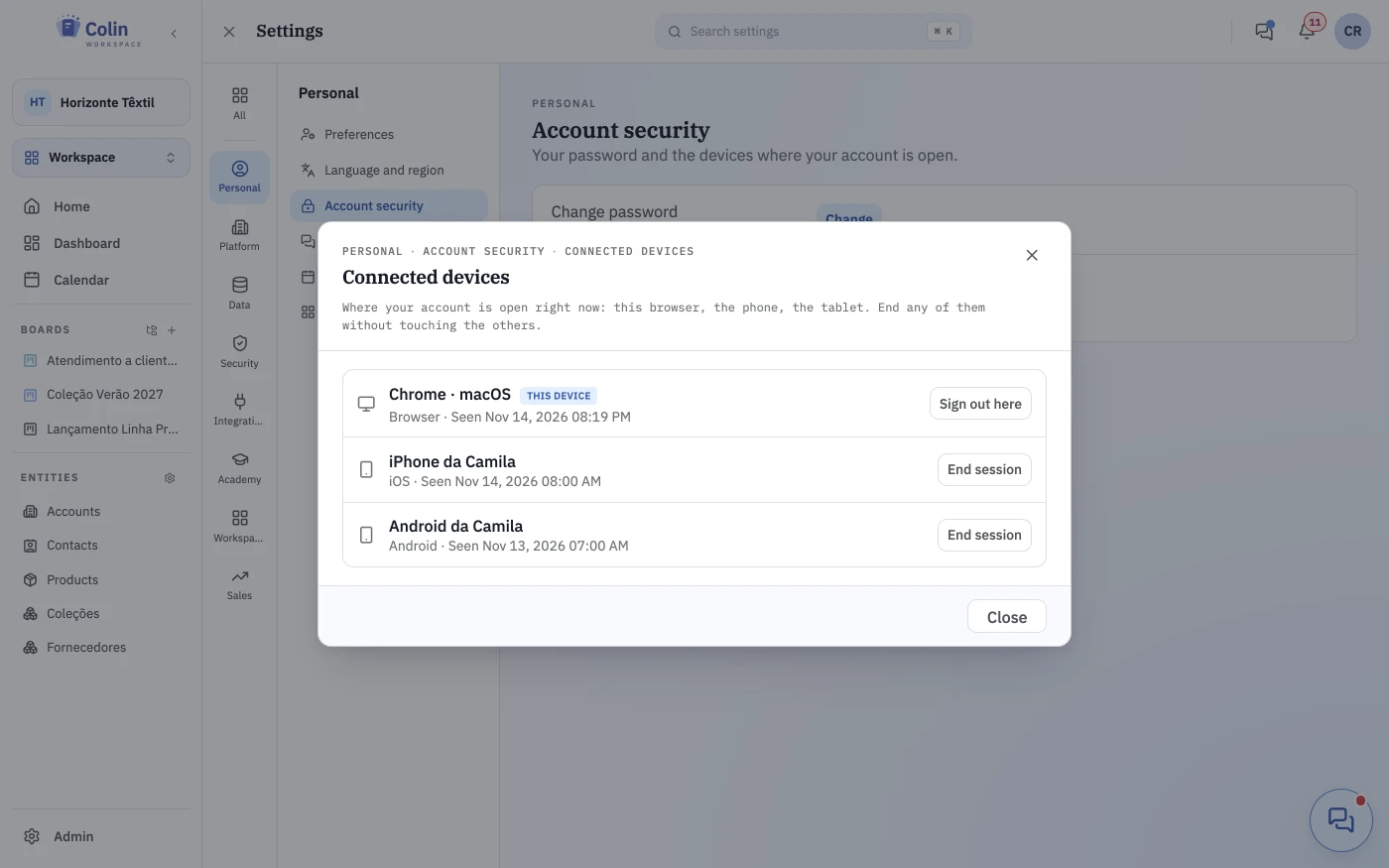
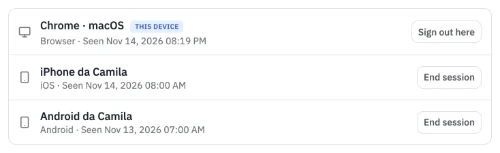
Camila opens Account security and sees where she is signed in: the browser she's using, her iPhone and her Android phone, with the day each one was last seen. If she loses her phone, she ends that session without signing out of the computer. An account stays open on at most five devices, and signing out of all of them, changing the password or being blocked ends every one at once.
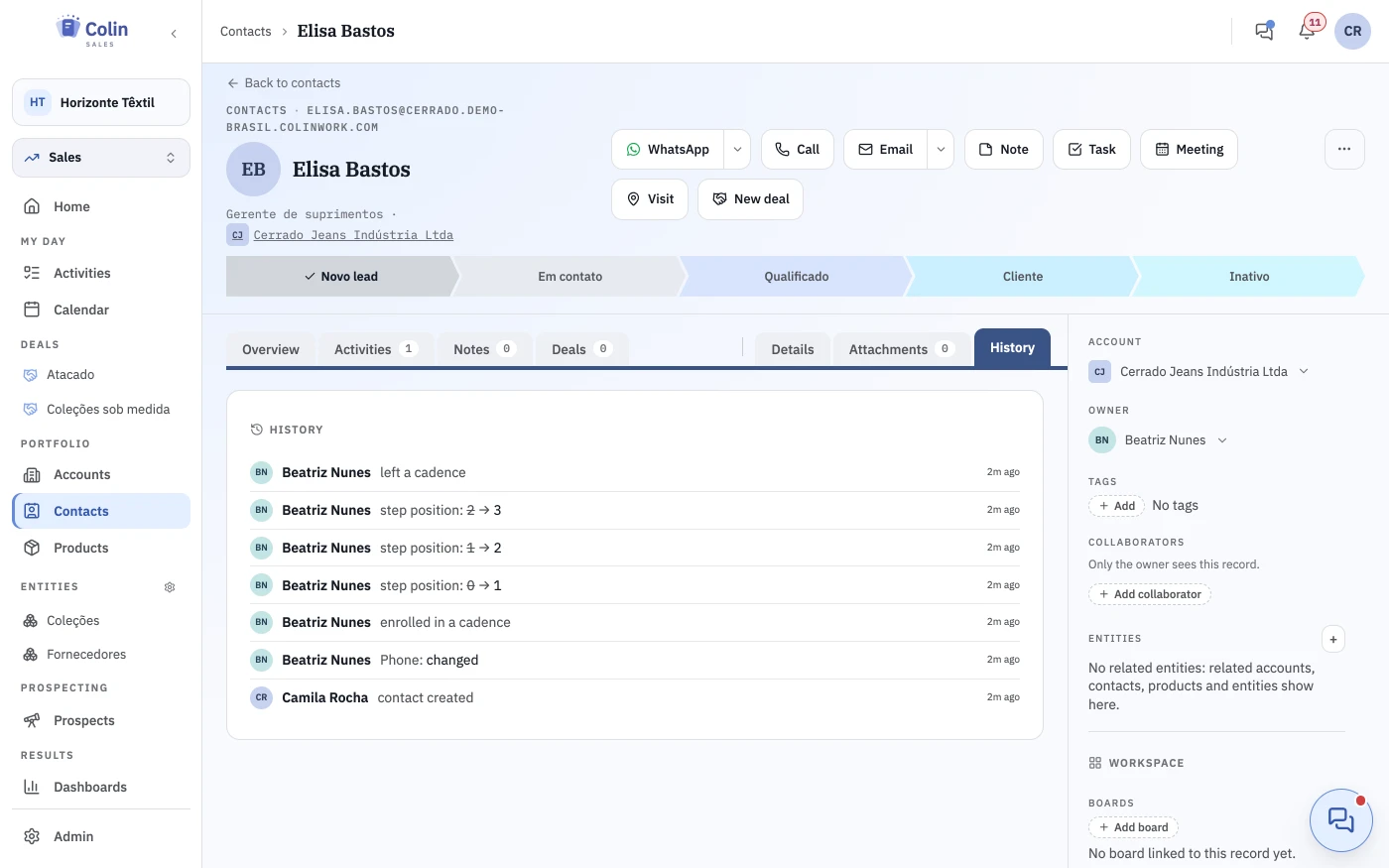
Beatriz changed Elisa Bastos's phone number. The contact's history records who changed it, when and what: Phone, changed. The old and the new number don't show there, not even to the administrator. The same goes for the name, email, CPF and fields marked as personal.
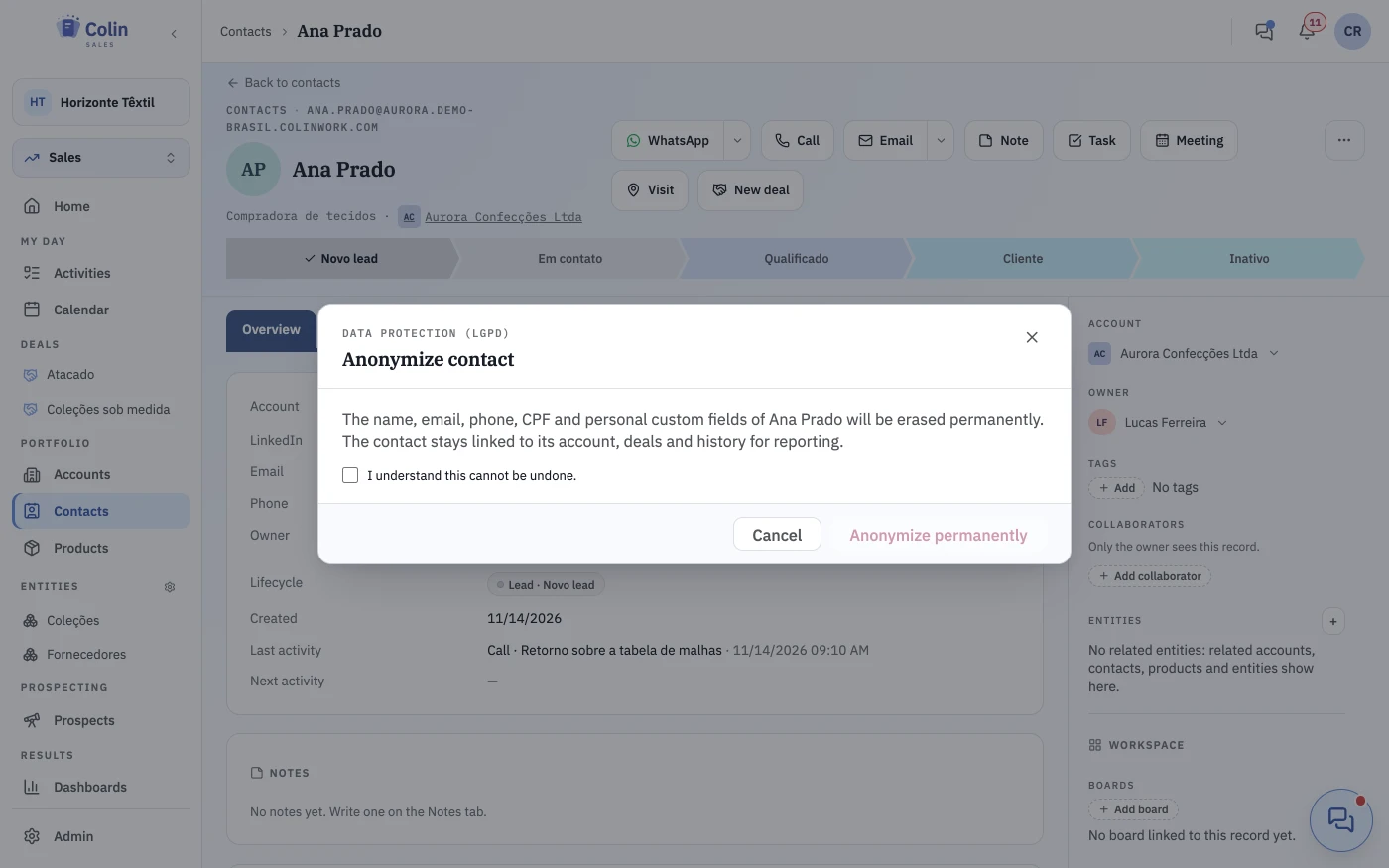
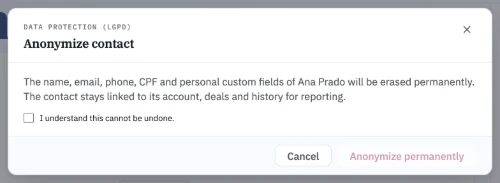
Ana Prado asked for her data to be erased. In the contact's menu, Anonymize permanently erases the name, email, phone, CPF and personal fields. The contact stays linked to the account and the deals, so the sales reports don't change, and the history records that it was anonymized.
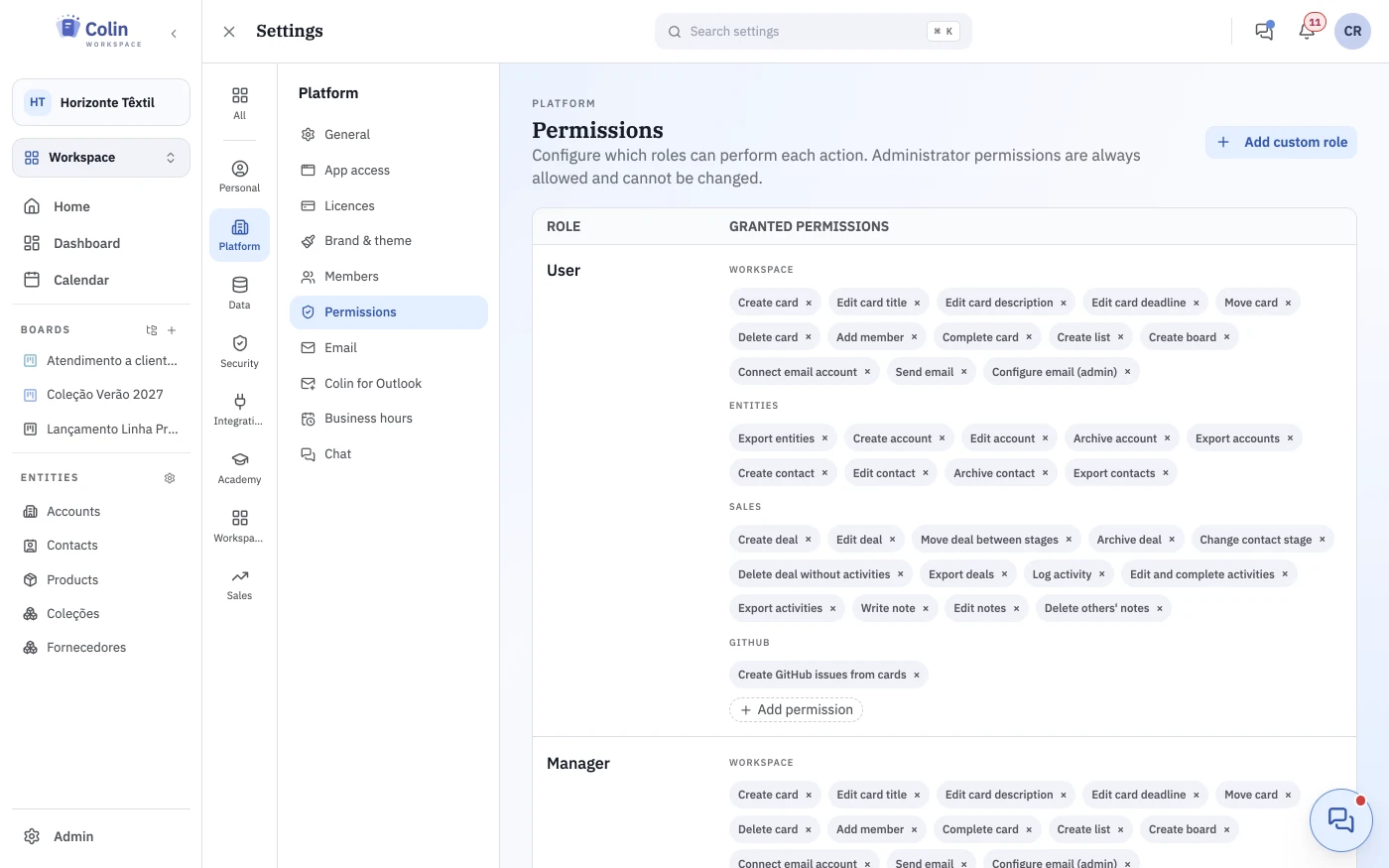
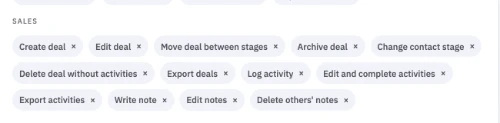
In Permissions, the administrator chooses what each role may do: create a deal, export contacts, delete a card. A custom role can gain or lose actions, but never sees more records than the role it is based on.

Any company in Brazil that keeps customers' names, phones and emails answers to the LGPD. Some examples of who uses these tools:
A distributor with reps on the road ends the phone session of whoever left the company the same day.
A services company answers a customer's request to erase their data and keeps the record that it did.
A garment maker lets each sales agent see only their own customers, not the whole company's.
A manufacturer shows the auditors who changed a supplier's record and when, without a separate spreadsheet.
A software company answers its customer's security questionnaire by pointing to where the data lives and who can see it.
To see what changed in the company, open the audit log in Settings and filter by person, record, action type or period.
The data lives on Microsoft Azure, in the Brazil South region, in São Paulo. Each company has its own space, and no query returns another company's data.
The history can't be edited or deleted: the database refuses any attempt, whoever makes it. Name, email, phone, CPF and personal fields go into it masked. Passwords are stored hashed, and people can sign in with the company's Google or Microsoft account. Turning an app off hides it and deletes nothing; data is truly erased only by an anonymization or when the company closes its account.
What Colin does with the data of the people who use it is in the privacy policy.
All of this comes with Colin, in any app and any plan. It isn't a separate module or an extra cost.
Groups of people with access to boards by level: only their own cards, every card, or every card with editing.
Boards with your process's lists and cards with an owner, a deadline, a checklist and the conversation.
Rooms, direct messages and a link to a deal or a card turned into a record card in the conversation, for everyone in the company.
Legal basis, WhatsApp opt-out and anonymization on every contact, and each rep seeing only their own book.
Every change to a card stays in the history, and groups decide who sees each board.
The Colin app shows up among the connected devices and is wiped from the phone when its session ends.
Colin gives the company the tools the LGPD asks for: a legal basis per contact, WhatsApp opt-out, anonymization, a history nobody edits and masked data. Compliance belongs to the company, which decides what it collects and why; Colin processes the data on its behalf, as the privacy policy says.
On Microsoft Azure, Brazil South region, in São Paulo.
No. The database refuses to edit or delete the history, for anyone. The history only goes away with the company's account, when it is closed.
No. The history shows that the phone was changed, by whom and when, without the old or the new number.
They end that device's session themselves in Connected devices. An administrator can also block the person, which ends all their sessions at once.
Yes. A person signs in with the company's Google or Microsoft account, or with email and password.
Only if the company wants it. By default, a user sees their own records and those they collaborate on; a manager sees their team's; the administrator sees everything.
Write to the address on the security and LGPD page. We answer vendor questionnaires and take vulnerability reports there.
Register a card, pick the apps and how many seats you want, and nothing is charged until the trial ends. Or we'll show you Colin with your company's boards and pipeline in 30 minutes.
 Chat on WhatsApp