Fashion and apparel
An apparel maker tracks the sample that went to the retailer and sets the day to call about the size run, before the season moves on.
 Colin
Talk to us
Start free
Colin Sales · Sell
Every call, meeting and task is tied to the customer and the deal. When a rep opens Colin Sales, the first screen is their day: what's on at each hour, what's already past due and what comes next.
The customer asked for a call on Thursday. The rep wrote it in a notebook, or in a phone reminder, or nowhere at all. On Thursday an urgent order came in and the call got pushed back. Two weeks later, the customer had already bought from someone else.
The manager has no way of knowing either. Everyone's agenda lives somewhere different, and the CRM only shows what someone remembered to log. When the question is "who hasn't heard back from us?", the answer comes from a round of messages in the group chat.
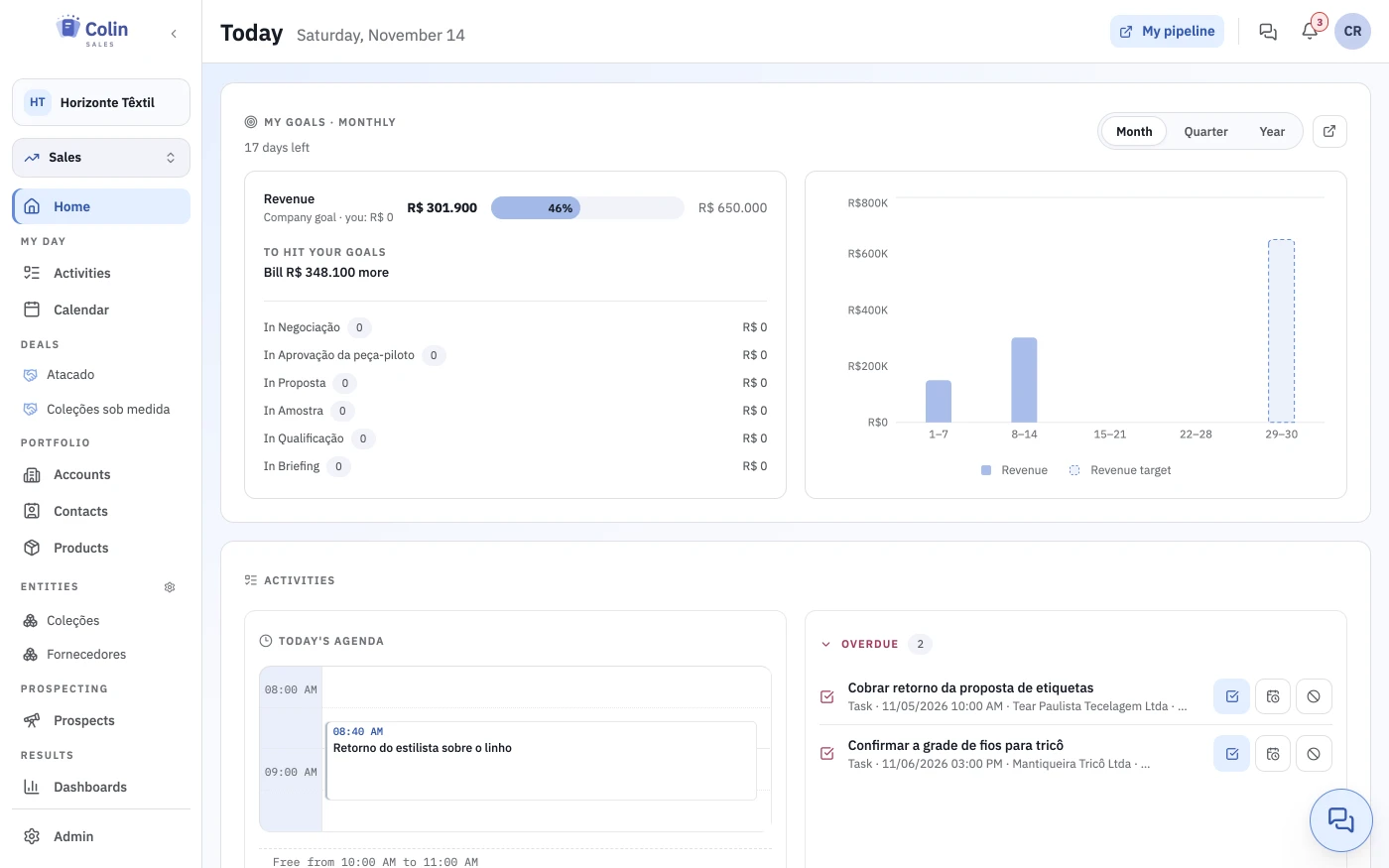
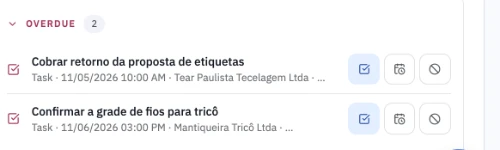
It's the first thing the rep sees. On one side, the day's agenda by the hour, with the free gaps marked. On the other, the overdue ones, oldest first, and what's coming this week and later. Complete, reschedule and cancel sit right on the row.
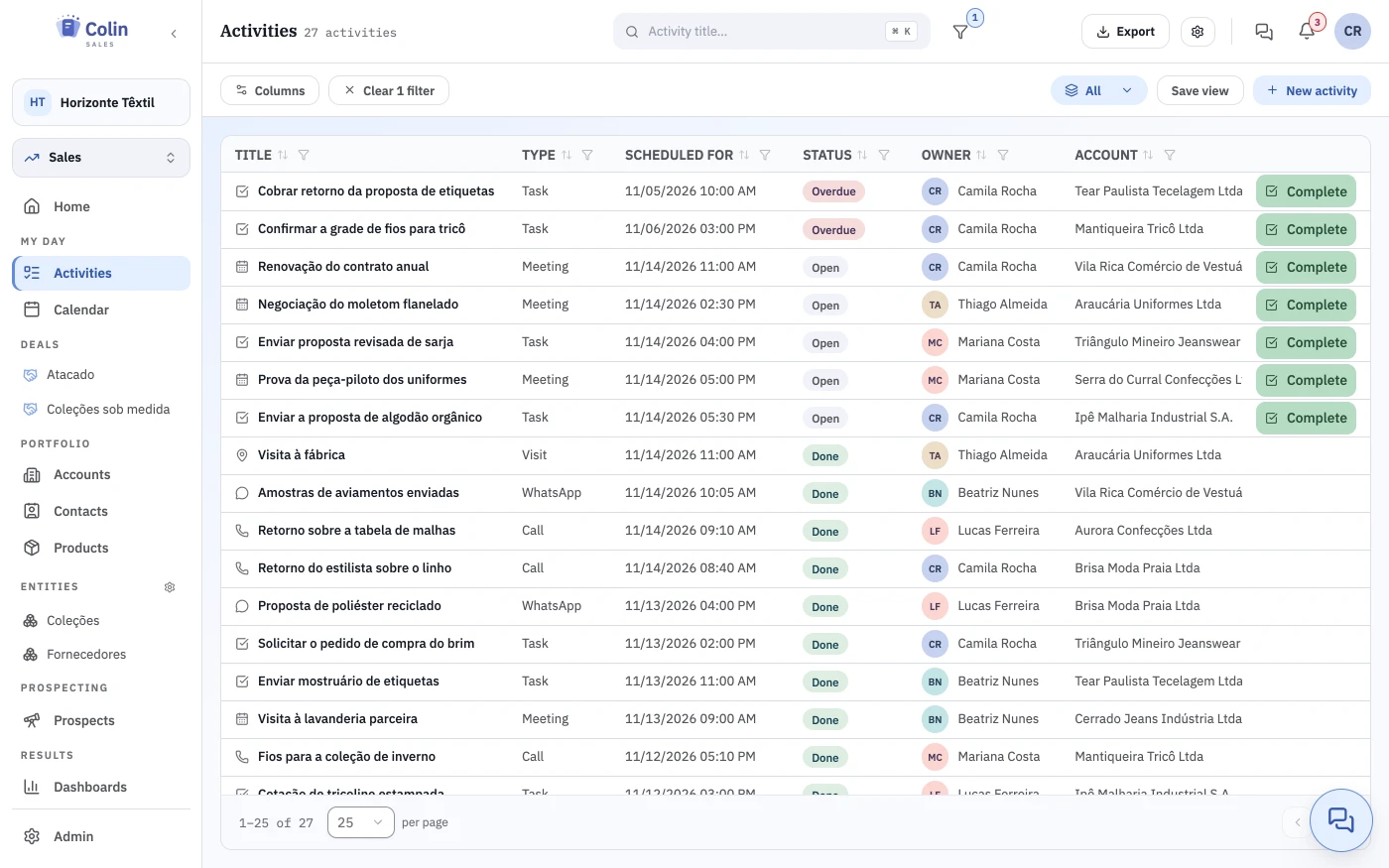
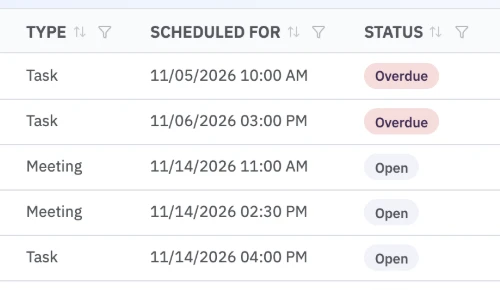
The list shows title, type, date, status, owner and account, with filters by owner, type and status. You can narrow it to the overdue ones, save the view and export it.
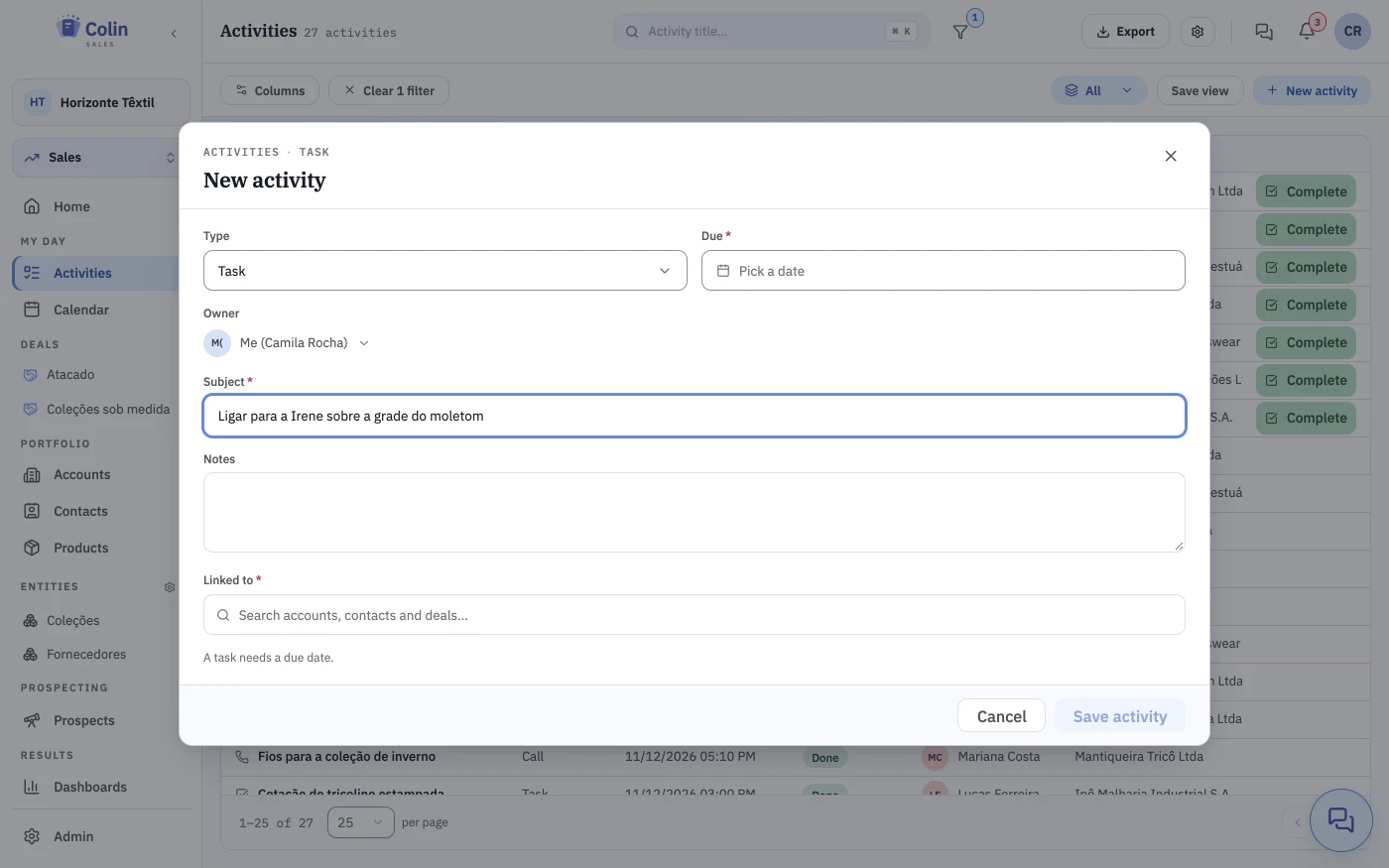
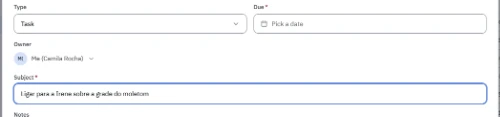
A new activity asks for the type, the owner, the subject and at least one customer or deal it's linked to. If it's a task, it asks for the due date too: without one, Colin won't save it.
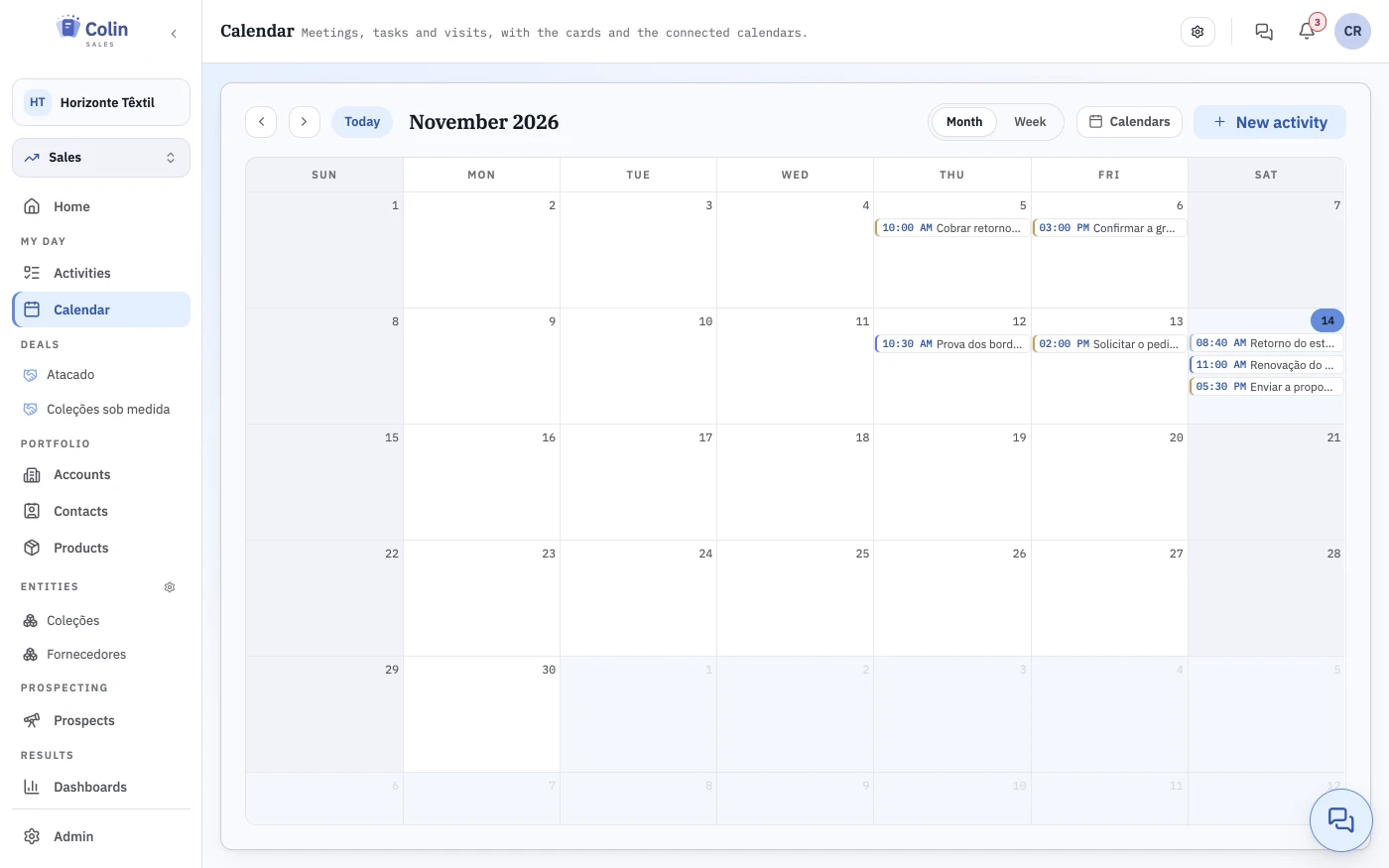
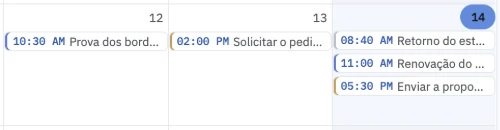
The calendar shows meetings, tasks and visits by month or by week. It brings in the calendars you've connected and, for anyone who also uses Colin Workspace, the cards with a deadline.
It works for any team where the sale depends on getting back to the customer at the right moment. A few examples:
An apparel maker tracks the sample that went to the retailer and sets the day to call about the size run, before the season moves on.
A manufacturer leaves every quote with a follow-up date, and on Monday morning the rep sees what slipped from the week before.
A distributor organizes each book's restocking calls and sees whose agenda is piling up.
A software company logs the demo as a meeting, which lands on the rep's calendar, and leaves the follow-up task already scheduled.
A services firm sees on the dashboard how many overdue activities each person has, without asking anyone for a report.
Activity types and each one's outcomes (answered, voicemail, asked for a proposal) are set up by whoever runs Sales at your company.
An open task past its due date becomes overdue, and Colin marks it once, with an entry in the audit log and a heads-up to the owner. A day before it's due, it sends a reminder too. Notifications arrive in the bell, by e-mail and on the phone, according to each person's preferences. When someone gives it a new date, the mark comes off.
Cancelling doesn't delete. A cancelled task or meeting leaves your list but stays in the customer's history. And a note isn't an activity: it lives in the notes tab, with no due date or owner to chase.
Who sees activities follows the same rule as customers: reps see their own, managers see those of the team they lead and administrators see everything. Even when a team shares its book, each person's calls and visits are still their own.
It comes with Colin Sales and Colin Suite, at every user tier. Colin Sales starts at R$ 100 per user/month.
As many pipelines as you want, with your stages, each one's probability and who reaches the deals.
The series of touches for each contact, step by step, with the outcome deciding what comes next.
Call through net2phone from inside the CRM. The call is logged on the customer without anyone typing a thing.
WhatsApp and e-mail templates with the customer's name filled in, and every send logged in the history.
The Teams transcript inside the logged meeting, and the Outlook meetings still to log.
Rooms, direct messages and a link to a deal or a card turned into a record card in the conversation, for everyone in the company.
Goals per rep, per team and for the company, measured by the CRM's own deals and activities.
The customer list becomes the day's route, and every visit keeps its check-in.
The sales day, the boards and the chat on iPhone, Android and Apple Watch, with part of the work done even without signal.
Colin beside the email open in Outlook: the conversation goes to the right contact, account and deal.
Anyone who uses both apps sees their boards' cards with a deadline on the Sales calendar.
Task, meeting and visit, which have a date and are completed later, and call, WhatsApp and e-mail, which log what already happened. Your company can create its own types on top of these, each with its own list of outcomes.
Yes. A day before a task's due date Colin sends a reminder, and again when it goes overdue. Each person chooses in their preferences whether they also want it by e-mail, besides the bell and the phone.
Yes. With your Google, Microsoft or iCloud calendar connected, a meeting you create in Colin shows up there. It's one way only: changing the event in the calendar doesn't change the activity.
It stays at the top of the Today screen, in the overdue group, until someone completes, reschedules or cancels it. Nothing disappears on its own.
They see those of the team they lead. The activities dashboard shows activities by owner and type, and how many are overdue.
Yes. The same meeting can be linked to the account, two contacts and the deal, and it shows up in each one's activities tab.
The Today screen lists the open deals in the default pipeline with nothing scheduled, grouped by temperature, with a button to create the activity right there.
Yes. An overdue task is one of the Sales automation events, and your company's administrator sets them up.
Register a card, pick the apps and how many seats you want, and nothing is charged until the trial ends. Or we'll show you Colin with your company's boards and pipeline in 30 minutes.
 Chat on WhatsApp