Fashion and apparel
An apparel maker keeps seasonal wholesale apart from made-to-order pieces, each with its own stages, from sample to closed order.
 Colin
Talk to us
Start free
Colin Sales · Sell
Each pipeline has the stages of your process, and each stage says whether the deal is open, won or lost and how likely it is to close. You drag the deal from one column to the next and Colin Sales does the math.
Almost every team starts the same way: a spreadsheet with a "status" column everyone fills in their own way. One person writes "proposal sent", another writes "waiting on the customer", and nobody can say how much is in negotiation without stopping for half an hour to add it up.
It gets worse as the company grows. Wholesale follows one path, made-to-order follows another, and it all lands in the same place. The month's forecast turns into a guess, and the manager only finds out a deal stalled once it has gone cold.
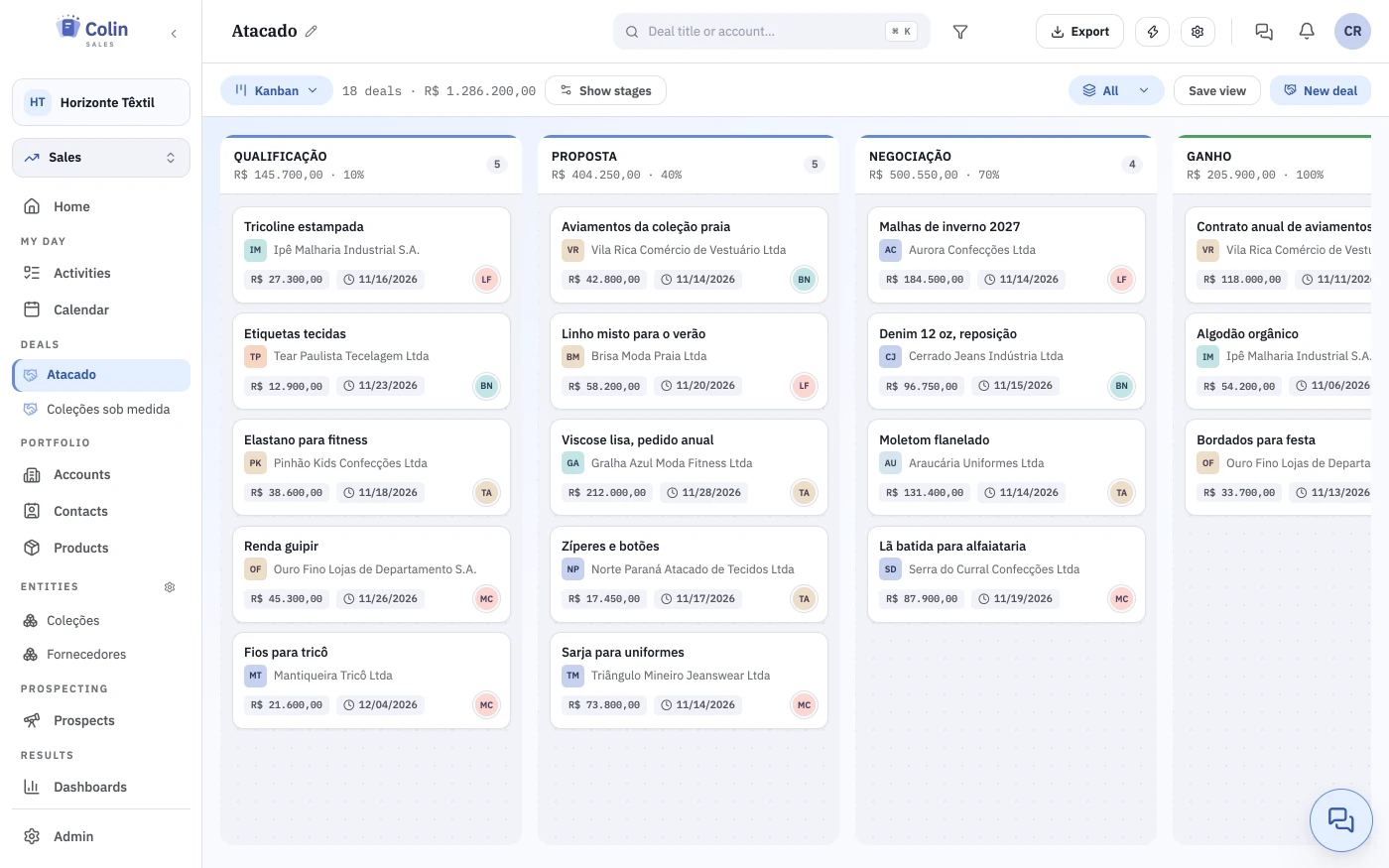
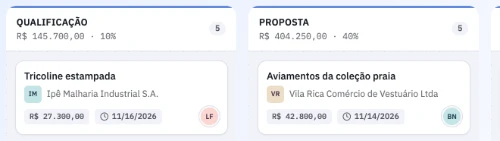
Each stage is a column, with how many deals it holds, the sum of their amounts and its probability. At the top, the pipeline's total. When a deal moves forward, you drag the card to the next column.
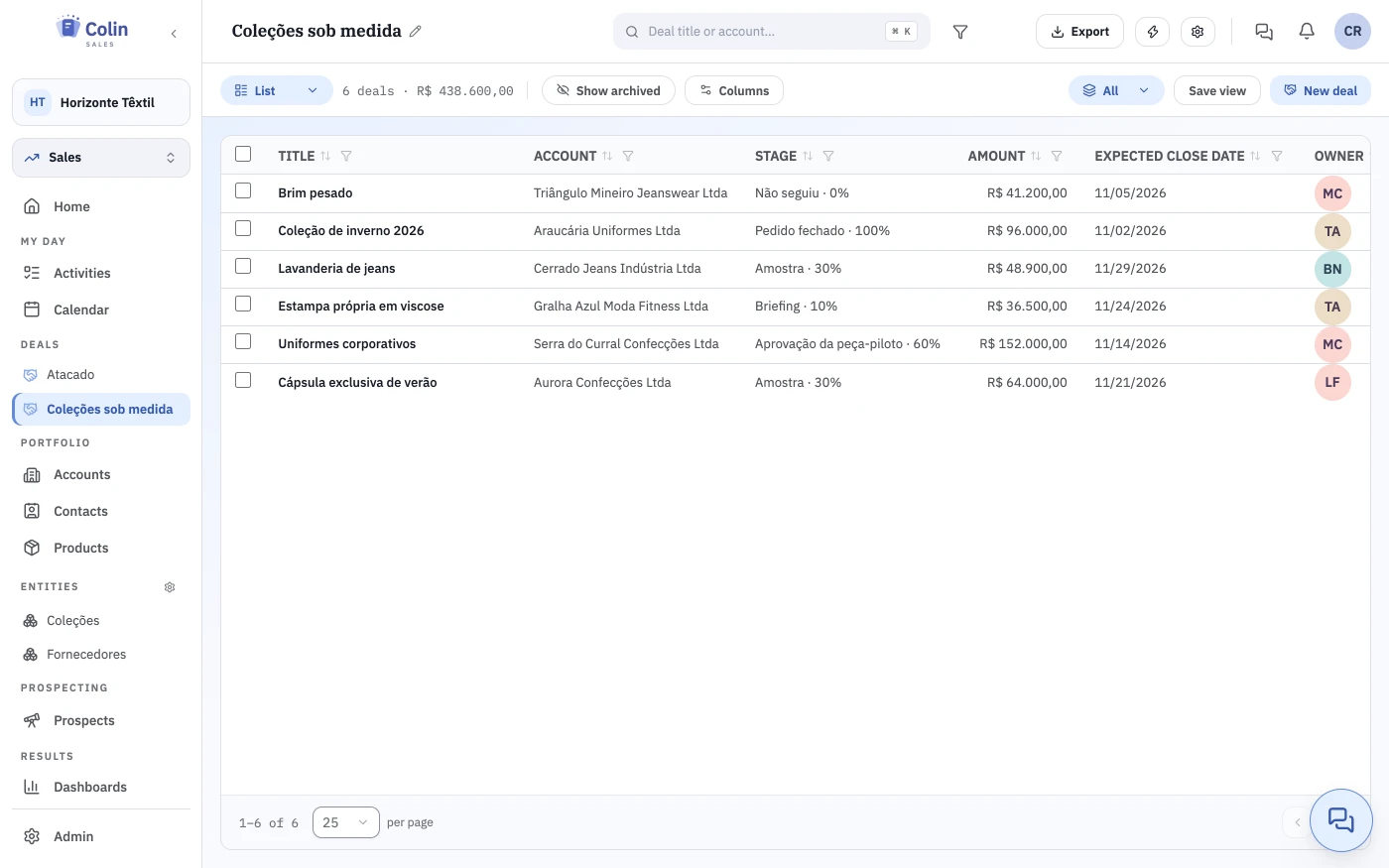
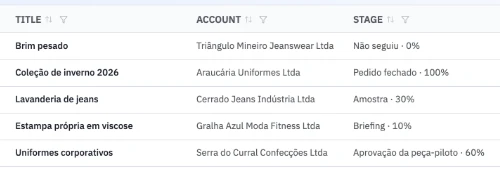
Prefer a table? The list shows account, stage with its probability, amount, expected close date and owner, with filters, columns and export. Save the view to come back to it later.
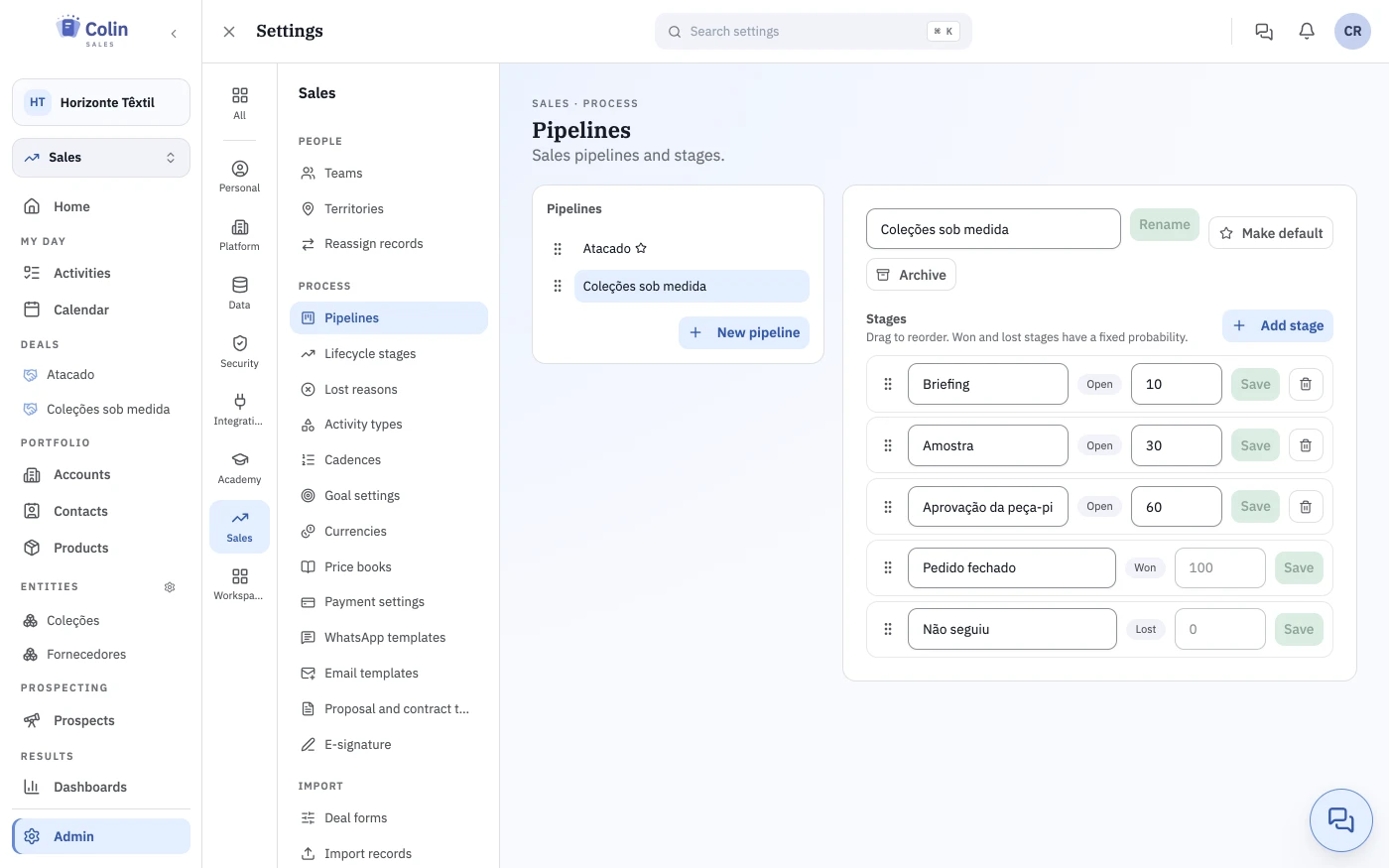
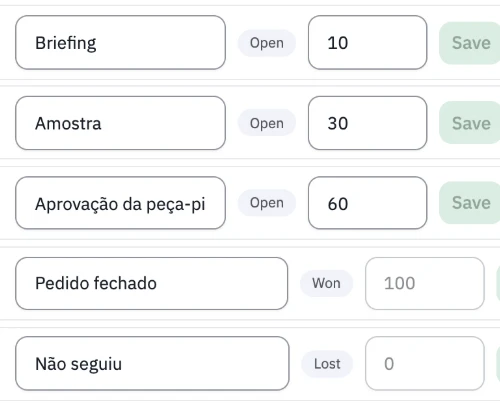
In the Sales admin you name the stages, set their probability and drag them into order. Won and lost stages have a fixed probability, and before you delete a stage that holds deals, Colin asks where they should go.
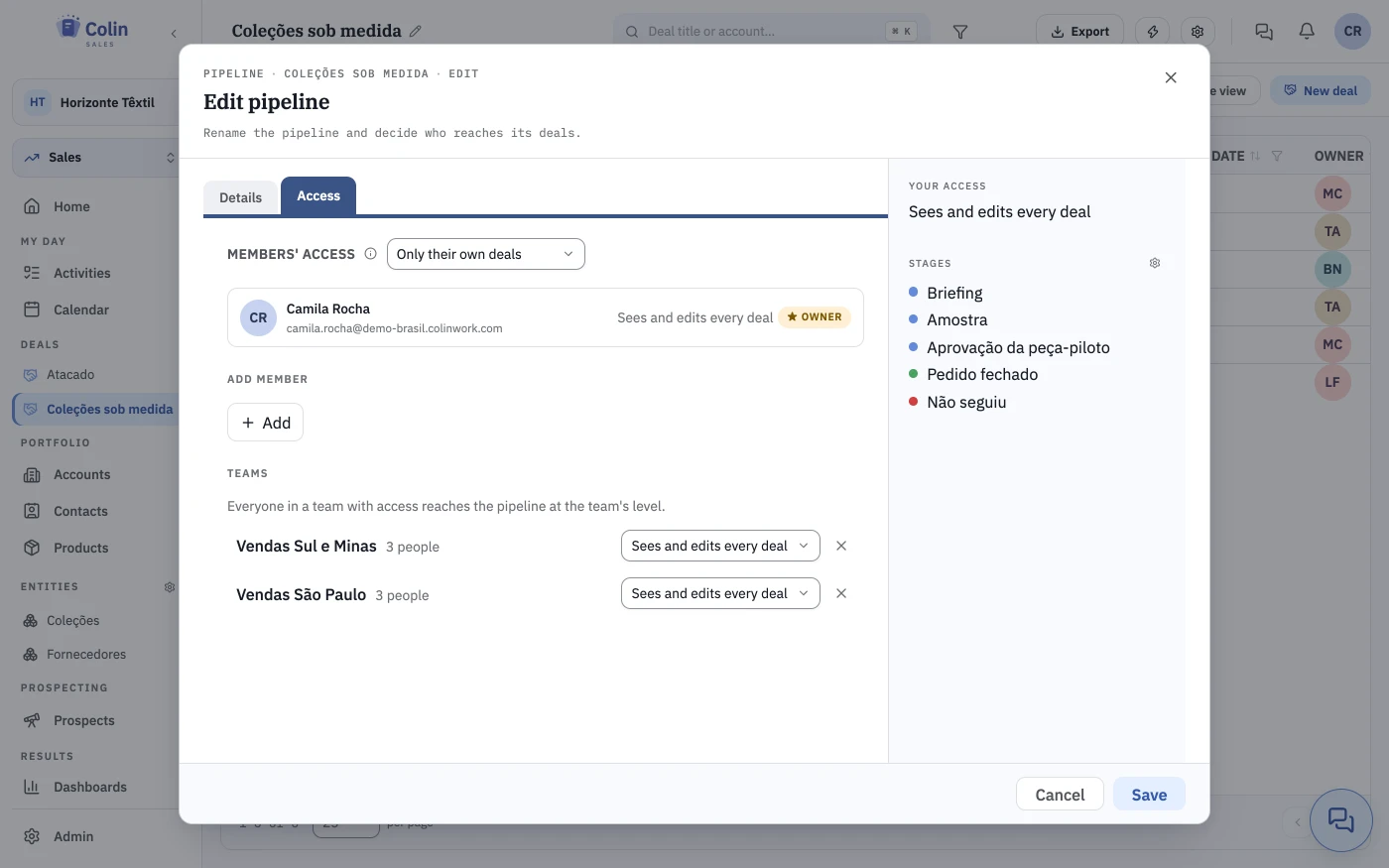
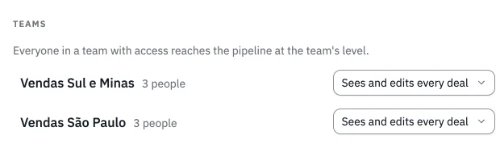
Each pipeline has an owner and members. You choose whether members see only their own deals, see every deal, or see and edit every deal, and you can give a whole team access at once.
It works for any team that tracks deals by stage. A few examples:
An apparel maker keeps seasonal wholesale apart from made-to-order pieces, each with its own stages, from sample to closed order.
A manufacturer tracks quote, sample and customer approval on one board, and knows how much sits in each phase.
A distributor keeps each region's team in its own pipeline, without seeing the neighbor's book.
A software company runs one pipeline for new business and another for expanding existing customers, with different probabilities.
A services firm reads the month's forecast from each stage's probability, without building a spreadsheet.
Lost reasons are set up in the Sales admin too. When someone moves a deal to a lost stage, Colin asks for the reason.
Every stage change goes into the deal's history, with the date and who made it. Dashboards and automations look at the stage's outcome (open, won or lost), never its name. That's why you can rename "Negotiation" to "Closing" without breaking a single report.
The weighted value is the deal's amount times the stage's probability, and it feeds the forecast in the pipeline's dashboards. If your company sells in more than one currency, each deal stays in its own and the columns add up in the company's base currency.
A pipeline someone creates starts closed: only its owner and the administrators reach it until someone gives access. Whoever can only view can't change anything, and nobody can raise their own access.
It comes with Colin Sales and Colin Suite, at every user tier, with as many pipelines and stages as you want. Colin Sales starts at R$ 100 per user/month.
Type the CNPJ and the account comes filled with the Receita Federal's data.
A rep's day on one screen: the agenda, what's overdue and the next step with each customer.
Every submission from your site becomes an account and a contact in the CRM, with an owner.
Proposals and contracts generated from the deal, as numbered PDFs, signed through Autentique or Clicksign.
Each deal's installments, when they fall due, when the money reaches the account and who follows up.
Quotes on the deal, priced from each customer's price book, with quantity tiers and discount approval.
Goals per rep, per team and for the company, measured by the CRM's own deals and activities.
What was won, who wins most, why deals are lost and how much should come in over the next months.
Rules that act by themselves when something happens in the pipeline, or on a date you choose.
A spreadsheet or the old CRM's export, checked before it's written, with every book of business under the right owner.
As many as you need. One is the default, the one Sales opens first, and you change which in the admin.
Yes. You rename, reorder and add stages whenever you want. To delete a stage that holds deals, Colin first asks which stage they should move to.
When you move it to a lost stage, Colin asks for the reason, picked from the list your company set up. The deal leaves the open pipeline and shows up in the won and lost dashboard.
Yes. A deal field can be required to win. If it's empty, Colin opens a window to fill it in right there before the deal moves to the won stage.
No. Each person sees the pipelines they have access to, as a member or through their team, and inside them sees deals by their level: only their own, every deal, or every deal with editing.
Yes. Under Show stages you hide the columns you don't want to see right now. The deals stay where they are, they just leave your screen.
Yes. Sales automations fire when a deal changes stage, is won or is lost, and your company's administrator sets them up.
It does. Each deal has its own currency, and the board adds everything up in the company's base currency.
Register a card, pick the apps and how many seats you want, and nothing is charged until the trial ends. Or we'll show you Colin with your company's boards and pipeline in 30 minutes.
 Chat on WhatsApp