Fashion and apparel
A clothing maker reaches store and chain buyers with a LinkedIn connection, an e-mail with the catalogue and a call before the trade fair.
 Colin
Talk to us
Start free
Colin Sales · Prospect
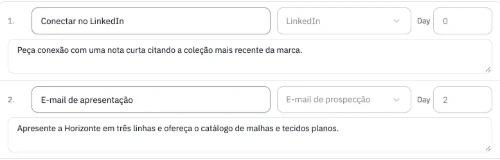
You set the steps once: day 0 on LinkedIn, day 2 an e-mail, day 5 a call. The rep adds the contact to the cadence and Colin hands over each step as their task, on the right day, with what to say. When the contact replies, the cadence stops by itself.
Everyone knows a cold contact rarely answers the first message. The plan is five or six touches over two weeks. In practice, the rep sends the first e-mail, calls once, and the contact gets lost among forty others. Nobody remembers it was the day to send the WhatsApp with the catalogue.
When the cadence lives in a spreadsheet, each rep has their own version. The manager can't tell which step each contact is on, or which message gets replies. And whoever already replied still gets the goodbye e-mail, because nobody took them off the list.
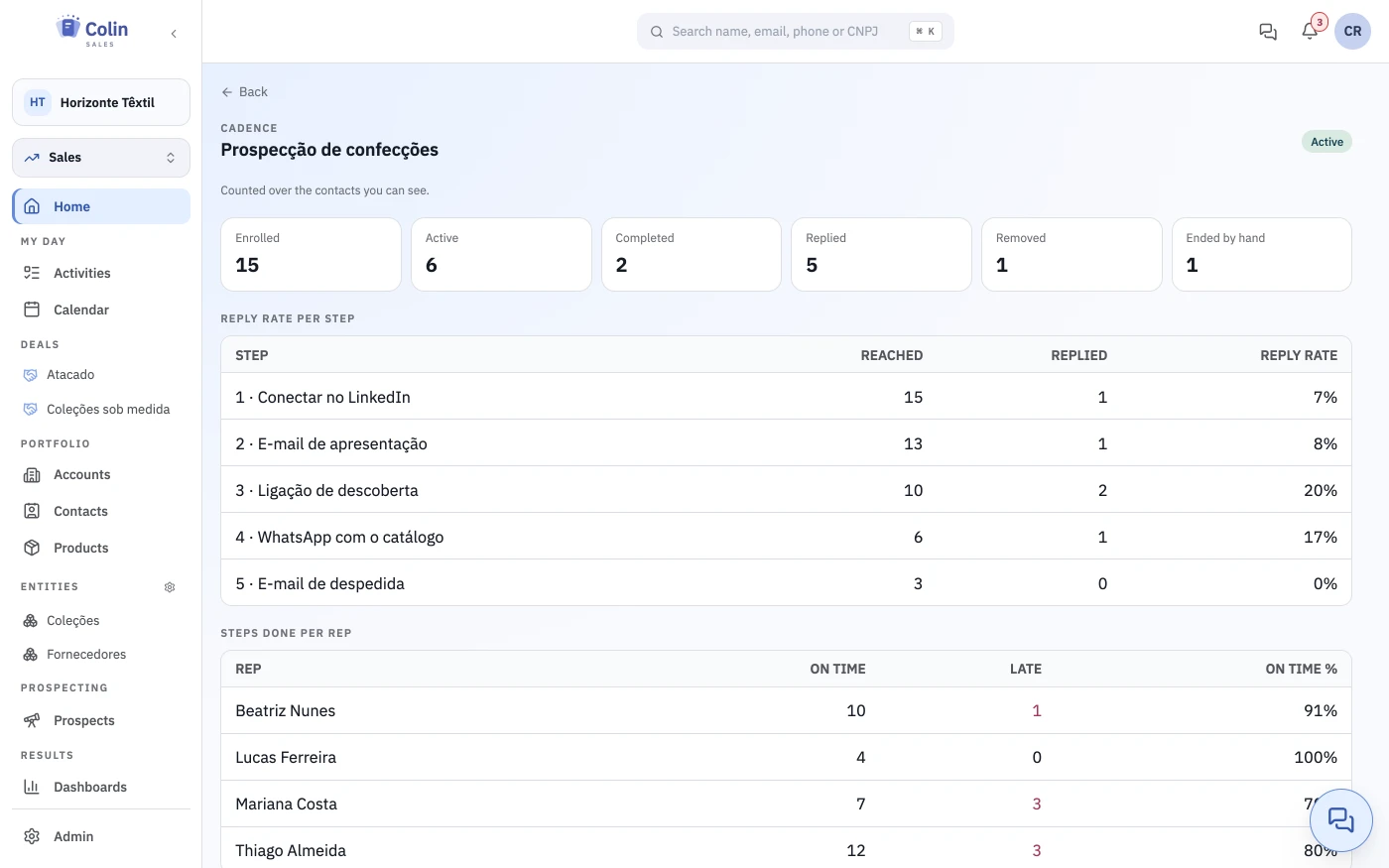
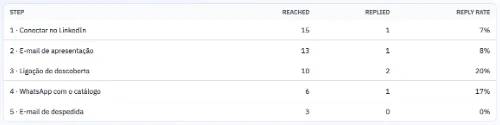
It shows the funnel of everyone who went in: enrolled, active, completed, who replied, who left and who was ended by hand. Below, the reply rate of each step and, per rep, how many steps were done on time and how many late. All counted over the contacts you can see.
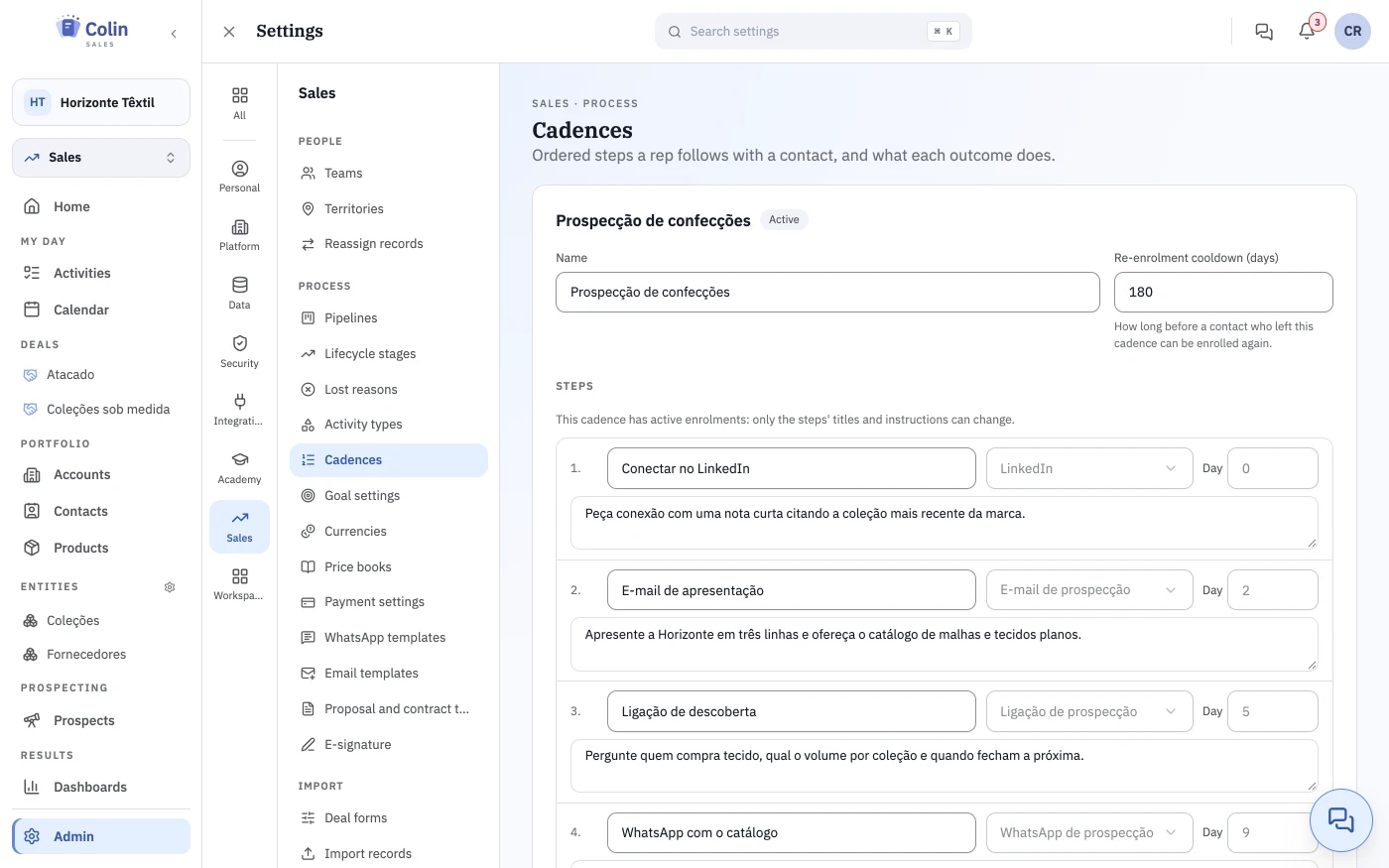
Each step has a title, an activity type, the day it falls on and the instruction for the rep. The re-enrolment interval says how long a contact who left waits before they can go in again.
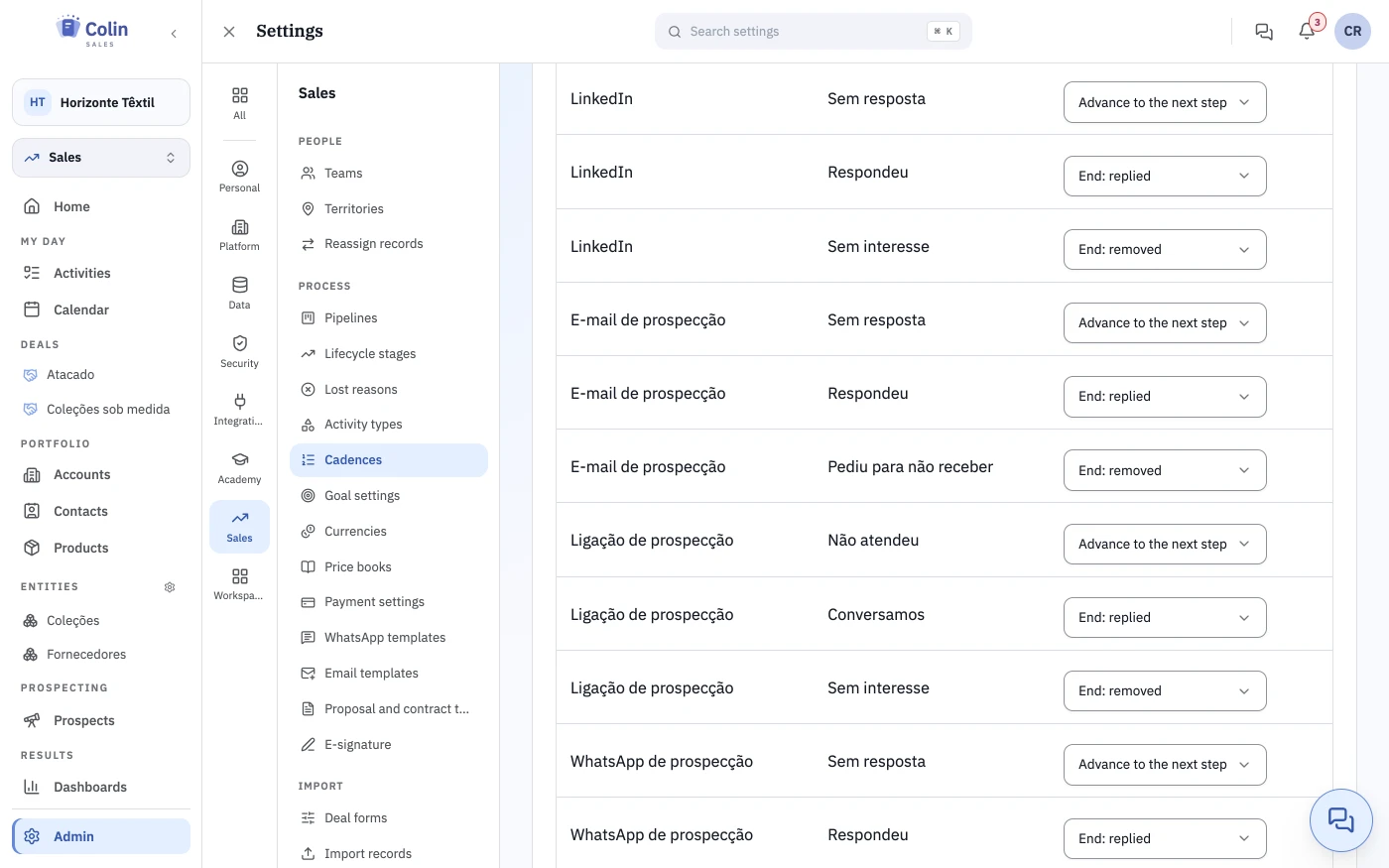
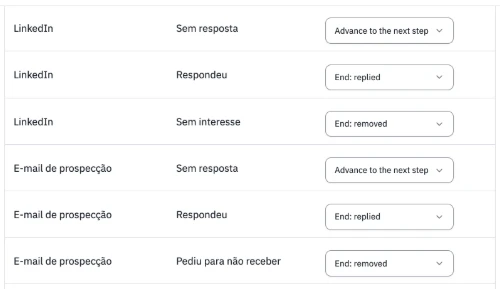
For each outcome of each activity type you pick the effect: move on to the next step, end because the contact replied, or end because they left. A cadence is only activated once every outcome has an effect.
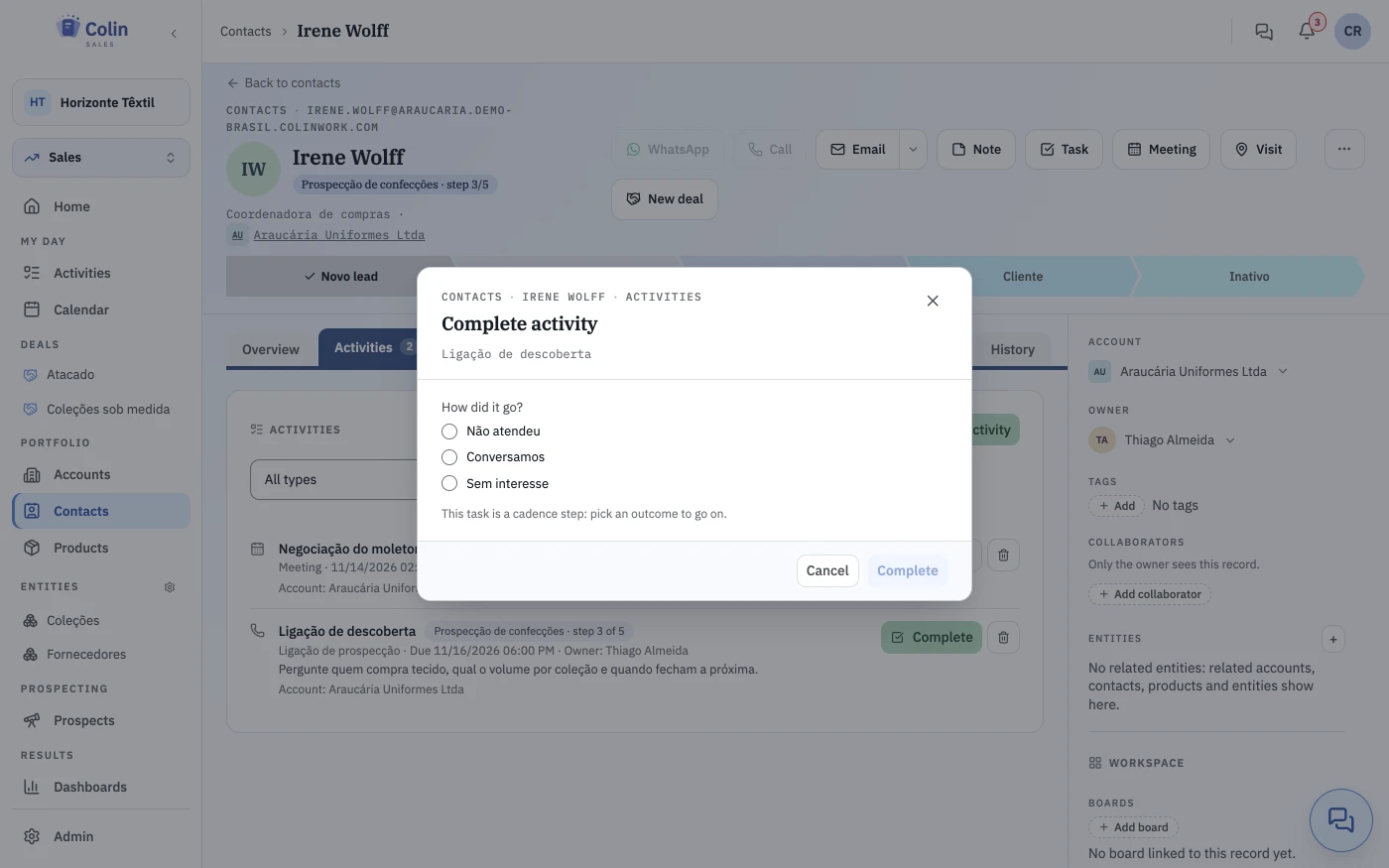
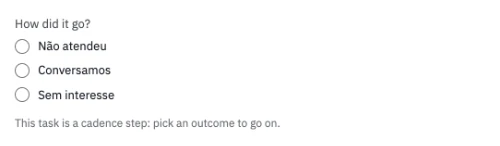
The step's task shows the cadence label and the step number. When it is completed, Colin asks how it went, and the answer decides whether the cadence moves on or ends.
It fits any team that has to reach new contacts with an agreed sequence. Some examples:
A clothing maker reaches store and chain buyers with a LinkedIn connection, an e-mail with the catalogue and a call before the trade fair.
A manufacturer gives every sales rep the same sequence and sees which step gets the most replies from buyers.
A distributor wins back customers who stopped buying with a cadence of its own, apart from prospecting new accounts.
A software company runs its SDRs' outbound cadence and sees, per person, how many steps were done on time.
A services firm follows up proposals it sent in steps with set days, and stops when the client replies.
To add many contacts at once, select them on the contacts list: up to 500 at a time. Anyone already in a cadence or still inside the re-enrolment interval is left out, with the reason.
Colin never sends a message by itself. Each step is a task for the rep, due at 6 pm on the step's day, counted from the enrolment. A step that would fall on a Saturday or Sunday moves to Monday. Only the current step has an open task, and the task carries shortcuts to LinkedIn, WhatsApp and the call. The WhatsApp shortcut respects anyone who asked not to be contacted there.
A contact is in one active cadence at a time. Ending it by hand cancels the open task, which stays in the history. Someone who replied can be resumed at the next step within 30 days. Once a contact leaves, they only go back into the same cadence after the re-enrolment interval, which is 180 days unless someone changes it.
A cadence with active enrolments keeps its structure: you can fix the titles and the instructions, but not the types, the days or the order. That way, someone halfway through never skips a step or gets one that didn't exist.
It comes with Colin Sales and Colin Suite, at every user tier. Colin Sales starts at R$ 100 per user/month.
A rep's day on one screen: the agenda, what's overdue and the next step with each customer.
Rules that act by themselves when something happens in the pipeline, or on a date you choose.
In the iPhone and Android app, the rep adds a contact to a cadence from its overview, online.
No. Each step becomes a task for the rep, with the instruction of what to say. The person sends the message, calls or connects on LinkedIn, and then completes the task with the outcome.
The rep completes the task with an outcome such as Replied or We talked. If that outcome is set to end, the cadence stops there and no other step is created.
Not at the same time. A contact is in one active cadence at a time. To switch, end the current one and add them to the other.
Yes. When adding them, choose Start at step. Only that step becomes a task, due today.
No. Only completing the step's task with an outcome moves the cadence along.
Yes. Enrolling in a cadence is one of the Sales automation actions, and entering and leaving a cadence are events they can listen to. Your company's administrator sets them up.
On the cadence page, each rep has the steps done on time, the late ones and the share on time. A step counts as on time when its task was completed by its due date.
The titles and instructions, yes. The types, days and order of the steps stay fixed while it has active contacts. For a different structure, create a new cadence.
Register a card, pick the apps and how many seats you want, and nothing is charged until the trial ends. Or we'll show you Colin with your company's boards and pipeline in 30 minutes.
 Chat on WhatsApp