Fashion and apparel
An apparel maker sends the retailer the collection proposal with the products table and the installments, then the supply contract for the retailer and a witness to sign.
 Colin
Talk to us
Start free
Colin Sales · Sell
The company writes the proposal template and the contract template once. On the deal, the rep generates the document, Colin fills in the customer, products, amounts and installments, and the PDF comes out numbered. If it needs signing, it goes through Autentique or Clicksign, and you follow who has signed without leaving Colin.
Every proposal starts the same way: open the last one that worked, save it under another name, change the customer, the products, the total and the validity. When it goes out, someone forgot to change the buyer's name down in the footer. And the version the customer approved is "proposal_final_v3_for_real.pdf", which only exists on the sender's laptop.
The contract is worse. It goes off to a signing site, people sign or they don't, and the CRM never hears about it. To find out whether the witness has signed, you log into another system, with another password, and search for the name.
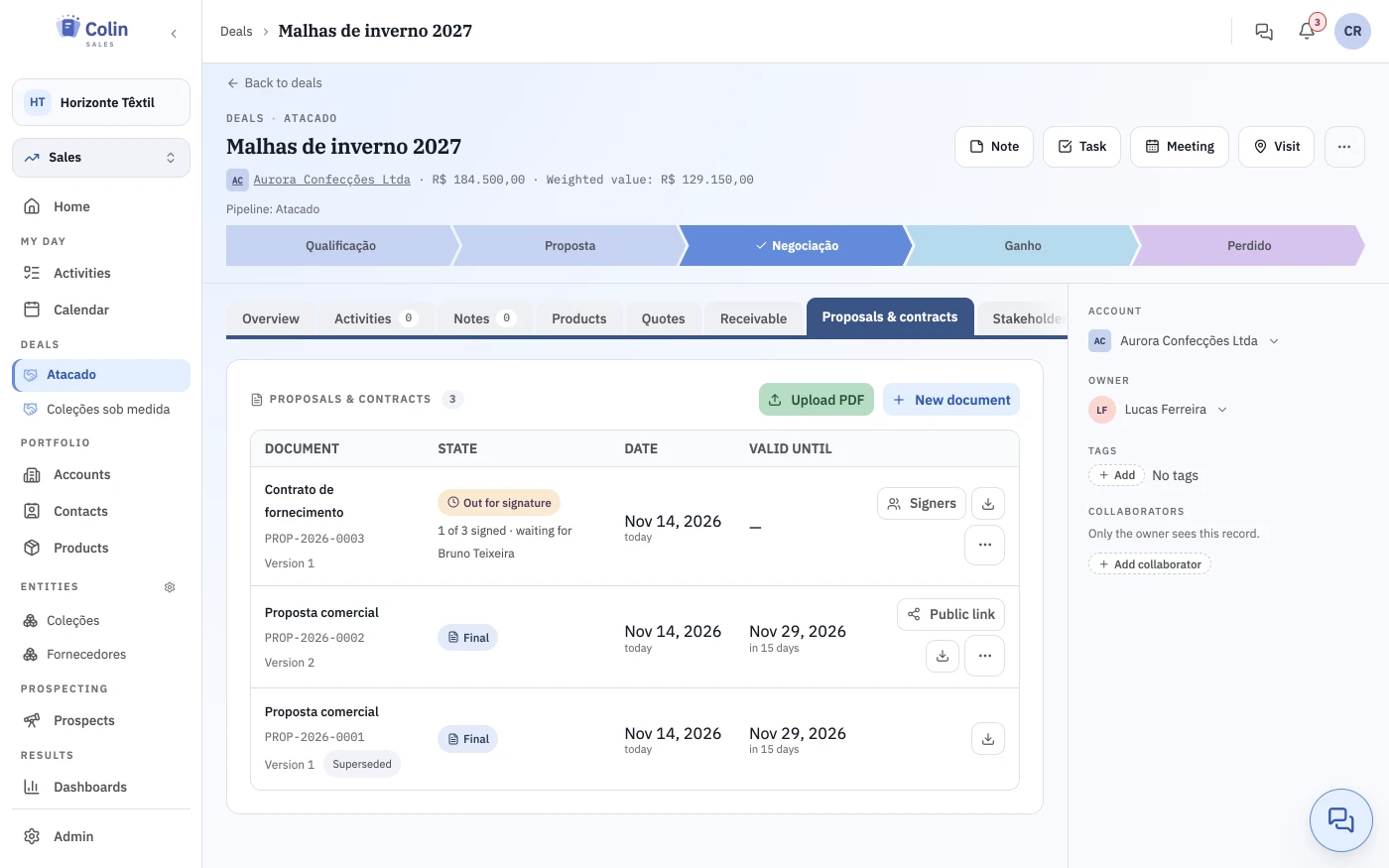
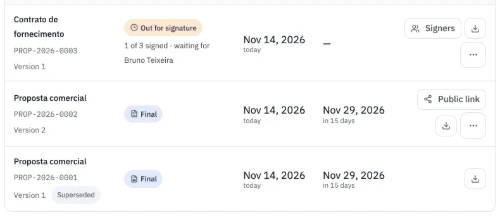
The deal's Proposals and contracts tab holds everything generated for it: each document's number, version, state and how long the proposal is valid. A new version supersedes the old one, which stays there marked as superseded. From here you download the PDF, create the public link or send it for signature.
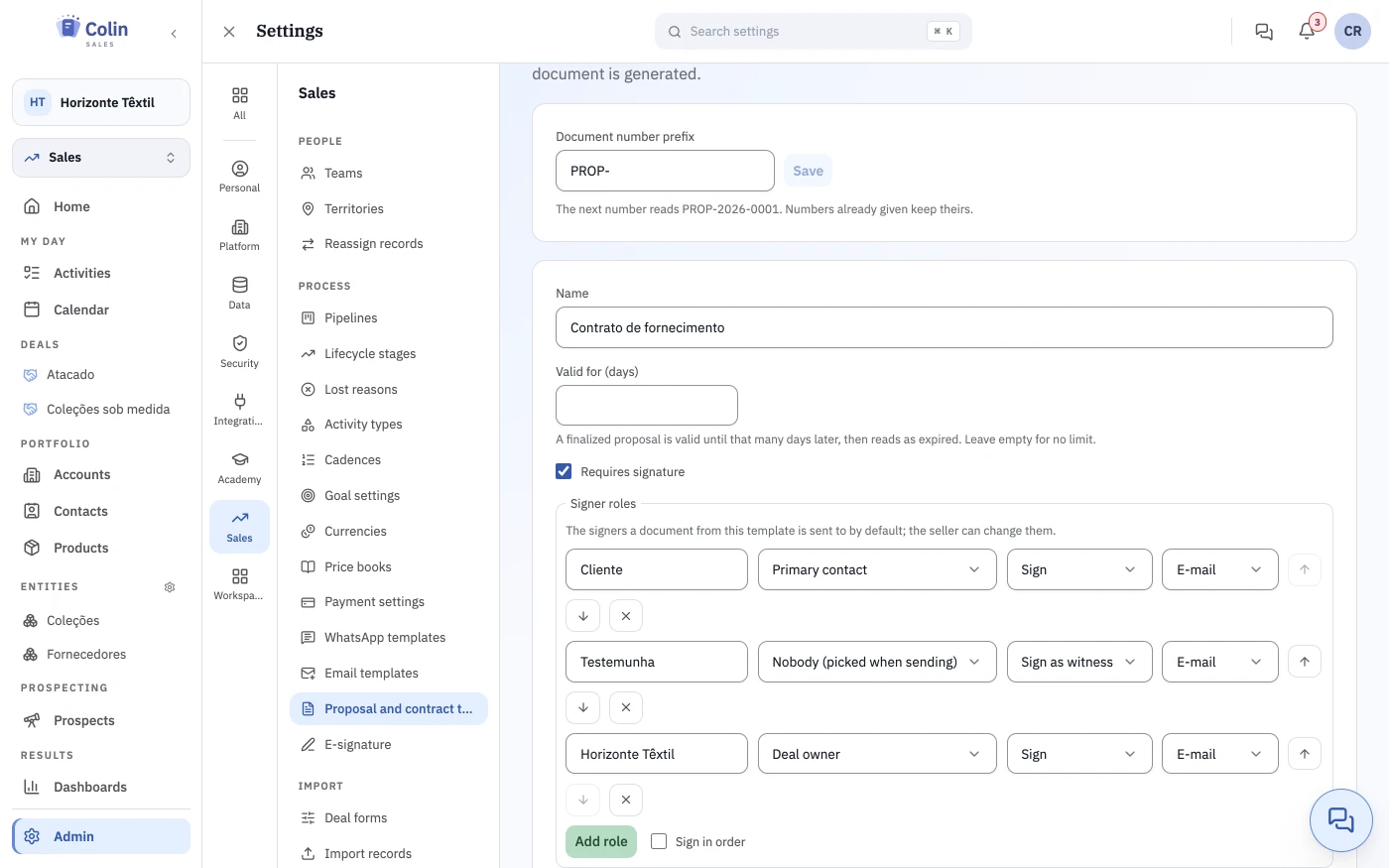
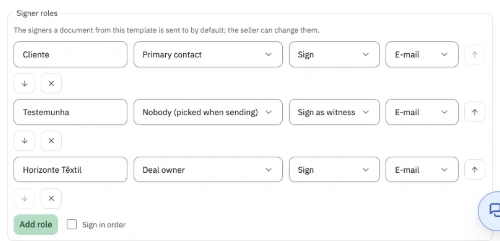
In Admin, each template has its body, header and footer, with placeholders Colin swaps for the data of the deal, the account, the contact and your company. You can add the products table and the installments table, and choose the font, the colour and the page orientation. The contract template also says who signs by default.
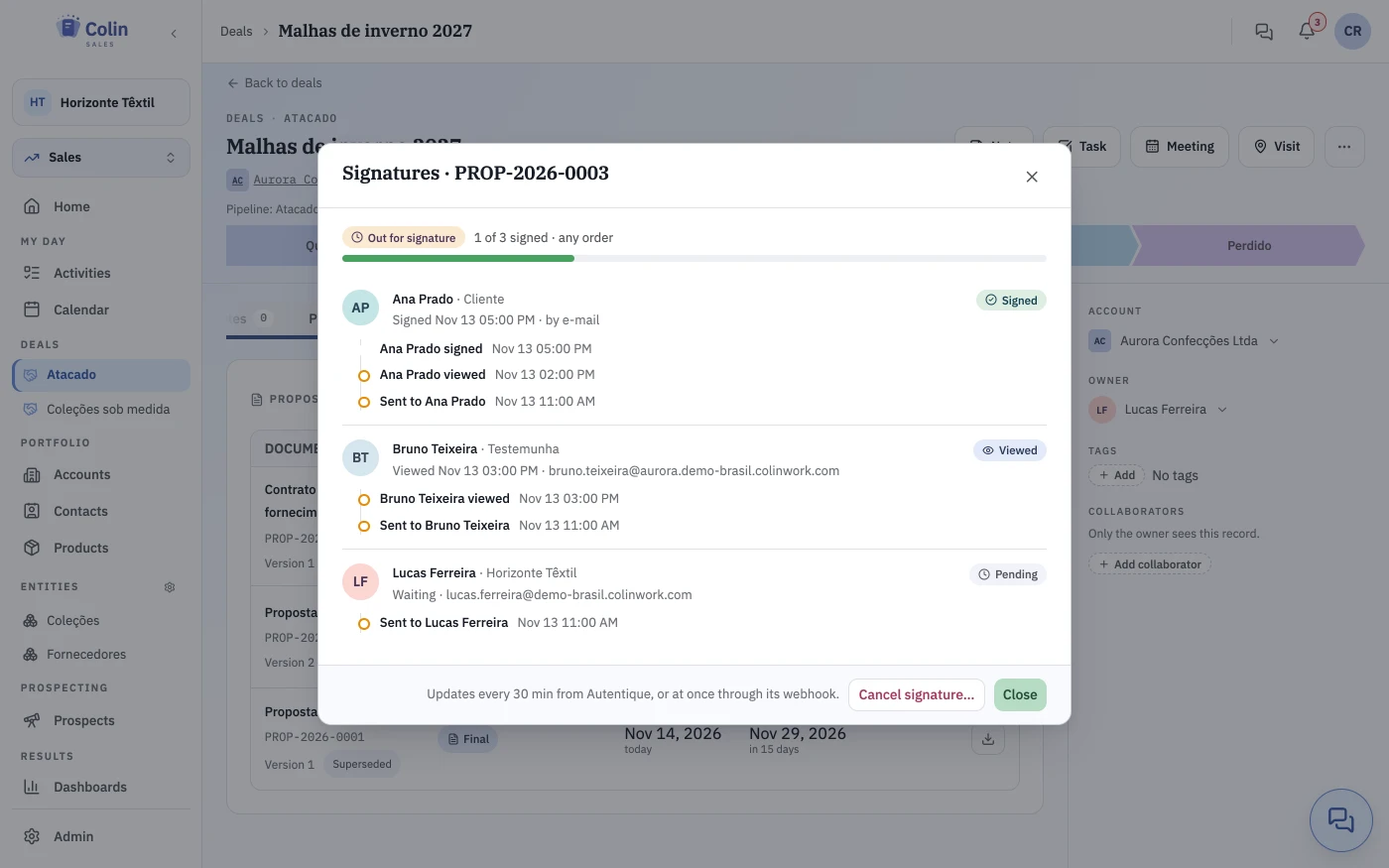
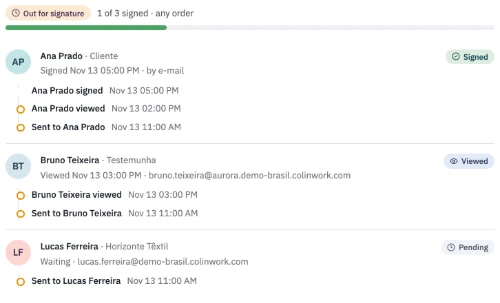
Once the contract is out, the Signers button shows each person, their role and what has happened so far: sent, viewed, signed. Whoever is left shows as pending. Colin keeps it current by itself, from the provider's notice and a regular check.
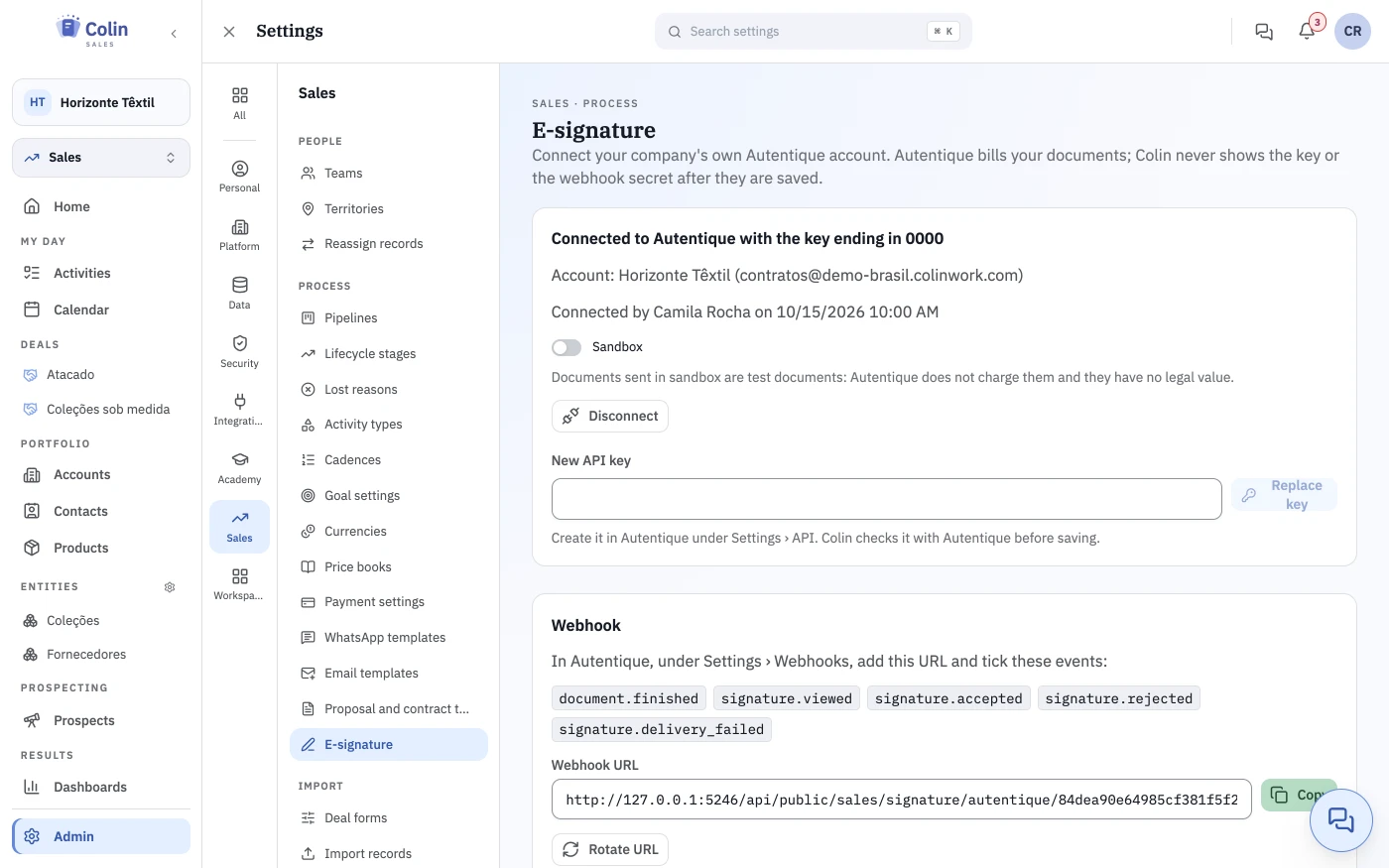
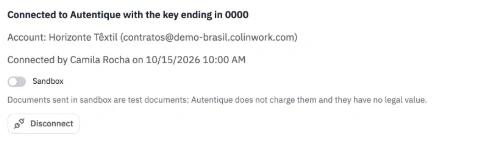
The company connects its own Autentique or Clicksign account, one at a time. Colin shows only the end of the key and has a Sandbox mode to test at no cost and with no legal validity. The provider bills the signed documents, on your account.
It fits any team that sends the same proposal with different numbers and needs the customer's signature at the end. A few examples:
An apparel maker sends the retailer the collection proposal with the products table and the installments, then the supply contract for the retailer and a witness to sign.
A manufacturer keeps a landscape proposal template for the long item table and a contract template, each in the brand's colour.
A distributor generates the order's proposal, sends the buyer the link and sees how many times it was opened before calling.
A software company sends a foreign customer the proposal in English, with dates and amounts in their format, and the contract signed in the right order.
A services firm uploads the contract the customer's legal team sent as a PDF and sends it for signature the same way.
Templates are written by whoever holds the permission to manage them, and the signature account is connected by an administrator. Sending for signature is a permission too, which the company gives to whomever it wants.
While it is a draft, the document can be edited, and Colin lists the placeholders left without a value before you go on. Once finalized, it becomes a PDF that never changes, with a number from your sequence, such as PROP-2026-0002. If something has to change, you generate a new version, and the old one stays in the history as superseded.
The PDF goes out however you like: download, a public link you can revoke that counts its opens, or an e-mail sent from the mailbox the rep connected to Colin, with the PDF attached. A contract that arrived ready-made comes in as a PDF and is born final, with a number.
When sending for signature, you place on the page where each person signs, initials or has their name, the date or their CPF written, as far as the provider allows. When everyone has signed, the signed PDF is kept on the deal. When someone refuses, the document shows the refusal. Either way, the deal owner and the sender are told.
It comes with Colin Sales and Colin Suite, at every user tier. Signatures are billed by Autentique or Clicksign, on your company's account. Colin Sales starts at R$ 100 per user/month.
As many pipelines as you want, with your stages, each one's probability and who reaches the deals.
Each deal's installments, when they fall due, when the money reaches the account and who follows up.
Quotes on the deal, priced from each customer's price book, with quantity tiers and discount approval.
Connect the account your company already has. With Clicksign, Colin registers the signature notice by itself, with nothing to set up on their side.
To sign, yes. The account is your company's, connected in Admin, and it is what the documents are billed to. Without one, Colin still generates, numbers and sends the PDFs, it just does not collect signatures.
One at a time. To switch providers, no document can be out for signature.
Data from the deal, the account, the primary contact, your company and the document itself, such as its number and validity, plus your custom fields. The products table and the installments table go in as ready-made blocks.
No. The products table shows quantity, price, discount and total, as they are on the deal.
Yes. Each template has a document language: Portuguese, English, Spanish or German. It changes the dates, amounts and headings Colin writes. The template's own text is what you wrote.
If the template asks for signing in order, Autentique follows the order of the roles. On Clicksign, everyone receives it at the same time.
Yes. Turn on Sandbox on the E-signature screen: documents sent there are tests, with no charge and no legal validity.
Yes. Upload the PDF in Proposals and contracts. It comes in final, with a number, and goes for signature like any other document.
Register a card, pick the apps and how many seats you want, and nothing is charged until the trial ends. Or we'll show you Colin with your company's boards and pipeline in 30 minutes.
 Chat on WhatsApp