Distribution and wholesale
A distributor leaving Freshsales keeps each reseller with the rep who already served it.
 Colin
Talk to us
Start free
Colin Sales · Manage
You upload a contact spreadsheet or the whole Freshsales export. Colin reads it, shows what it will create, what's already there and what has a problem, and writes only when you say so. Each salesperson keeps the customers that were theirs.
The old system's export arrives as several files, with columns nobody knows where to put. Someone spends days fixing the spreadsheet, imports it, and finds half the contacts duplicated and the customers of the salesperson who left with no owner. So they delete it all and start again.
And the list of buyers from the trade fair, which arrives every week, goes through the same pain on a smaller scale. Importing a spreadsheet into a CRM should be checking and confirming, without fear of breaking what's already there.
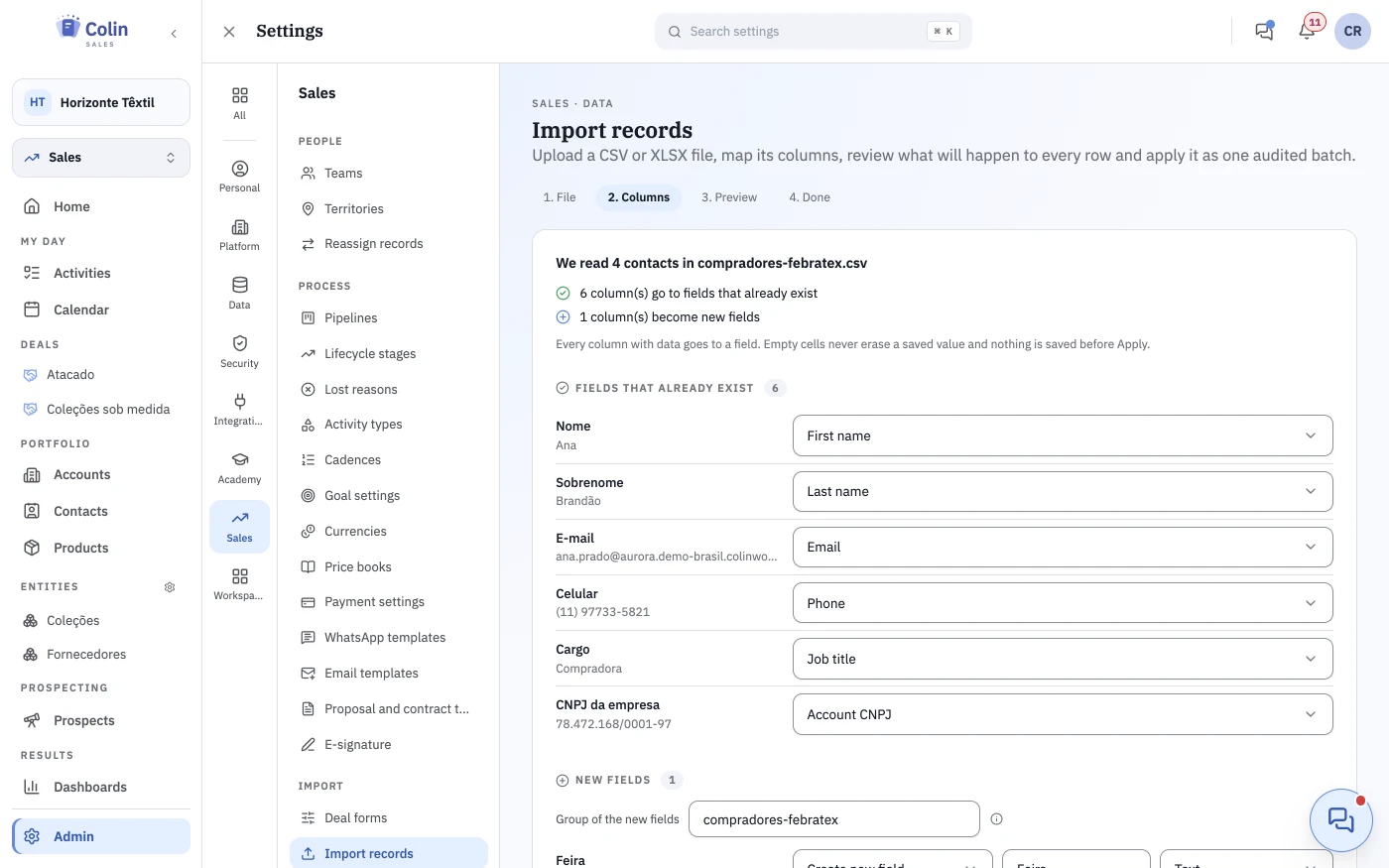
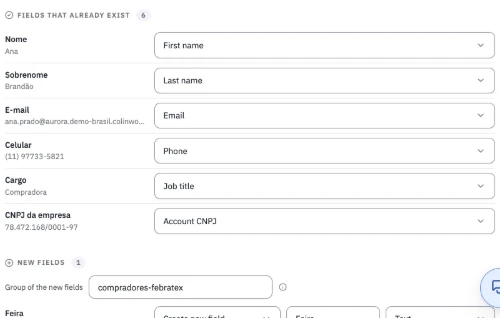
You upload the XLSX or CSV and Colin reads the columns. Name, e-mail, mobile and CNPJ go to the fields that already exist. A column that fits none of them, like the trade fair where the buyer was met, becomes a new field, named after the header and typed from the cells. Change whatever you like before going on.
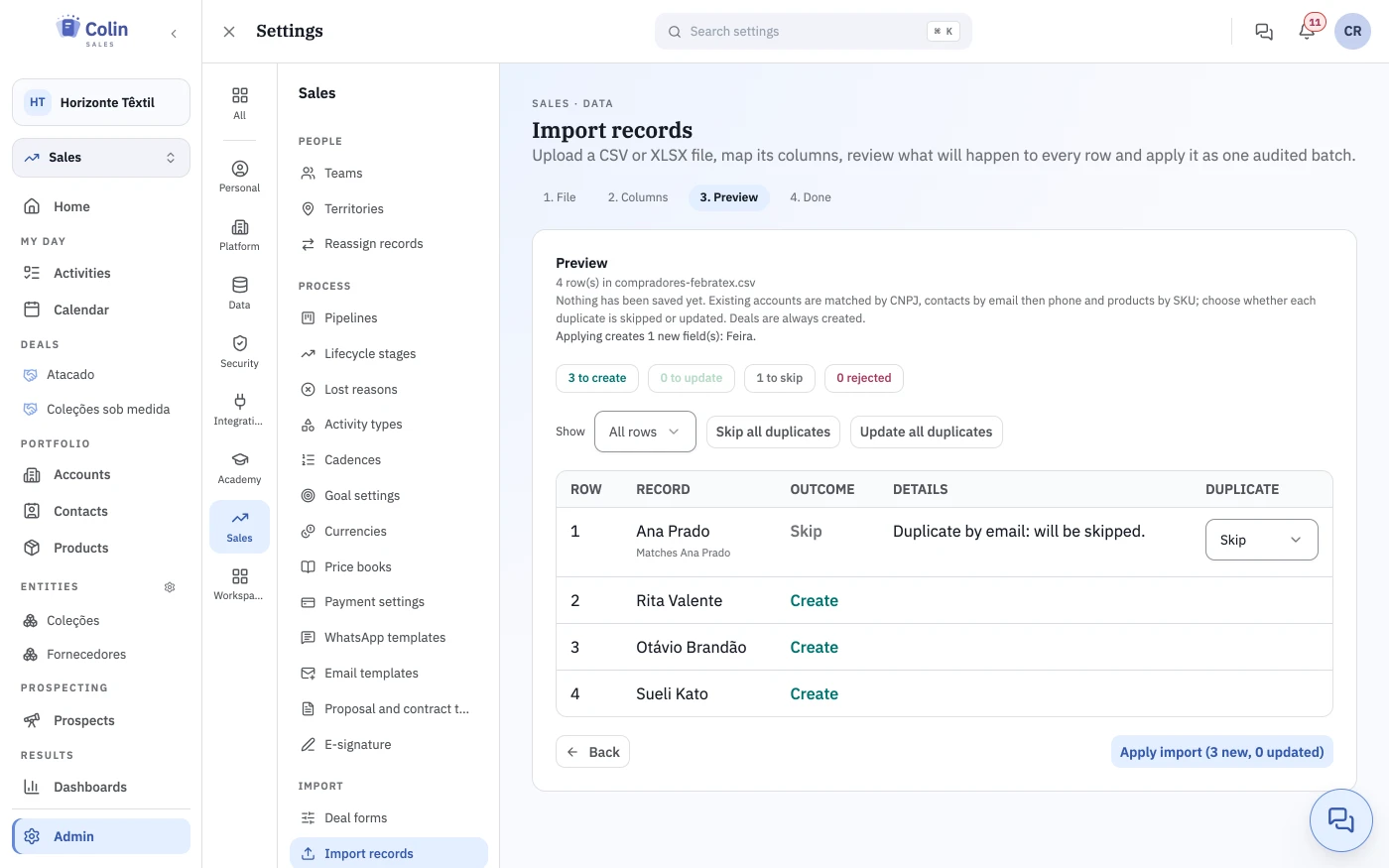
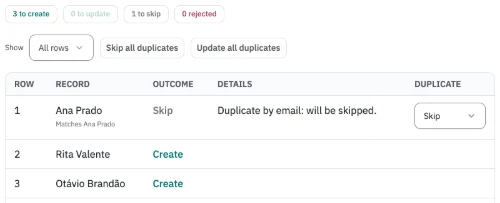
Before anything is written, you see how many rows will be created, updated, skipped or rejected. Anyone already in the CRM shows up with the reason, duplicate by CNPJ, by e-mail or by phone, and you choose between skipping and updating. Nothing has been written yet.
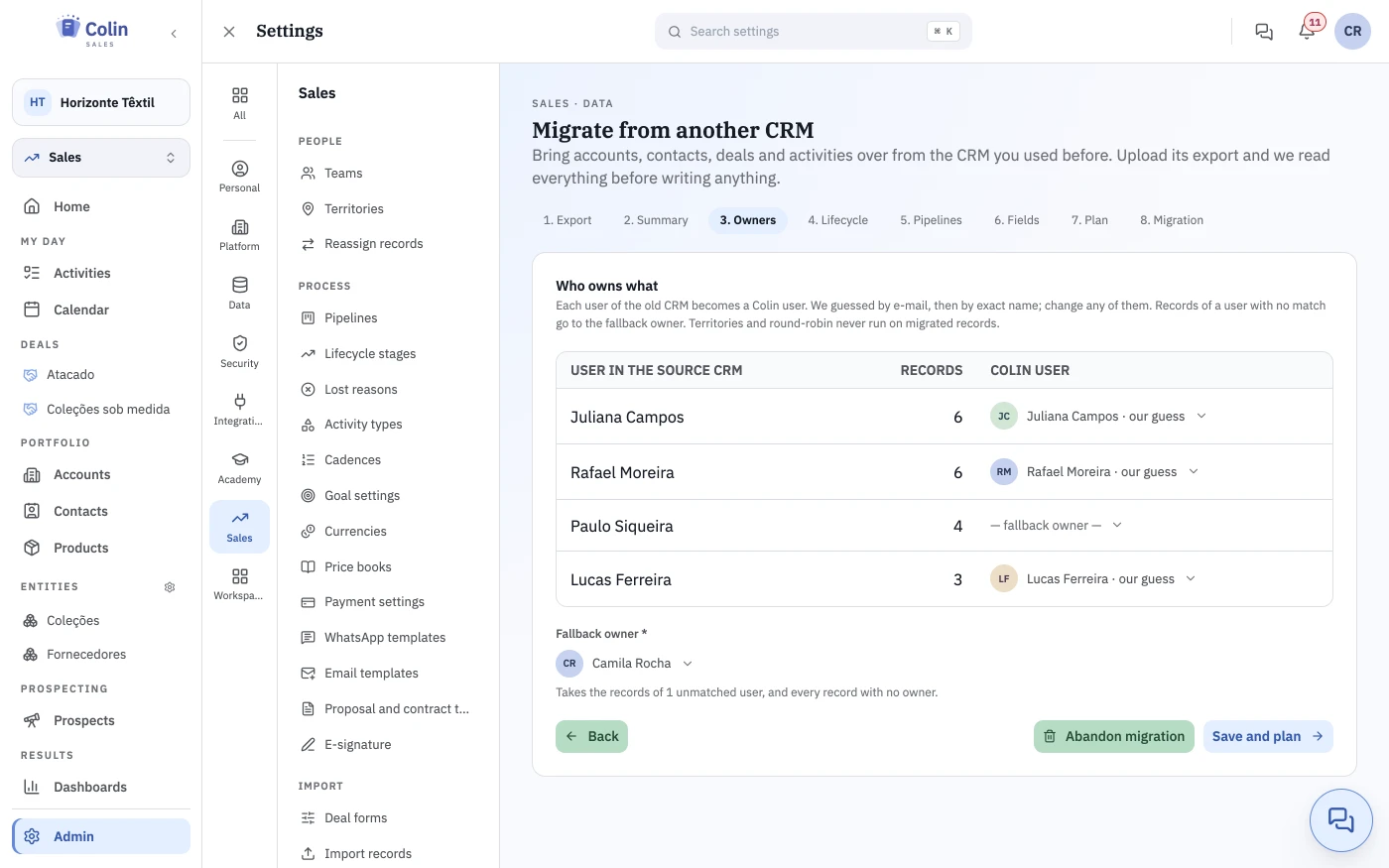
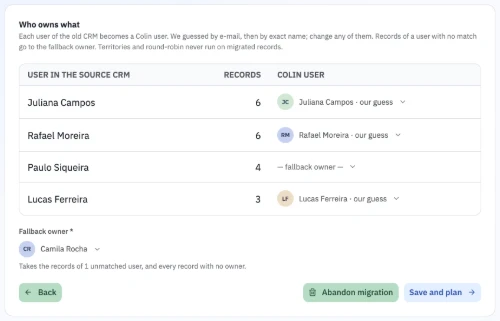
In a Freshsales migration, Colin matches users by e-mail, then by name. Anyone who has left goes to the fallback owner you pick. Records arrive with the owner they had: territories and round-robin never run on migrated records.
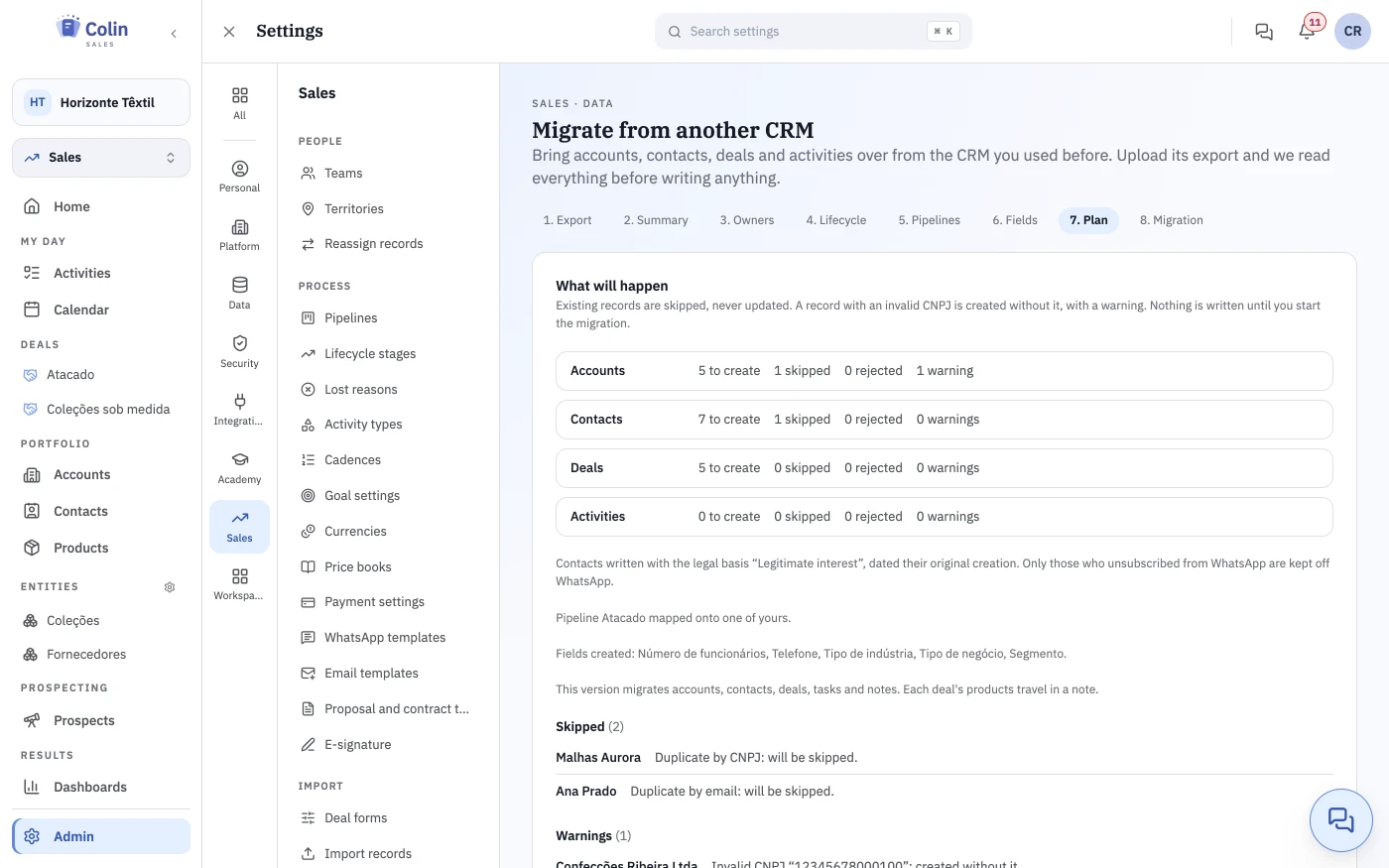
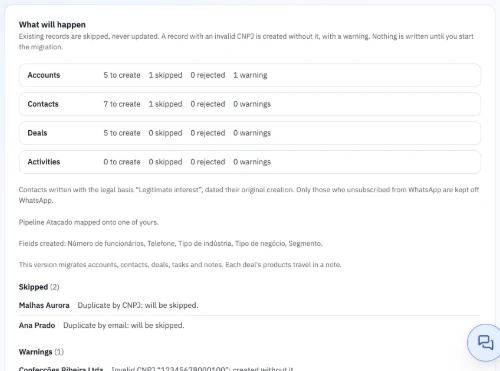
Accounts, contacts, deals and activities, each with what will be created, skipped or rejected. What already exists is skipped, never overwritten. An invalid CNPJ doesn't block the account: it comes in without one, with a warning. The products on each deal become a note.
It works for any company whose customers are kept somewhere else. A few examples:
A distributor leaving Freshsales keeps each reseller with the rep who already served it.
A manufacturer back from a trade fair with a list of buyers imports only the new ones, since the CNPJ finds the accounts it already has.
A software company migrates its open deals with the same pipeline and stages as before.
A consultancy that kept everything in Excel uploads the sheet and gets fields for the columns only it used.
Dates in day-first, month-first or ISO order, amounts like R$ 1.234,56 or 1,234.56 and percentages are read as they are. If the migration didn't turn out as you wanted, undo it within 30 days, as long as nobody has touched the records.
Records live in Colin's database on Microsoft Azure, Brazil South region (São Paulo). Each migrated record keeps the id it had in the old CRM, and that's how a second run skips what was already done.
Each import and each migration is one batch in the audit log, which nobody can edit, with one line per record created. Personal data shows there masked.
The migration's files are kept while it runs and deleted 30 days after it ends. The records stay.
It comes with Colin Sales and Colin Suite, at every user tier. Importing and migrating are for administrators, or whoever holds that permission. Colin Sales starts at R$ 100 per user/month.
Type the CNPJ and the account comes filled with the Receita Federal's data.
As many pipelines as you want, with your stages, each one's probability and who reaches the deals.
Every submission from your site becomes an account and a contact in the CRM, with an owner.
Find companies by activity and city in the public registry and bring them into the CRM.
Imported accounts and contacts show up under Entities and can be linked to cards on your boards.
After the migration, each salesperson opens the app and finds their own book, with the customers that were theirs.
One audit line per record created, personal data masked and the legal basis stored on every migrated contact.
From Freshsales, through the export it generates. From any other system, export the accounts, contacts and deals to a spreadsheet and use the import, which takes XLSX and CSV.
Barely. Each filled column goes to an existing field or to a new field the import proposes. Dates, amounts and percentages are read as they are. Only a row that can't be read at all is rejected, with the reason.
No. The account is found by CNPJ and the contact by e-mail or phone. With a spreadsheet, you choose whether a duplicate is skipped or updated. In a migration, what already exists is always skipped.
They go to the fallback owner you choose. Whoever is still with the company keeps the book they had, without going through territories or round-robin.
Yes. A migration can be undone within 30 days, as long as nobody has touched the records it created. After that, you archive what you don't want.
No. During a migration, automations stay off and nobody gets a notice per record.
Yes. Each record keeps the id it had in Freshsales, and the second run skips what the first one already brought in.
For an import, 5,000 rows and 10 MB per file. For a migration, the export's zip up to 50 MB and 200,000 rows.
Register a card, pick the apps and how many seats you want, and nothing is charged until the trial ends. Or we'll show you Colin with your company's boards and pipeline in 30 minutes.
 Chat on WhatsApp