Fashion and apparel
An apparel maker keeps one book for wholesalers and another for retailers, with a lower price from a thousand pieces, and sets the new collection's book to start on launch day.
 Colin
Talk to us
Start free
Colin Sales · Sell
The company sets up its price books once and says which one applies to each account. On the deal, the rep builds the quote by picking products, and Colin fills in the price from the customer's book, by quantity and by date. A discount beyond what was agreed asks for approval from whoever you named, and the quote only goes out after the yes.
Every customer has its own price. The big wholesaler pays less, the small shop pays list, and anyone buying over a thousand pieces gets another tier. All of it lives in a spreadsheet someone in sales updates when they remember. The rep copies the price from memory, or from the last order, and the customer gets a figure that isn't theirs.
Then comes the discount. The rep wants to close, gives 10% on their own and sends it. The manager finds out once the margin is gone. And when the customer asks to change the quantity, a new quote goes out with the same number, and nobody knows which one was sent last.
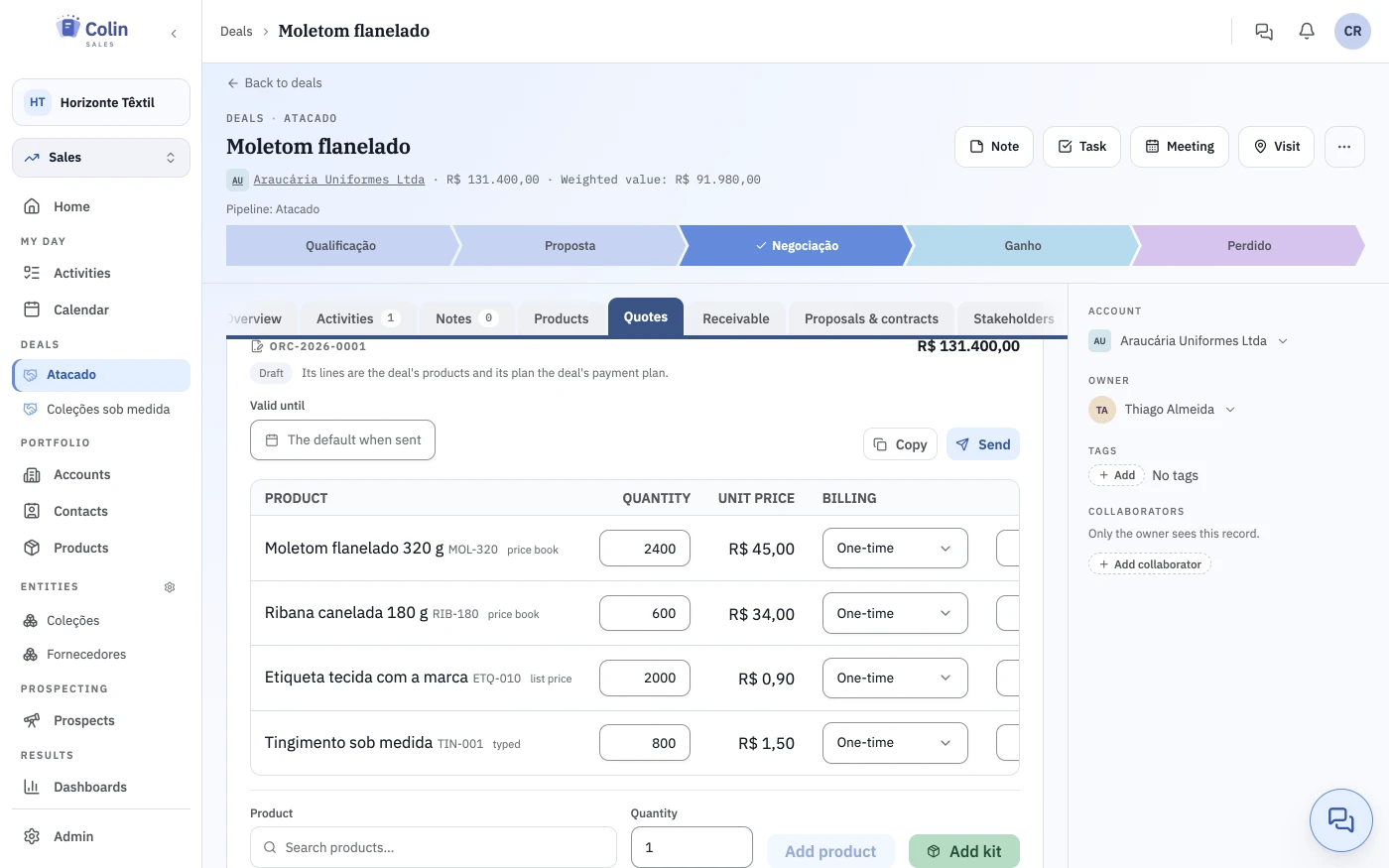
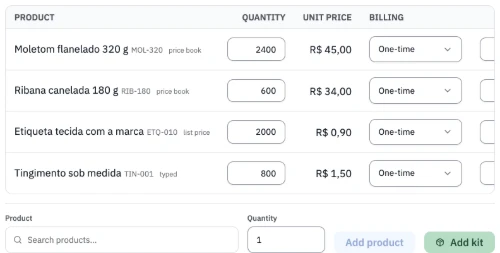
The deal's Quotes tab holds all of its quotes, each with a number, a status and a total. The primary one is the one that counts for the deal: its lines are the deal's products. Next to each product, Colin says where the price came from: the customer's price book, the list price or typed by the rep.
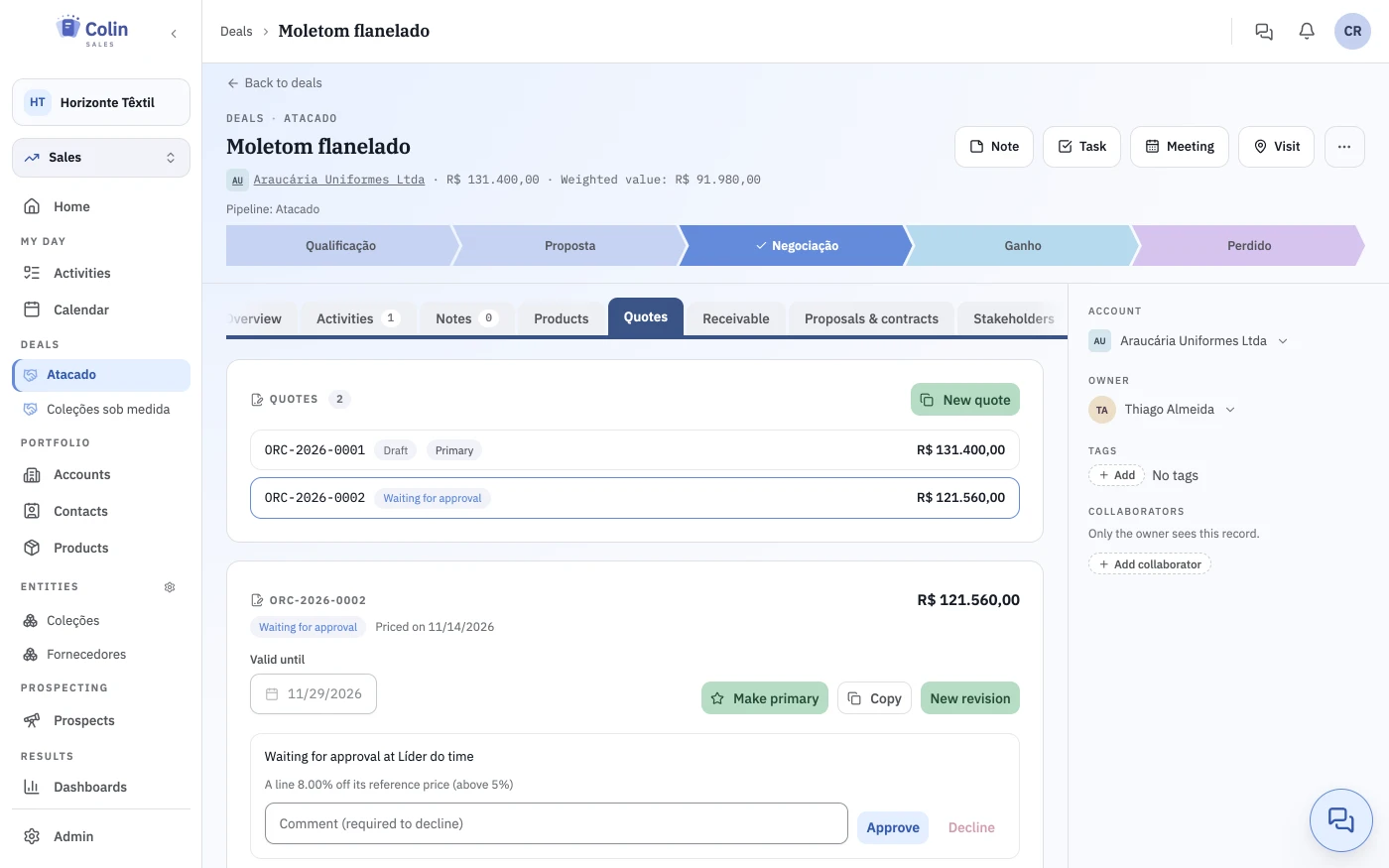
When the rep sends a quote with a discount beyond your rule, it waits for approval. Colin shows who has to approve and why, in words, such as "a line 8% off its reference price". The approver sees the reason, approves or declines with a comment, and reps never approve their own quote.
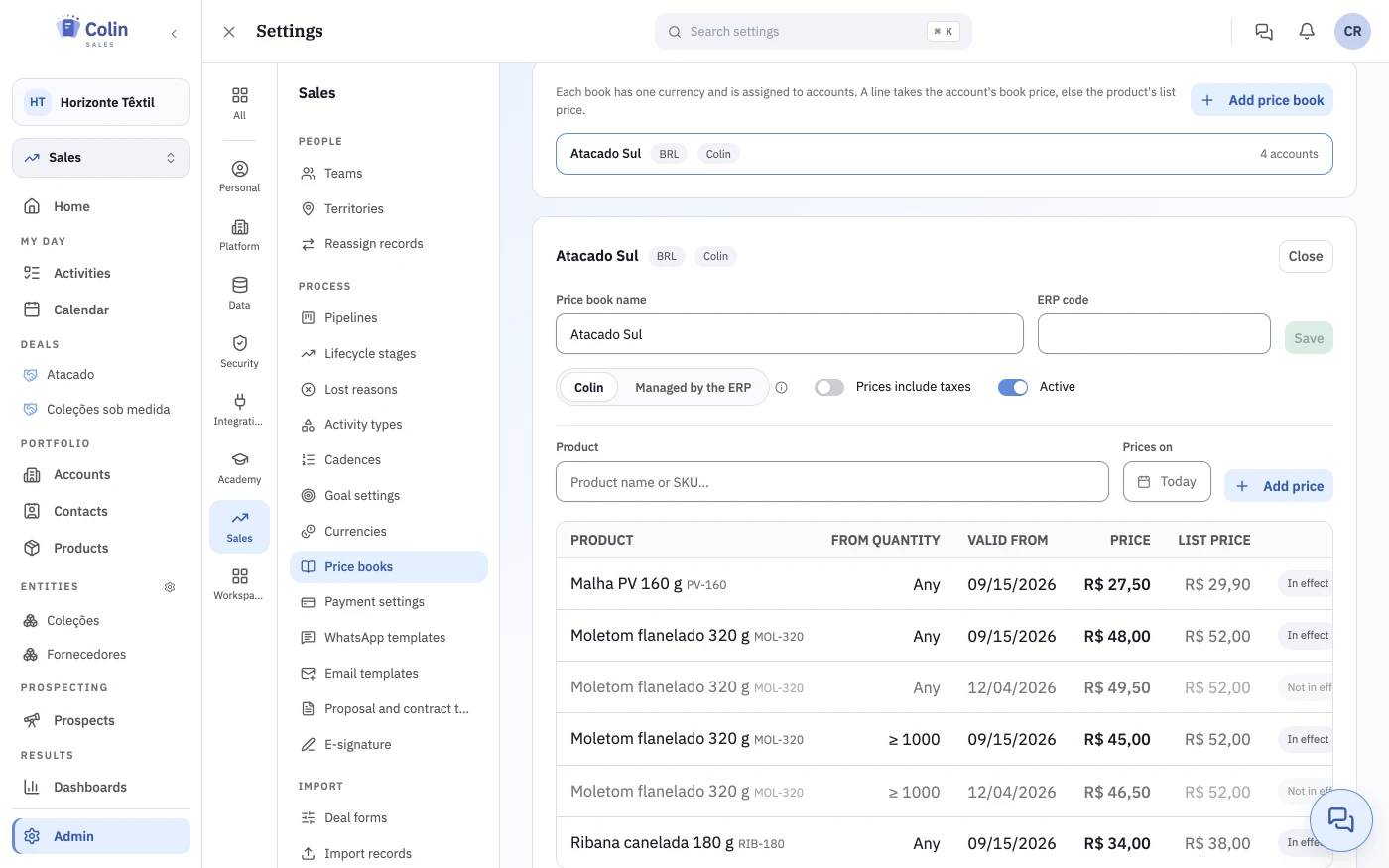
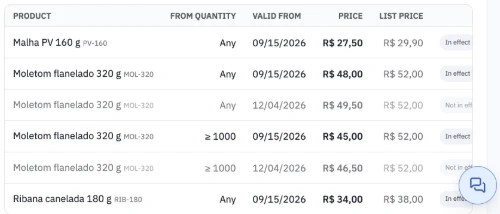
In Admin, customer price books each have one currency and apply to the accounts you choose. A product can have more than one price in the same book: one from any quantity, another from a thousand, and a new price that only starts on a future date. The book can be edited in Colin or kept by your company's ERP.
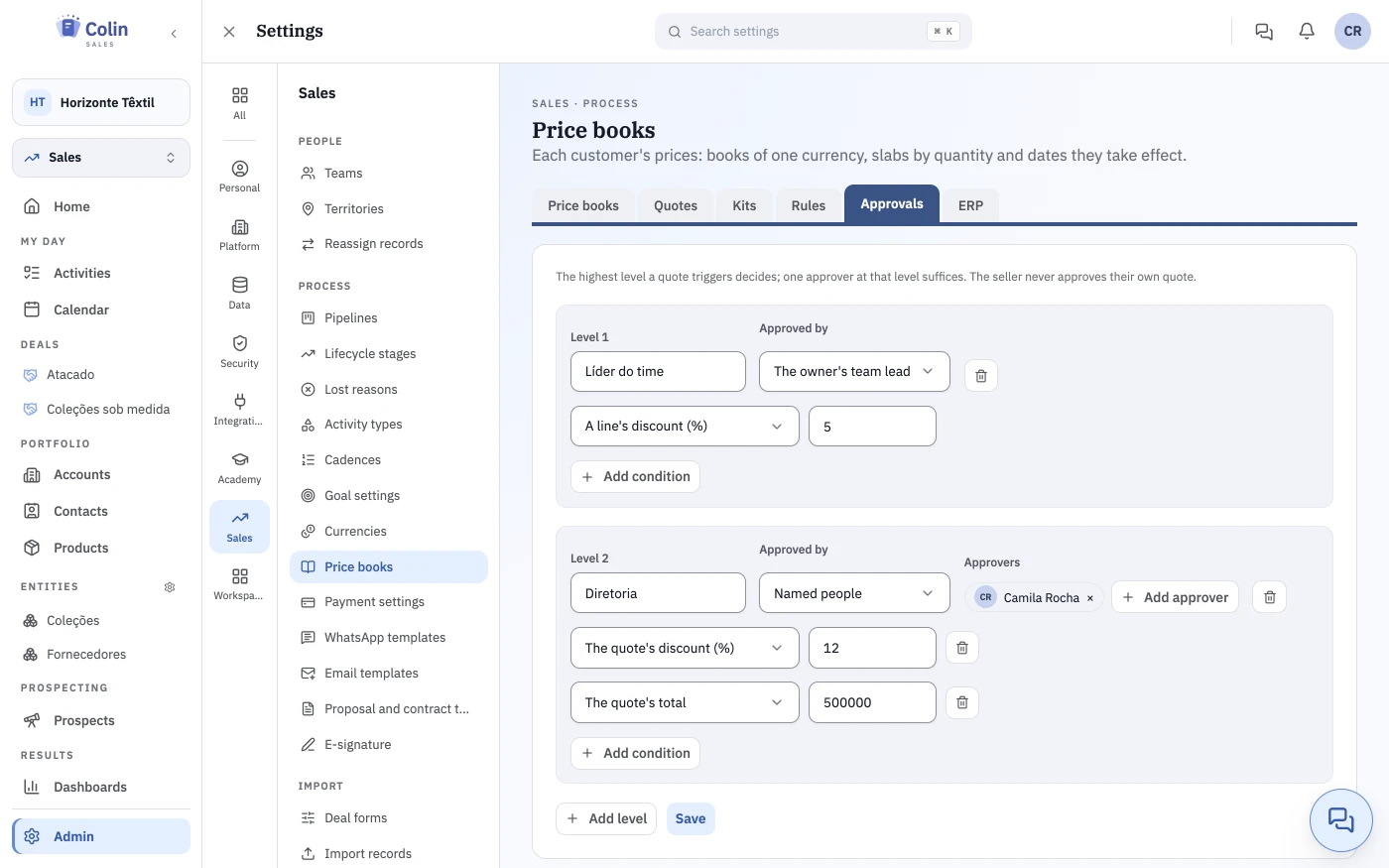
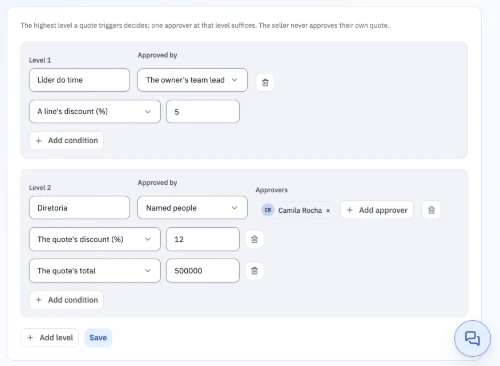
Also in Admin, you build the approval levels. Each level has its conditions, such as a discount on one line, a discount on the whole quote or the total, and who approves: the rep's team lead, a role or people you pick. When several conditions match, the highest level decides, and one approver from it is enough.

A CRM with quotes fits any company that sells the same product at different prices depending on the customer, the quantity or the season. A few examples:
An apparel maker keeps one book for wholesalers and another for retailers, with a lower price from a thousand pieces, and sets the new collection's book to start on launch day.
A manufacturer sells machines as bundles, with required and optional components, and a rule keeps the quote from going out without the part the machine needs.
A distributor lets its ERP keep the books and prices up to date, and the rep just builds the quote with the price already there.
A software company puts the one-time setup and the monthly licence on the same quote, and any discount over 15% goes to the board.
A services firm sends the customer two options, a lean quote and a full one, and makes one primary when the customer decides.
Viewing and editing price books are permissions the company gives to whomever it wants. Reps don't need to see the books: they see the price on the quote line.
Each quote has a number from your sequence, such as ORC-2026-0001, and moves through clear statuses: draft, waiting for approval, approved, sent, accepted, rejected, expired. While it is a draft, you change whatever you like. Once sent, it never changes. To change it, you create a revision, which keeps the number with "rev 2", and the old one is marked as superseded. If its validity runs out with no answer, Colin marks the quote as expired.
Each line's price comes from the account's book, at the quantity's tier and on the quote's date. Without a book, the product's list price applies. Without either, the rep types it. When sent, the quote fixes that day's prices: if the book changes later, the quote stays the same. A line can be billed once or every month or year, and the quote shows both totals apart.
The primary quote is the deal: its lines are the deal's products and its payment plan is the deal's. That is why the quote's PDF comes out of the Proposals and contracts tab, with the primary quote's products table. Colin computes no tax. Each book says whether its prices already include taxes, and the amount is what the book holds.
It comes with Colin Sales and Colin Suite, at every user tier. Colin Sales starts at R$ 100 per user/month.
Proposals and contracts generated from the deal, as numbered PDFs, signed through Autentique or Clicksign.
As many pipelines as you want, with your stages, each one's probability and who reaches the deals.
If your books and prices already live in your ERP, it can keep them up to date in Colin. A book kept by the ERP is read-only on screen, so nobody changes a price on both sides.
Configure, price, quote: picking the right products, giving the customer their price and sending the quote. In Colin, that is the price books, bundles, rules and the deal's quotes.
No. Each account has one book, and the same book can apply to many accounts. So there is never a question of which price wins.
Each price has a minimum quantity. The quote line takes the highest tier its quantity reaches, and that price applies to every piece on the line.
Yes. Each price has the date it applies from. Until then, quotes use the current one.
No. Each book says whether its prices already include taxes, and the quote shows the amount in the book.
Whoever you set in the levels: the rep's team lead, holders of a role, or people you pick. When more than one level is triggered, the highest decides, and one approver from it is enough. Reps never approve their own quote.
A product made of others, with required components and option groups. Its price is the bundle's own or the sum of its parts, as you choose.
No. The accepted quote is recorded, but moving the deal to Won is still the rep's decision.
Register a card, pick the apps and how many seats you want, and nothing is charged until the trial ends. Or we'll show you Colin with your company's boards and pipeline in 30 minutes.
 Chat on WhatsApp