Fashion and apparel
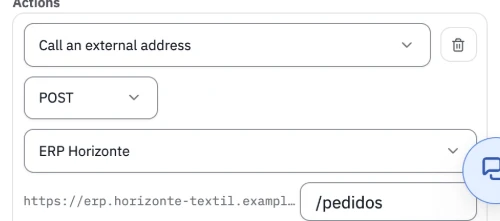
A clothing maker that, on winning a wholesale order, creates the task to check the size grid and sends the order to the ERP.
 Colin
Talk to us
Start free
Colin Sales · Manage
A big deal won? Colin creates the onboarding task and tells the manager. A new lead from the site? Into the prospecting cadence. A deal stuck for a week? The owner gets the reminder. You build the rule once, test it on a real record and follow every time it acted.
Every sales team has its agreements: when a big contract closes, someone opens the onboarding. When a lead comes from the site, someone puts it in the contact sequence. When the deal is won, someone tells finance or enters the order in the ERP. It works as long as that person remembers.
In a busy month, the contract closes on Friday night and the onboarding starts on Tuesday. The site lead waits two days until someone sees it. And the order gets typed into the ERP again, with the wrong amount. Nobody did anything wrong: it just got left for later.
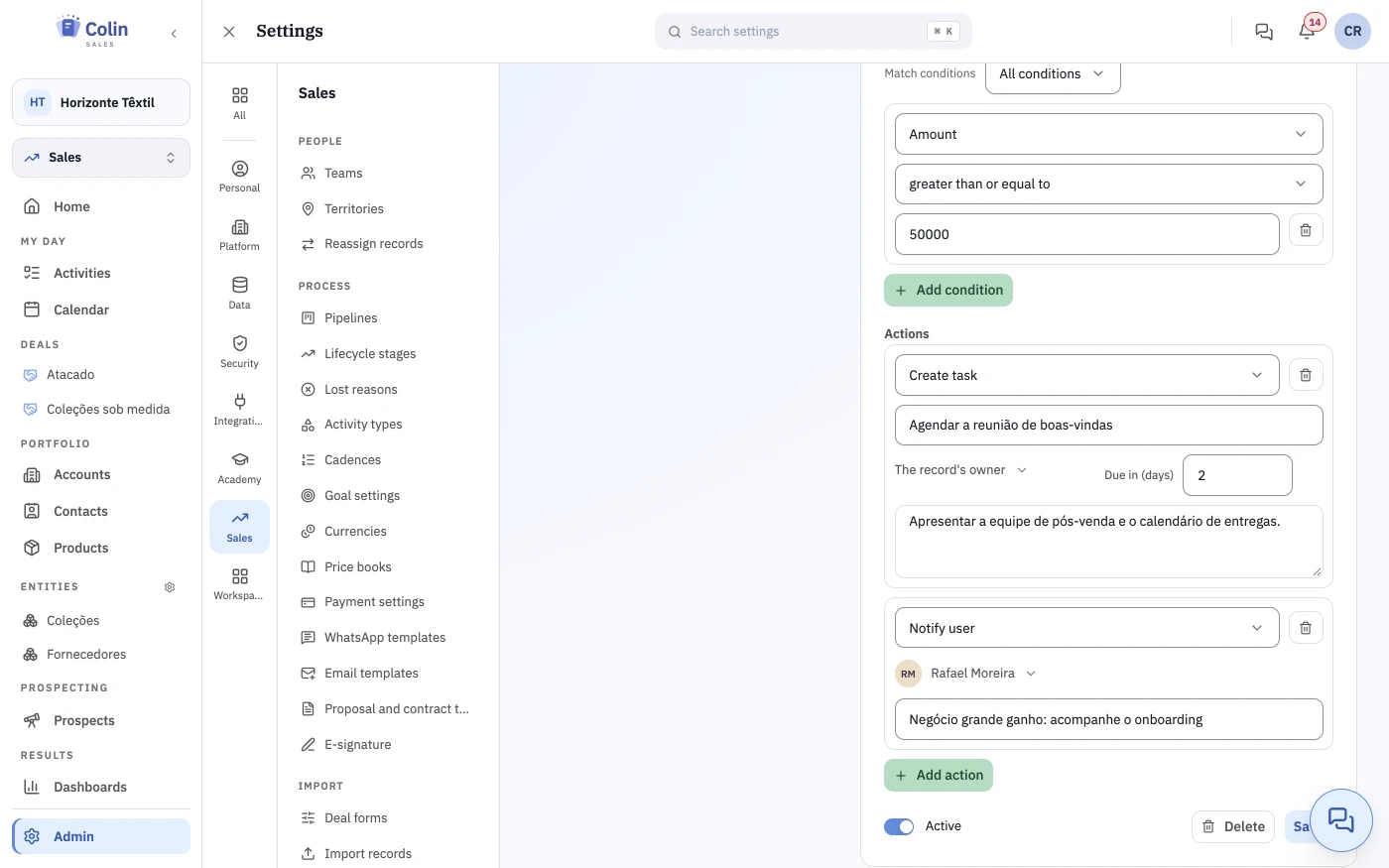
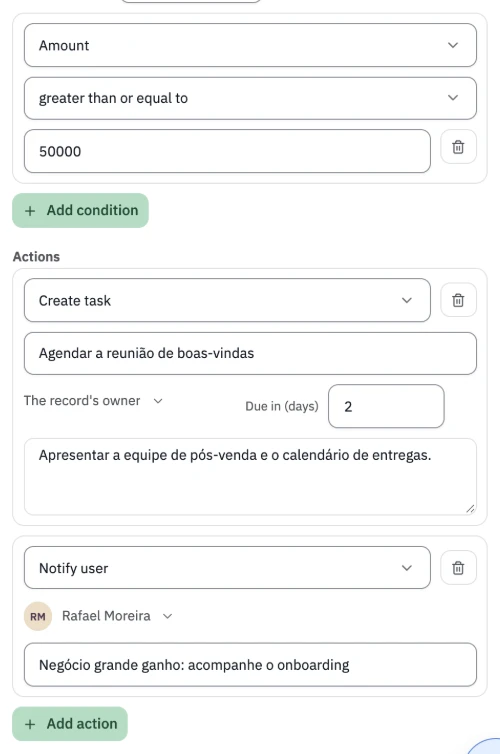
Each automation belongs to one object: account, contact, deal or activity. You pick the events that fire it, the conditions that must match and the actions, in order. Here, a won deal of R$ 50,000 or more creates the onboarding task and tells the account manager.
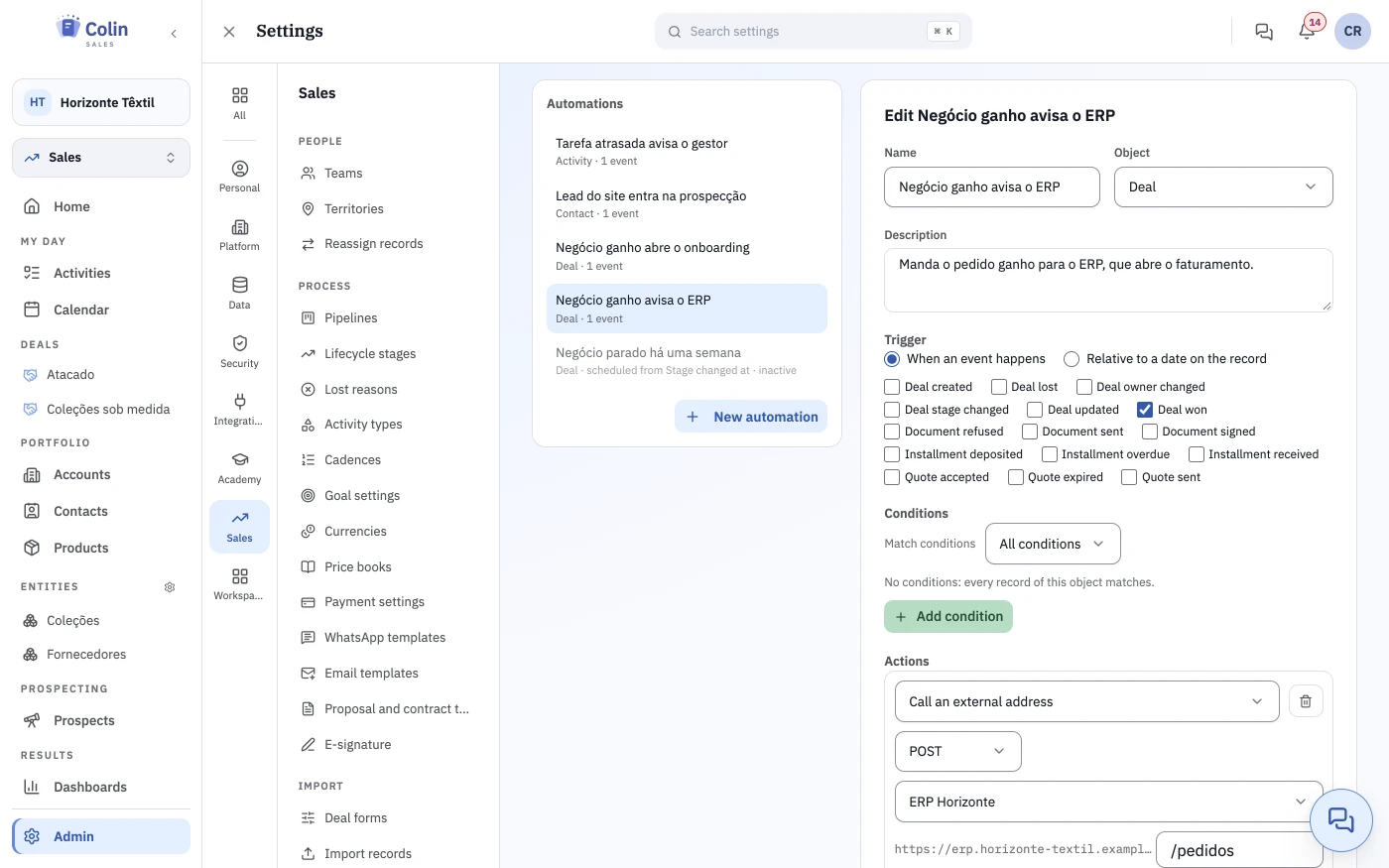
The action that calls an external address goes through a Connection, set up once under Integrations with the base address and the credential. The rule holds only the path, the method and the body. The body carries identifiers, such as the record's and the event, never a name, e-mail or phone.
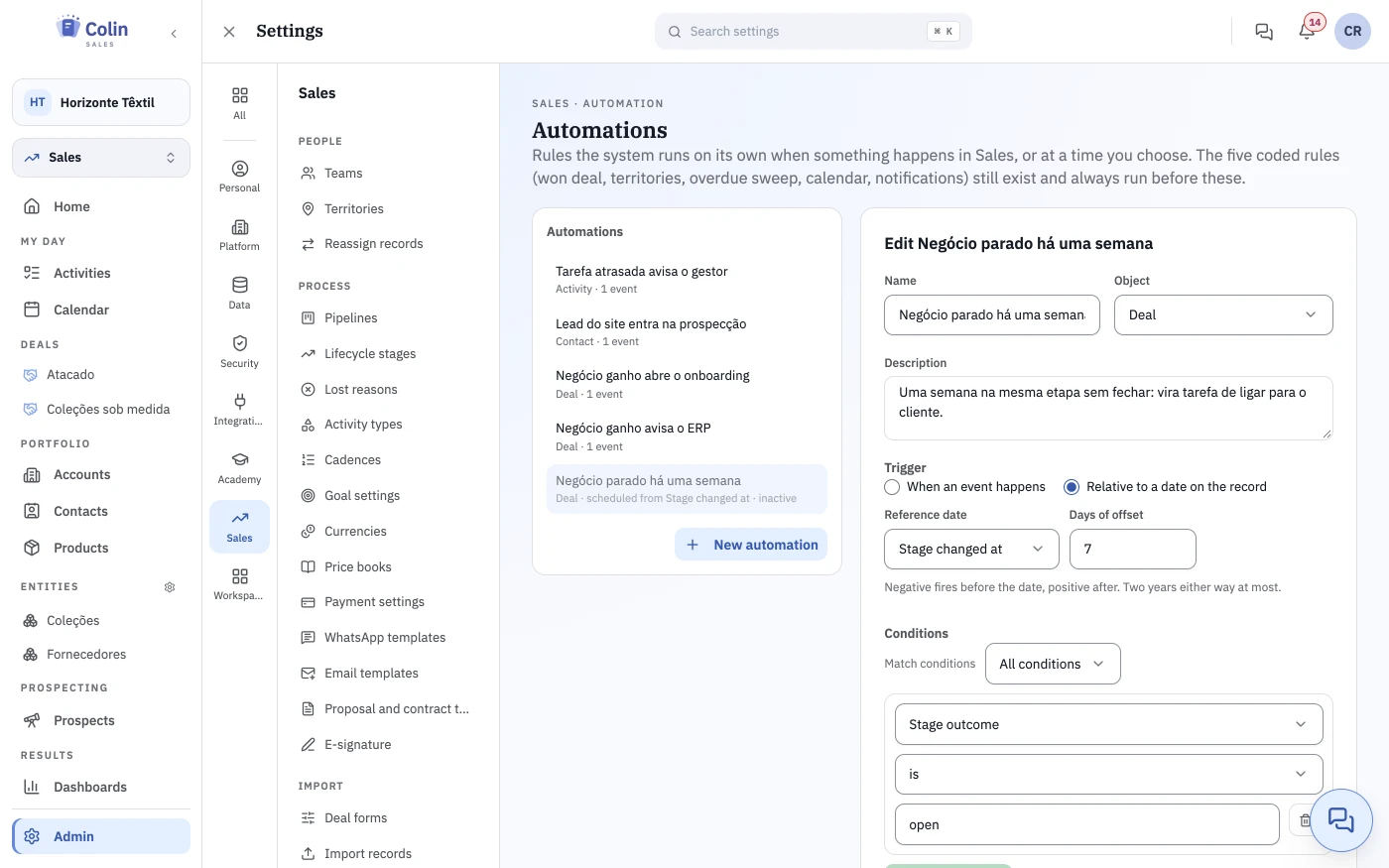
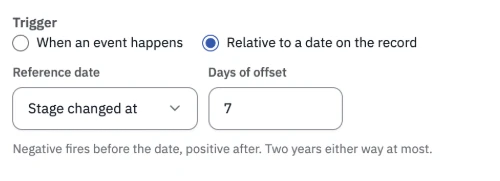
Instead of waiting for an event, an automation can count from a date on the deal: created, stage changed, expected close, won or lost. Seven days after the last stage change, if the deal is still open, the owner gets a task.
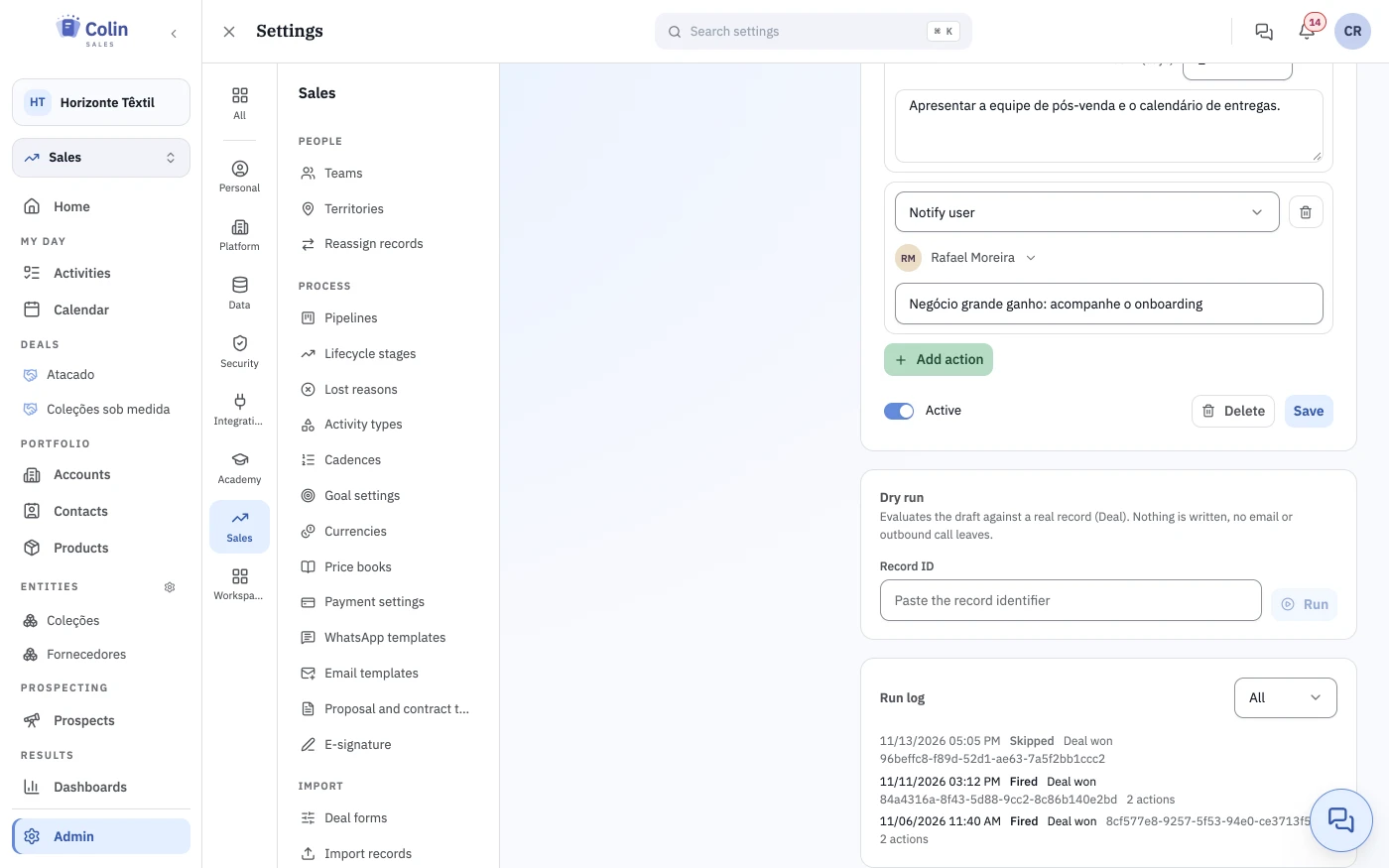
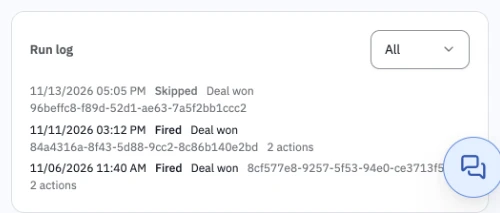
Every time the rule is evaluated, a line stays behind: when, the event, whether it fired or was skipped because the conditions did not match, and how many actions it ran. A R$ 33.7k deal won sits under the condition and opens no onboarding, and the log shows why.
Any team that repeats the same steps after every sale saves time. Some examples:
A clothing maker that, on winning a wholesale order, creates the task to check the size grid and sends the order to the ERP.
A manufacturer that tells the manager when a technical visit task is overdue and reminds the owner of stuck deals.
A distributor that moves the account's contacts to customer when the first deal is won.
A software company that enrols every lead from the site's form in the SDRs' cadence.
A services firm that posts each signed contract to the team's chat and opens the kickoff task.
Automations are built by the administrator, or by whoever was given the permission to manage sales automations. It is denied to every other role by default.
Events, actions and operators are a closed list, per object. An account listens for creation, edits and a change of owner. A contact also listens for a lifecycle stage change and for entering and leaving a cadence. A deal listens for creation, edits, a stage change, won, lost, a change of owner, installments received, overdue and deposited, documents sent, signed and refused, and quotes sent, accepted and expired. An activity listens for creation, completion and going overdue. The actions are create a task, notify a user, add and remove a tag, set and clear a field, change the owner, move the stage, change the contact's stage, enrol in a cadence, post to chat, send an e-mail and call an external address.
Five of Colin's own rules stay fixed and always run before yours: promoting the contacts when a deal is won, assignment by territory and round-robin, the overdue task sweep, the calendar and the assignment and import notices. No automation can skip or switch off those five. Conditions look at a snapshot of the record taken when the event happened, so what one automation changes does not alter what the next one sees in the same pass.
Each automation acts once per record and event, even if the event comes again. A scheduled one acts once per date, and the sweep runs every five minutes. If Colin was down for more than two days, whatever fell due before that does not fire late. The log keeps runs for 90 days.
An automation never deletes a record and never touches permissions, roles, app access or licences. It acts as the system, not as whoever built it, and never widens what any user sees. Archived and anonymized records are left out, without an error. E-mail goes out from the company's mailbox, one per contact, ten at most, and never to an anonymized contact. One request makes at most three external calls, and an automation that fires another stops at the fifth level.
It comes with Colin Sales and Colin Suite, at every user tier. Colin Sales starts at R$ 100 per user/month.
As many pipelines as you want, with your stages, each one's probability and who reaches the deals.
The series of touches for each contact, step by step, with the outcome deciding what comes next.
Every submission from your site becomes an account and a contact in the CRM, with an owner.
A rep's day on one screen: the agenda, what's overdue and the next step with each customer.
Each new account lands in the right territory and goes to the next salesperson on the team.
An automation posts to a Colin Chat room and calls your ERP's or another system's API through a Connection, with the credential kept in Colin.
Every run stays in the log, no external call carries personal data and anonymized contacts never get an e-mail.
The administrator, or whoever was given the permission to manage sales automations. It is denied to every other role by default, and without it the screen doesn't even show.
No. An automation never deletes a record of any kind. It creates, fills in, moves and tells people. To get something out of the way, use a tag or move its stage.
No. It is one of Colin's five fixed rules, it runs before yours and no automation can stop it. An automation of yours can do more, such as moving every contact of the account up, but never less.
Yes. Dry run evaluates the draft against a real record and shows whether it would fire, each condition's current value and every action that would run. Nothing is written, and no e-mail or call goes out.
Not personal data. The call's body can only use identifiers: the record's, its type, the event and the automation. The ERP fetches the rest through Colin's API, with the key you gave it.
The call waits ten seconds at most and is not retried. What the rep did in Sales stays saved as normal. Today the run log shows that the rule fired but does not flag that the call came back with an error: whoever needs that alert checks on the ERP side.
No. Sales events fire nothing in Workspace, and a won deal creates no card. Boards have their own triggers.
Register a card, pick the apps and how many seats you want, and nothing is charged until the trial ends. Or we'll show you Colin with your company's boards and pipeline in 30 minutes.
 Chat on WhatsApp