Fashion and apparel
An apparel maker that sells the collection to a retailer with a deposit, a payment on delivery and the balance later, and wants to know which retailers are up to date before the next order.
 Colin
Talk to us
Start free
Colin Sales · Sell
The deal closed in three payments: a deposit by Pix, the delivery on card and the balance by boleto. In Colin, those installments live on the deal itself, with a due date and a payment method. Whoever follows up gets a task for each one, and the Receivables list shows everything still to come in and when the money should reach the bank.
The payment terms agreed with the customer end up in an e-mail, on the order or in the rep's head. Finance finds the late installment when the bank statement does not add up, and the rep finds it when the customer asks for the next order and someone remembers the last one has not been paid.
Then there is the gap between selling and getting paid. The customer paid by card today, but the money lands in 30 days. Whoever forecasts incoming cash needs both dates, and the spreadsheet that tries to hold them dies in its second week.
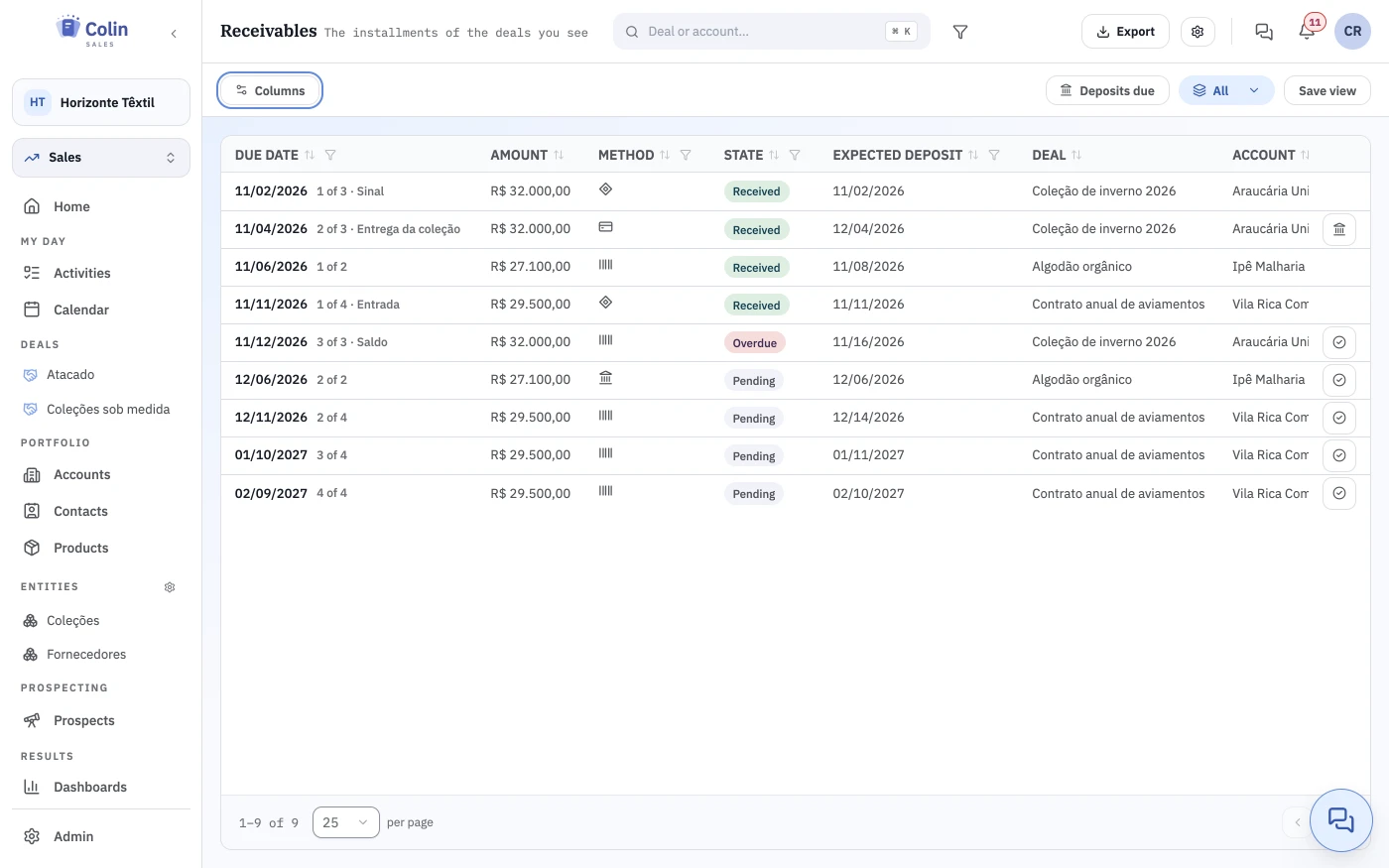
Receivables shows one row per installment of every deal you can see: due date, amount, method, status, the expected deposit day, the deal and the account. You can filter, pick the columns, save the view and export. The Deposits due button gathers what was received and has not reached the bank yet.
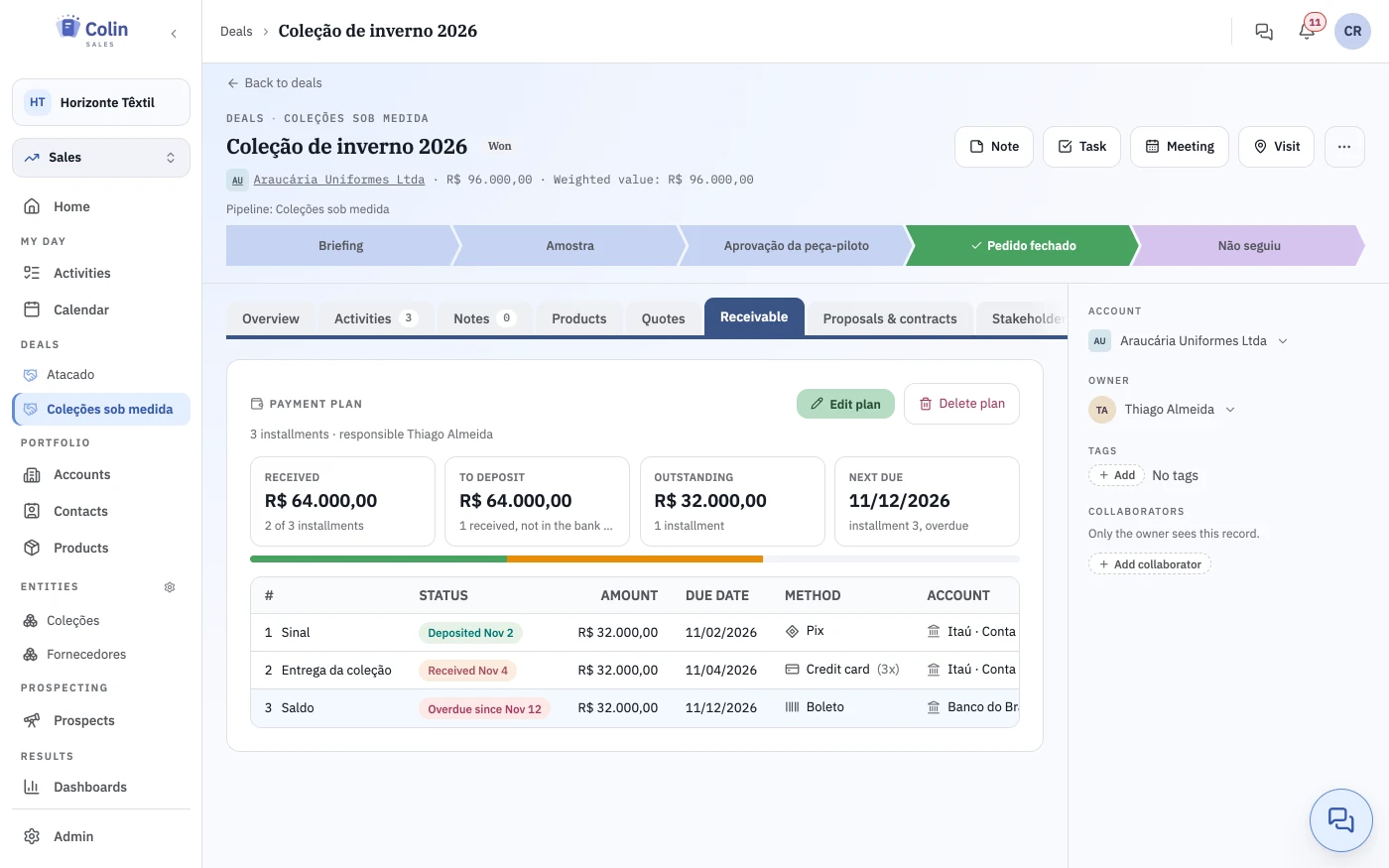
The deal's Receivable tab holds the installments, with a name, amount, due date, payment method and bank account. On top: how much was received, how much is still to deposit, how much is outstanding and the next due date. Whoever follows up marks an installment received and, later, deposited.
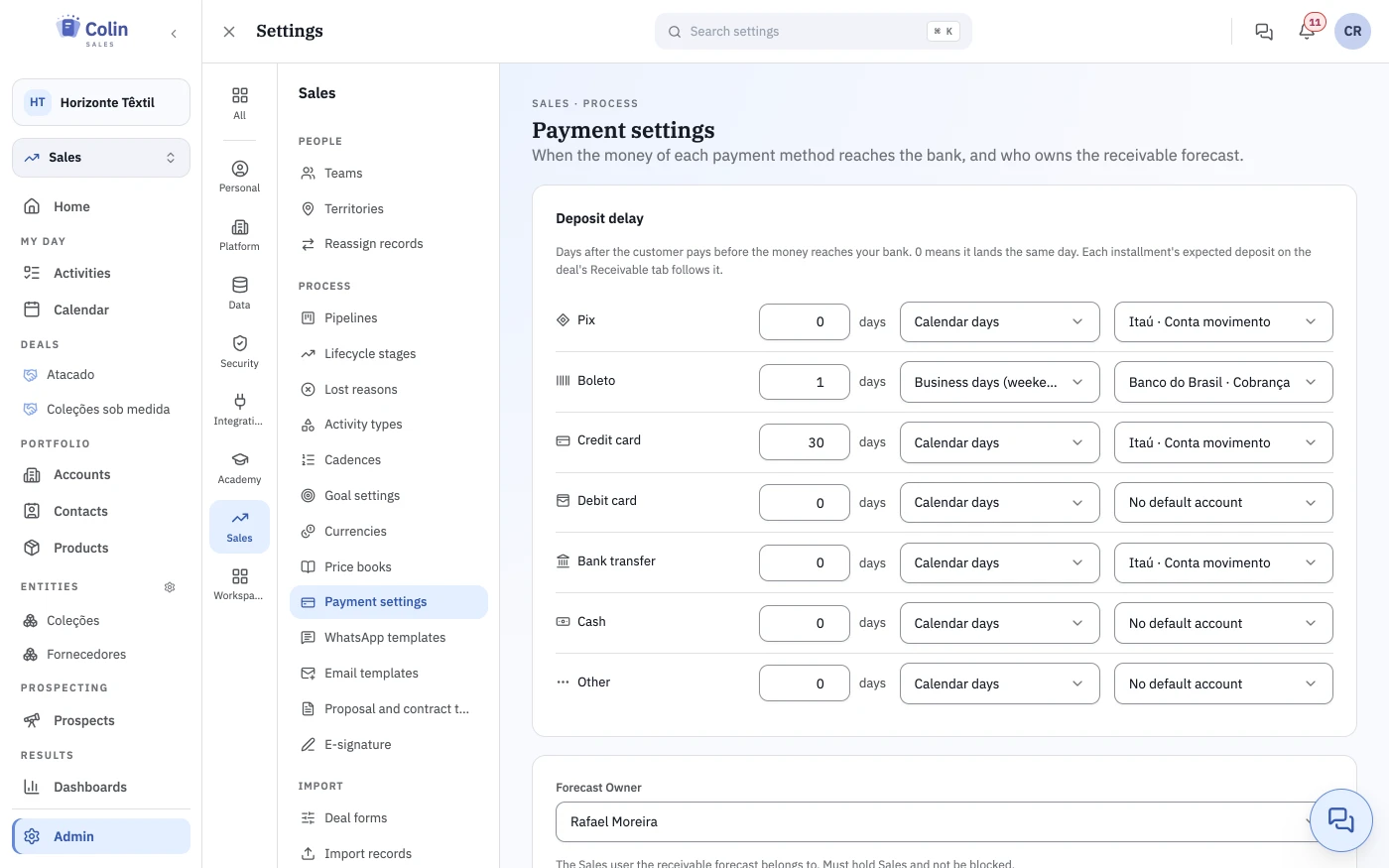
In Payment settings you say, for each method, how many days the money takes to reach the bank, in calendar or business days, and which account it lands in. You also pick there who owns the forecast of incoming deposits.


It fits any team that closes a sale and gets paid in parts. A few examples:
An apparel maker that sells the collection to a retailer with a deposit, a payment on delivery and the balance later, and wants to know which retailers are up to date before the next order.
A manufacturer with yearly contracts paid month by month, each installment with its due date and the account it lands in.
A distributor paid by card and by boleto that needs to know when each payment arrives, not just when it was made.
A software company that closes the rollout in installments and wants to see, in one list, what falls due this month.
A services firm paid per delivered stage that gives finance the list of what came in and what is late.
Payment settings belong to whoever administers Sales. The installments belong to whoever can edit the deal. The deal's person responsible for payments can mark installments received.
Each deal has one set of installments, up to 120, in the deal's own currency. While the sum does not match the amount, Colin shows the difference. To save, it has to match. The payment method is information only: Colin does not invoice, issue boletos, collect from the customer or reconcile the statement.
When the deal is won, each installment becomes a task for the person responsible for payments, who is the deal owner unless someone else is picked. A received installment is frozen. If the customer paid only part of it, it splits in two: what was received and what is left.
The expected deposit comes from the due date, or the day the installment was received, plus the payment method's delay. The forecast owner gets a task for each deposit that should arrive. The bank account comes from the payment method and can be changed on each installment. Accounts no longer used are archived, never deleted.
An installment received and an installment overdue are events Sales automations listen to. And each person's Home shows the installments they follow up.
It comes with Colin Sales and Colin Suite, at every user tier. Colin Sales starts at R$ 100 per user/month.
As many pipelines as you want, with your stages, each one's probability and who reaches the deals.
Proposals and contracts generated from the deal, as numbered PDFs, signed through Autentique or Clicksign.
What was won, who wins most, why deals are lost and how much should come in over the next months.
No. Colin keeps what was agreed and reminds whoever follows up. Boletos, card terminals and collection stay with your bank or your finance system.
No. You can build them earlier, while negotiating. The installment tasks are only created when the deal is won.
Mark it received with the amount that came in. The installment splits: the paid part is received and the rest becomes a new outstanding installment, due on the same date or one you pick.
No. It is one installment paid by card, with the number of card installments noted on it. The card's deposit delay says when the money arrives.
Yes. Each payment method has its own delay, from 0 to 365 days, calendar or business.
They do, if the template has the installments table. It comes ready-made in the proposal and contract template editor.
Yes. The installments follow the deal's currency.
Register a card, pick the apps and how many seats you want, and nothing is charged until the trial ends. Or we'll show you Colin with your company's boards and pipeline in 30 minutes.
 Chat on WhatsApp