Fashion and apparel
A clothing maker links every garment in the collection to the fabric, the supplier that delivers it and the stores that will sell it, and finds everything that depends on one mill in seconds.
 Colin
Talk to us
Start free
Colin Workspace · Organize
The board shows what the team is doing. The register says who it's for and who it's with. In Colin Workspace the two live together: the customer's account, the supplier and the product are entities, every card points at the ones that are part of it, and when you open a customer you see the boards and cards it's on.
In plenty of companies the customer and supplier register is a spreadsheet someone updates when they remember. The CNPJ is there, the contact maybe, but nobody knows what's being done for that customer without asking in the group chat. On the other side, the team's board has cards with the customer's name typed into the title, each one differently, and finding everything that involves a supplier turns into a treasure hunt.
When the company also sells through a CRM, a third copy appears. The salesperson fixes the address in the CRM, production keeps the old one, and the conversation about the customer is spread across tools that don't talk to each other. Bringing CRM and project management together usually means exporting, pasting and hoping.
What the team needs is a customer database that's the same for everyone, with room for your business's own records, and that shows at a glance which pieces of work each one is part of.
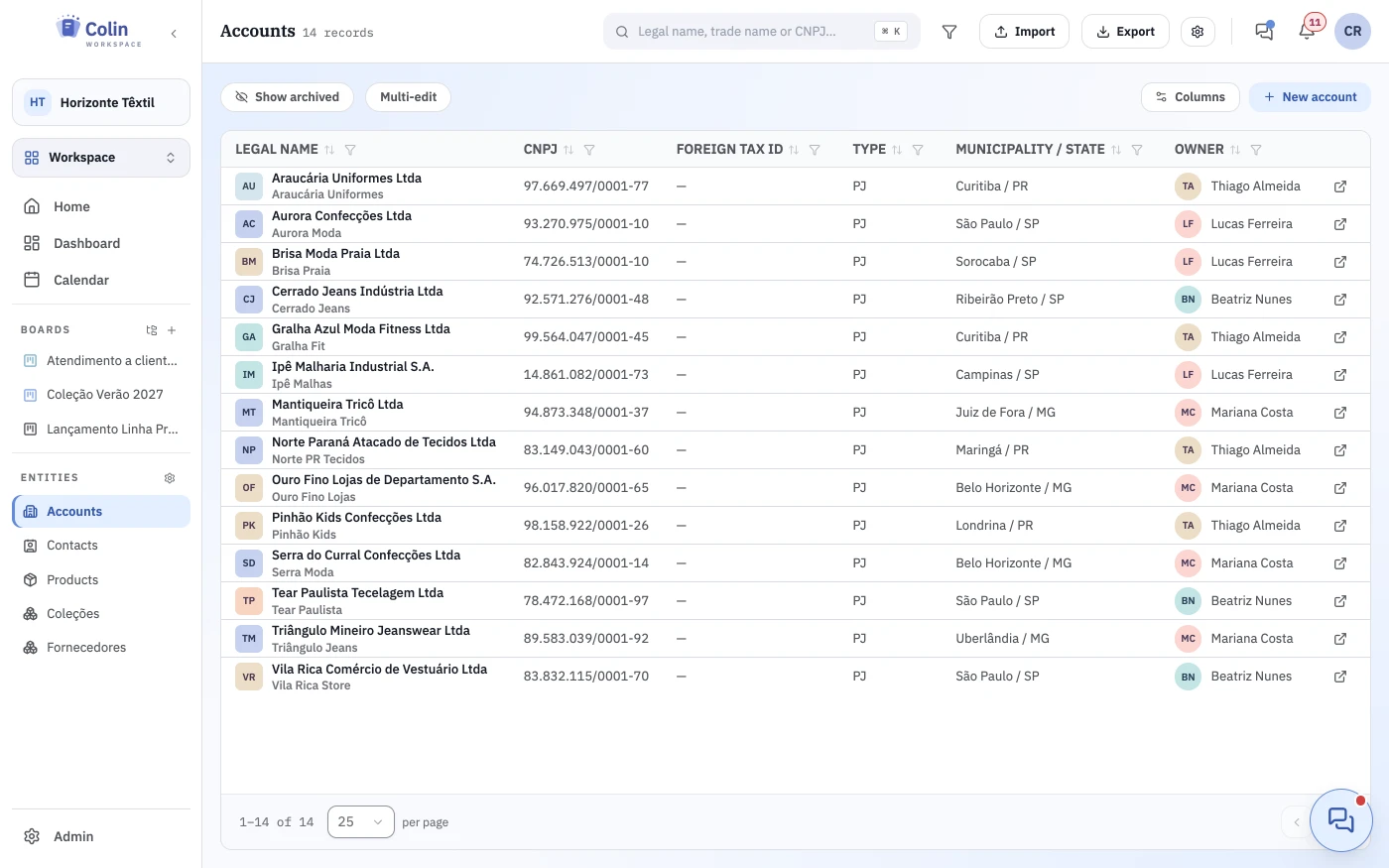
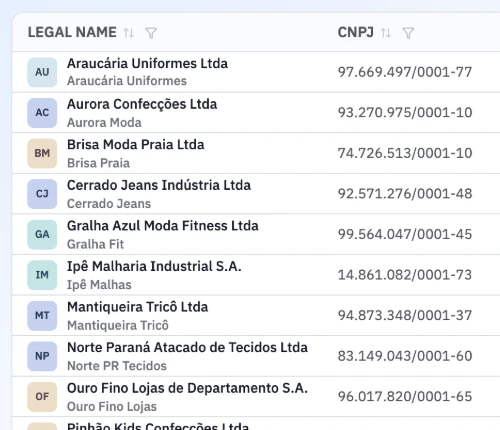
Under Entities, Accounts, you'll find the customers with legal name, trade name, CNPJ, type, municipality and owner. Search finds them by name or by CNPJ, the columns filter and sort, and Import and Export bring the list in and out as a spreadsheet. In the sidebar, below Accounts, Contacts and Products, sit the records your company created. Here they're Coleções (collections) and Fornecedores (suppliers).
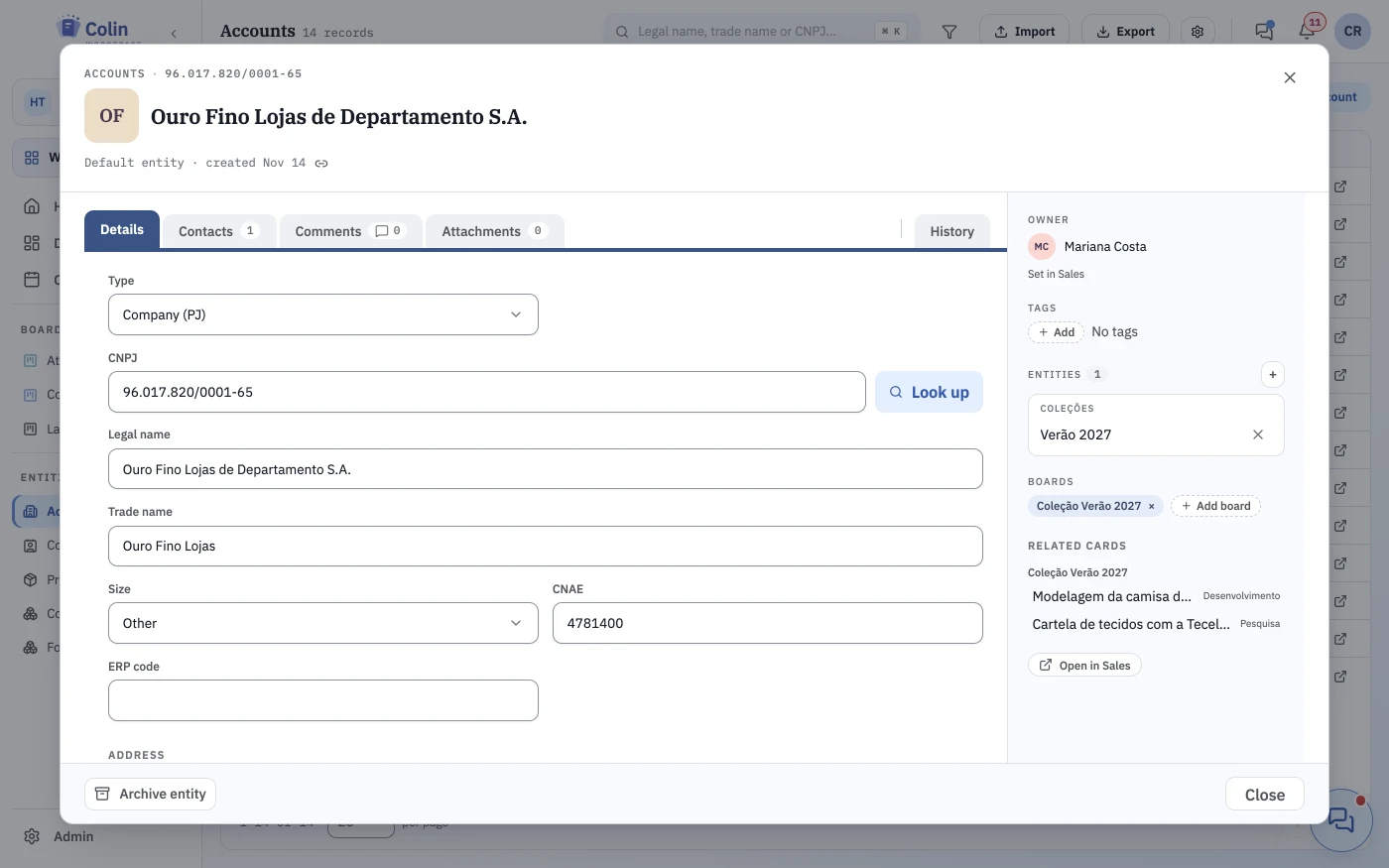
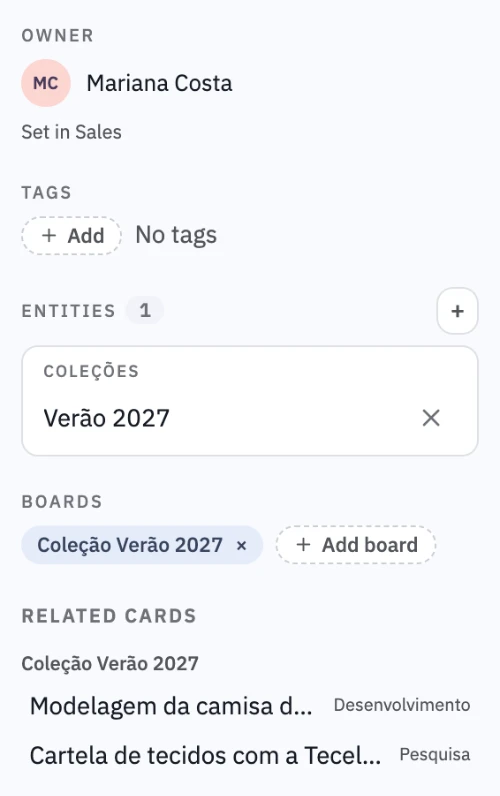
Click an account and its record opens. The Details tab holds the type, the CNPJ with the Look up button, the legal name, the trade name, the size, the CNAE and the ERP code. Alongside, the owner, the tags, the linked entities, the linked boards and the related cards. On Ouro Fino Lojas you can see straight away that it's part of the Verão 2027 collection and has two cards in progress, one in Desenvolvimento and one in Pesquisa.
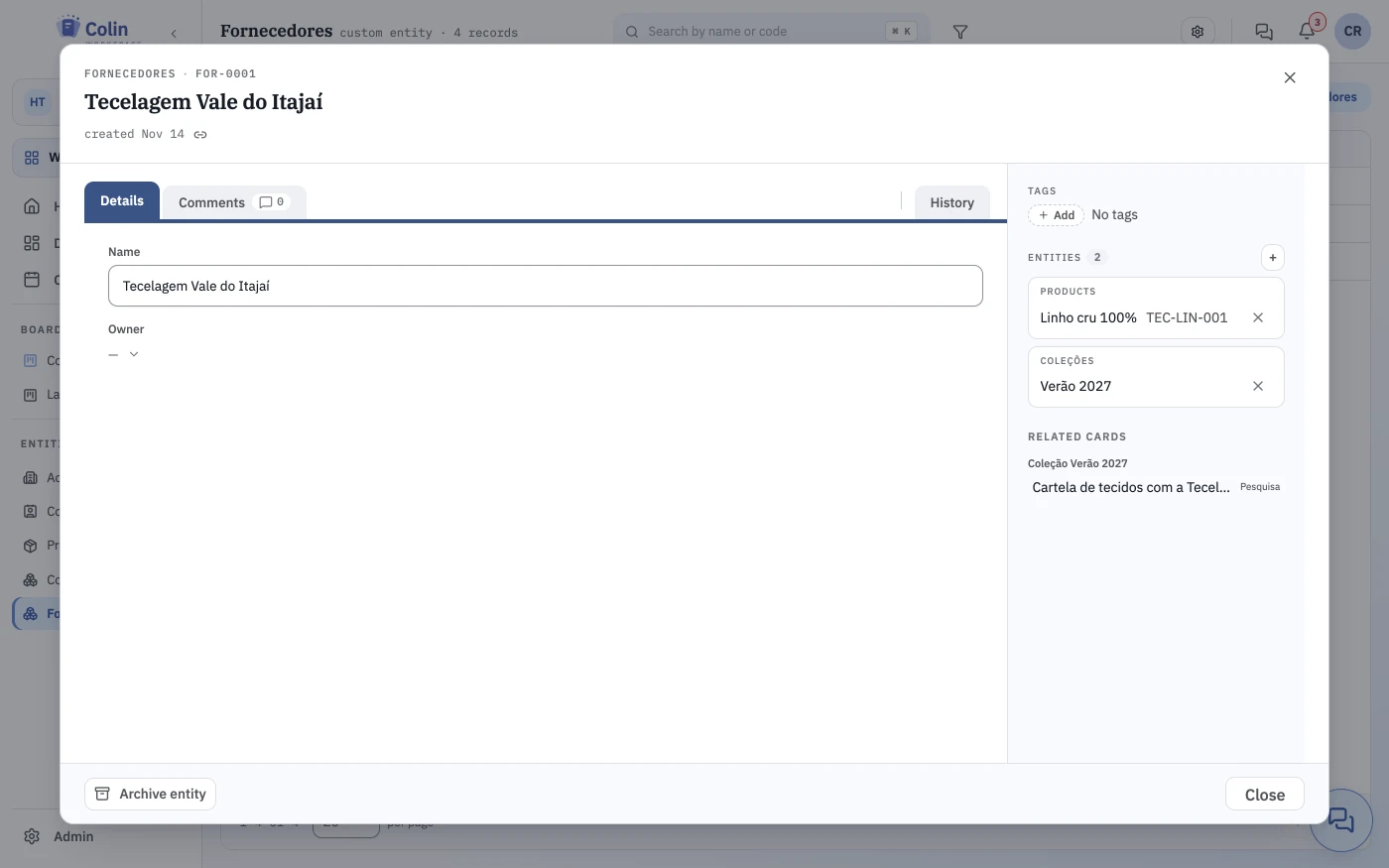
Fornecedores doesn't come out of the box: the company created that entity type, with the prefix FOR, and each supplier got a code in sequence. Tecelagem Vale do Itajaí is linked to the product it supplies, Linho cru 100%, and to the Verão 2027 collection, and shows the card where the team is putting together the fabric swatches with it.
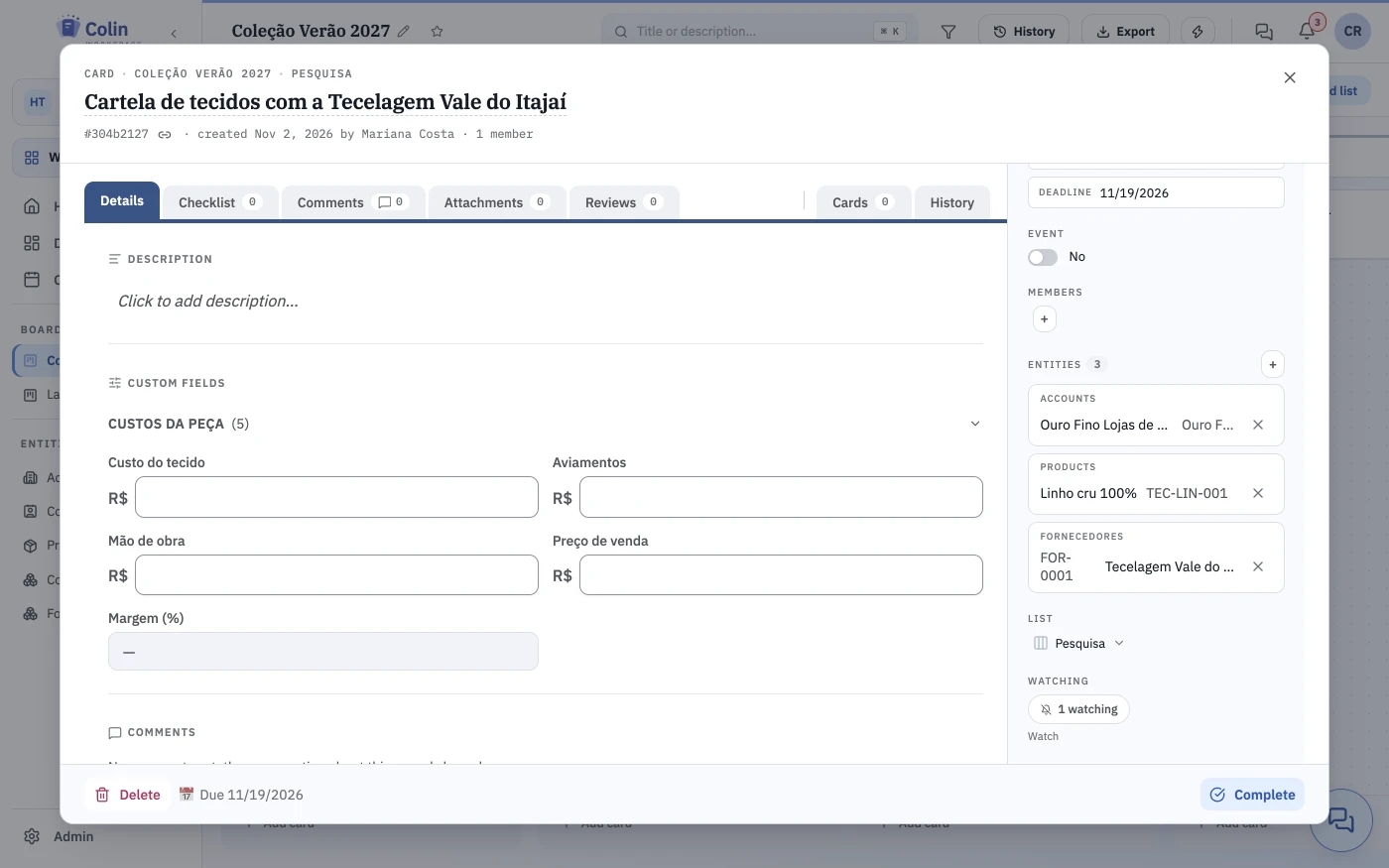
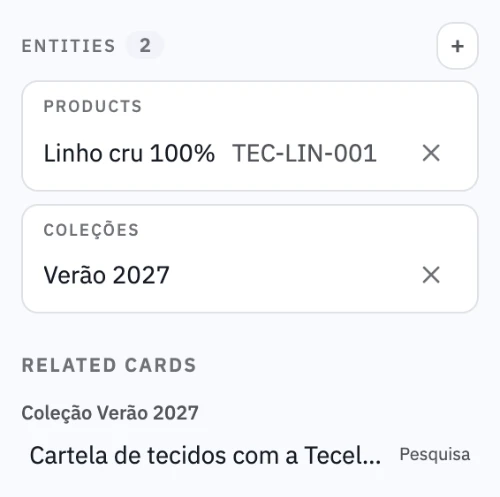
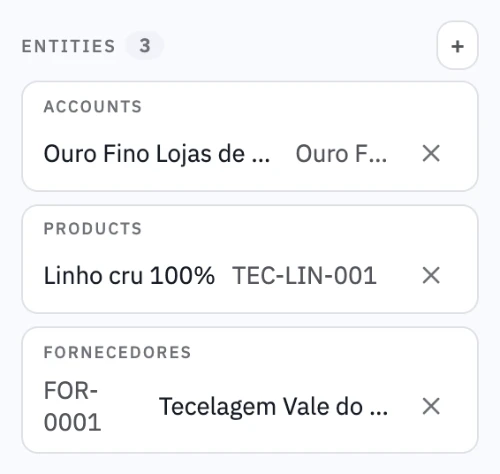
On the card, the Entities panel says who the work is with. The fabric swatch card points at the Ouro Fino account, the Linho cru product and the supplier Tecelagem Vale do Itajaí, each in its own group. The plus button searches any register, and each item opens the full record without leaving the board.
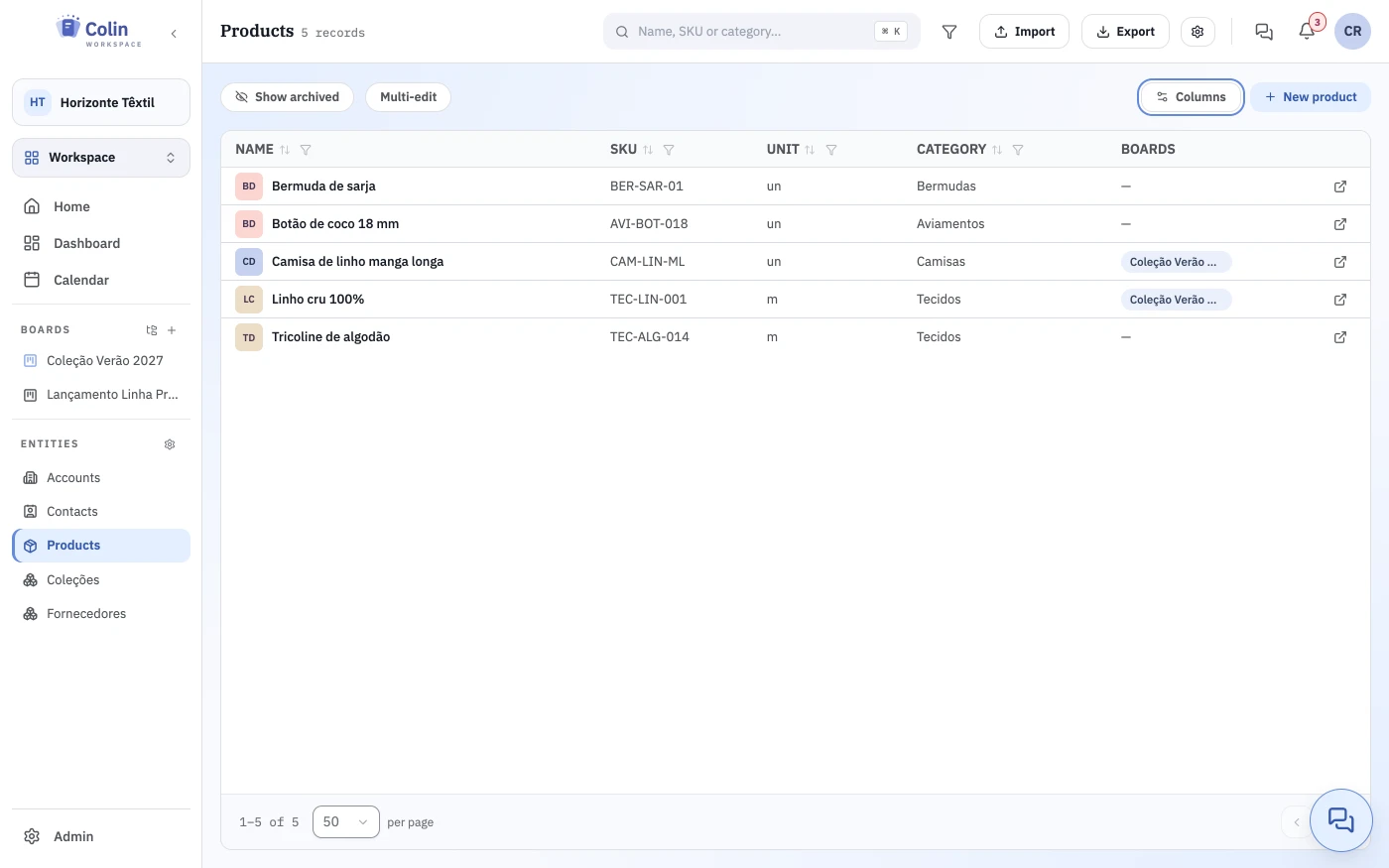
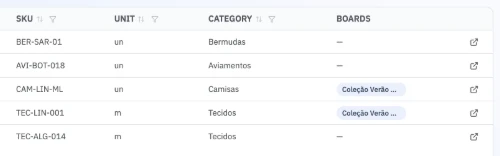
Products holds the items the company works with, with SKU, unit, category and the boards each one is linked to. The long-sleeve linen shirt and Linho cru 100% show on the Coleção Verão 2027 board, so whoever opens the board knows which products go into it, and whoever opens the product knows which collection it's in.
Every business has its own register. A few examples:
A clothing maker links every garment in the collection to the fabric, the supplier that delivers it and the stores that will sell it, and finds everything that depends on one mill in seconds.
An agency records its clients and each one's brands, and every job points at the right brand, without relying on the name typed into the title.
A builder creates a register of sites and another of contractors, and every task says which site it's on and who carries it out.
A distributor keeps its product records with SKU and category and links each restocking card to the product and the supplier.
A services company opens the customer and sees the boards and cards in progress for them before picking up the phone.
A new account starts with no registers of its own. You create only the types that make sense for your business.
Accounts, contacts and products are the same records as in Colin Sales, kept once. If your company also uses Sales, the salesperson and production look at the same account: an address fixed on one side already shows on the other. The account's owner is set in Sales and shown here, and the Open in Sales button takes you straight to the account, where its deals are. That's how CRM and project management meet, the cards on one side and the deals on the other, tied to the same customer.
Any entity can be linked to any other: a supplier to a product, an account to a collection, a contact to a site. The link is made once and shows on both sides. Linked boards are an explicit choice, made on the record or in the board's settings, and related cards arrive by themselves from every card that points at the entity, showing only the cards the person looking can see.
Custom entities have fields of their own, organised in groups, with the same types as the fields on cards. Each record gets a code in the sequence of the prefix you picked. Every record has comments with mentions of the people on the team and a history of what changed, who changed it and when. And nothing disappears: an entity you no longer need is archived, leaves the lists and stays stored, along with its links and its history.
It comes with Colin Workspace and Colin Suite, at every user tier. Accounts, contacts, products and custom entities are included, at no extra charge. Colin Workspace starts at R$ 84 per user/month.
Boards with your process's lists and cards with an owner, a deadline, a checklist and the conversation.
The data your process calls for inside every card, with calculated fields that update by themselves.
The accounts, contacts and products are the same as in Sales. What the salesperson records, the Workspace team already finds, and the other way round.
Accounts and contacts follow the same visibility rule as Sales, and related cards show only the ones each person can open. Products are visible to the whole company.
It's a record: a customer, a contact, a product or anything your company needs to keep track of, like suppliers, collections or building sites. Cards point at entities, and every entity shows the cards and boards it appears on.
Accounts, contacts and products come ready. Suppliers, collections and other registers of your own you create in Settings, Data, Custom entities, with the name, code prefix and fields you want.
No. The accounts, contacts and products work in Workspace. If the company also uses Sales, it's the same register, and the Open in Sales button takes you to the account there.
Yes. The entity lists have Import and Export, and custom entities also go in and out as spreadsheets.
Yes. The card's Entities panel takes as many entities as you need, of different types, each in its own group.
No. The register is there to organise the work around customers, suppliers and products. Invoicing and stock stay in your ERP, and the account's record even has a field for its ERP code.
The entity isn't deleted, it's archived. It leaves the lists and stays stored with its links, comments and history. Under Show archived you'll find it again.
Register a card, pick the apps and how many seats you want, and nothing is charged until the trial ends. Or we'll show you Colin with your company's boards and pipeline in 30 minutes.
 Chat on WhatsApp